
Choosing HR software for a small business starts with understanding what your team wants to improve. That might mean keeping people records accurate, making onboarding easier, or connecting HR and payroll without duplicate data entry.
The seven steps below will help you define your requirements, compare vendors, and evaluate the full cost. Use the checklist to keep each option focused on your business, your people, and the way you work.
Download the free HR software checklist
Key insights
- This guide helps businesses with 10 to 200 employees compare HR software against their everyday work and future plans
- Focus on three essentials: the right capabilities, connections to your existing systems, and the full cost of ownership
- Use the checklist to identify must-haves, then ask shortlisted vendors to demonstrate your actual workflows
- Download the checklist and weighted scorecard to compare vendors using the priorities that matter to your business
What is HR software for small businesses?
HR software for small businesses helps teams manage people records and everyday processes, such as onboarding, time off, and reporting. Depending on the platform, it may also include payroll, benefits, and hiring tools or connect to separate systems.
Why do small businesses need HR software?
When people information is spread across spreadsheets, inboxes, and separate tools, routine work can become harder to manage. HR software gives your team a shared place to maintain records, complete tasks, and find information.
Common capabilities include:
- People records, document storage, and employee self-service
- Onboarding tasks and approval workflows
- Time off and attendance tracking
- Payroll and benefits tools or integrations
- Reporting, hiring, and performance management
For a closer look at features and system types, explore our guide to HR systems for small businesses.
Benefits of online HR software for small businesses
The value of HR software depends on how well it supports your team’s work. These benefits can help you decide what to test during evaluation.
Boost efficiency and productivity
Automated tasks and shared people records can reduce repetitive administration. During demos, test a routine process, such as onboarding or a time-off approval, to see how much manual work remains.
Improve decision making
Accessible reports can help HR and leaders understand headcount, turnover, and other workforce trends. Check whether you can answer your regular business questions without rebuilding reports in spreadsheets.
Support compliance efforts
Organized records, permissions, and audit trails can support your compliance processes. Ask which requirements the system supports in your locations and what remains your organization’s responsibility.
Enhance employee engagement
Self-service can make everyday tasks easier for your people, while feedback and performance tools can support ongoing conversations. Test the employee experience alongside the administrator’s view.
For more detail, see our guide to HR systems for small businesses. Next, turn those potential benefits into requirements you can compare.
How to choose HR software for small businesses
Use these seven steps to build a shortlist, test your requirements, and agree on a choice with the people who will use and support the system.
1. Establish your business goals and challenges
The best HR software addresses your core business challenges and enables you to meet your growth goals. Clearly define your business goals and challenges before you begin your research into providers and options.
Whether your priorities revolve around building out your workforce or expanding to new locations, outline short-term and long-term business initiatives and pinpoint current and potential obstacles to growth. Knowing these details is crucial to informing the selection process and ensuring you choose the software that aligns best with your business’s goals.
What good looks like: A short, ranked list of problems to solve, with a way to measure improvement, such as fewer onboarding follow-ups or less time preparing headcount reports.
Common mistake: Starting with a vendor’s feature list before agreeing on your own priorities.
2. Identify key stakeholders
HR software only benefits your business if your key leaders and teams willingly adopt it. Identify which team members can support a successful rollout. Include HR, Finance or payroll, IT, managers, representative users, and senior leadership.
Capterra’s 2025 Tech Trends research, found that 64 percent of HR software buyers who regretted their purchase had been the sole decision-maker. This finding covers HR buyers across business sizes, rather than small businesses alone.
What good looks like: HR, Finance or payroll, IT, and representative users agree on requirements and how they will assess the shortlist.
Common mistake: Letting one team choose without checking how the system affects everyone else.
3. Consider other tools and integrations
HR software makes maximum impact when it integrates with the rest of your tech stack. Look for vendors that are compatible with your current systems. (Tip: Include a section on your request for proposal (RFP) that lists the software you currently use.)
For each connection, ask what data moves between systems, in which direction, how often, and who handles errors. Check payroll, accounting, your applicant tracking system (ATS), and single sign-on (SSO). Use the integrations row in the checklist below to record what each vendor demonstrates.
What good looks like: Your essential connections support the workflow you use, with clear ownership for setup and ongoing support.
Common mistake: Treating an integration logo as proof that every required field and process is supported.
4. Review features and capabilities
With your goals, challenges, and existing tech stack in hand, review the features and capabilities of top online HR software for small businesses. Do their tools address your core challenges? Will they help move the needle toward your organizational goals in the short and long term?
Capterra’s HR software buyer insights report analyzed 282 advisor interactions from January 2025 to January 2026. Among those buyers, 50 percent sought payroll management, 38 percent sought time and attendance tracking, and 23 percent sought onboarding. These are priorities within Capterra’s buyer sample, rather than adoption rates for all small businesses.
Use those findings as context, then rank features against your own requirements. Our guide to the best HR software for small businesses can help you identify vendors to evaluate.
What good looks like: Each shortlisted vendor demonstrates your must-have workflows using realistic examples.
Common mistake: Comparing the number of features rather than how well they support your work.
5. Prioritize scalability
As a small business, the last thing you need is to adopt new software, only to reach system fatigue in a year when you increase your workforce or expand sites.
To ensure that your new system’s capabilities will keep up with your future plans, prioritize localization capabilities, flexibility, and simple integrations.
Ask what changes if you add team members, locations, or countries. Compare policy flexibility, permissions, country coverage, and the cost of adding capabilities.
What good looks like: The platform supports your likely next stage without making you pay for every possible future requirement today.
Common mistake: Checking today’s headcount while overlooking planned changes to locations or ways of working.
6. Consider costs and budget
Balance your software feature and capability needs with your budget. Ask for an itemized quote that separates:
- Recurring fees, including any per-employee, per-month charges
- Minimum seats or minimum annual spend
- Implementation, migration, and training fees
- Module add-ons and integration charges
- Payroll fees, if priced separately
- Support charges and renewal increases
Compare the first-year total and ongoing annual cost using the same headcount assumptions for every vendor. For more detail, explore HR software pricing and HR cost and budgeting. If Bob is on your shortlist, review its pricing and request a quote for your requirements.
What good looks like: A comparable total-cost estimate, with assumptions and exclusions documented.
Common mistake: Comparing subscription prices while leaving setup costs and paid extras out of the calculation.
7. Get approval from all stakeholders
Be prepared to field topical questions from different stakeholders on each team. For example, your finance team may ask questions about expected ROI, while your IT team could ask technical follow-up questions about implementation processes. Take time to address questions about the software and discuss an implementation plan.
Work with the sales team from each vendor to gather in-depth answers so every stakeholder feels comfortable enough in your chosen solution to sign off. Once you have signoff, it’s time to adopt, train, test, and iterate.
Record any unresolved requirements, confirm who owns implementation, and agree on the conditions for approval before signing.
What good looks like: Stakeholders understand the choice, the trade-offs, the cost, and their responsibilities during rollout.
Common mistake: Treating approval as the finish line before agreeing on migration, training, and support.
Small business HR software checklist
Use this HR software evaluation checklist to compare vendors against the same requirements. The priorities below are starting points for businesses with 10 to 200 employees. Adjust them for your workforce, locations, and existing systems.
| Criterion | What to look for / ask | Why it matters at 10 to 200 employees | Must-have or nice-to-have |
| Core HR records and self-service | Can people update permitted details? Can HR control access and maintain accurate records? | Gives a lean team a shared source of people information | Must-have |
| Onboarding and workflow automation | Can you assign tasks, owners, deadlines, and approvals by role or location? | Reduces follow-ups and helps new joiners get a consistent start | Must-have if hiring regularly |
| Time off | Can you configure leave policies, balances, calendars, and approval routes? | Makes requests and coverage easier to manage | Must-have |
| Attendance and working hours | Does tracking support your work patterns and payroll inputs? | Helps teams that track hours avoid duplicate entry | Must-have if hours are tracked |
| Payroll, native or integrated | Which countries and pay types are supported? What data connects to your payroll provider? | Helps HR and payroll work from consistent information | Must-have connection; native payroll optional |
| Reporting and analytics | Can you build and export useful headcount, turnover, and absence reports? | Gives leaders visibility without rebuilding every report manually | Basic reporting: must-have |
| Integrations | Demonstrate accounting, ATS, and SSO connections, including fields, sync direction, and fees | Protects existing workflows and reduces repeated data entry | Essential connections: must-have |
| Security and compliance | Request current SOC 2 reports or ISO 27001 certification where relevant; review permissions, privacy terms, and GDPR responsibilities | Helps you assess how sensitive people information is handled | Must-have safeguards; evidence depends on requirements |
| Mobile app | Which employee and manager tasks work on mobile? | Makes access easier for people working away from a desk | Depends on workforce |
| Implementation time | What are the milestones, dependencies, migration tasks, and responsibilities? | Helps a small team plan the work alongside daily responsibilities | Must-have plan |
| Training and support | What onboarding help, support hours, response targets, and extra fees apply? | Reduces the burden on a team with limited internal capacity | Must-have |
| Pricing and hidden costs | Confirm billing model, minimum seats, implementation fees, module charges, and separate payroll costs | Makes vendor quotes comparable and exposes budget gaps | Must-have transparency |
| Scalability | What changes when headcount grows or you add countries, entities, or policies? | Helps you evaluate your likely next stage | Must-have for planned changes |
| Data export and contract terms | What can you export, in which formats, and at what cost? Check renewal and cancellation terms | Helps you understand your options if requirements change | Must-have |
Treat essential requirements as pass-or-fail checks first. Then use weighted scoring to compare the remaining options. A high overall score shouldn’t hide a missing payroll connection or another critical requirement.
Download the free checklist and weighted scorecard
Take the checklist into vendor demos, assign weights to your priorities, and record evidence alongside each score.
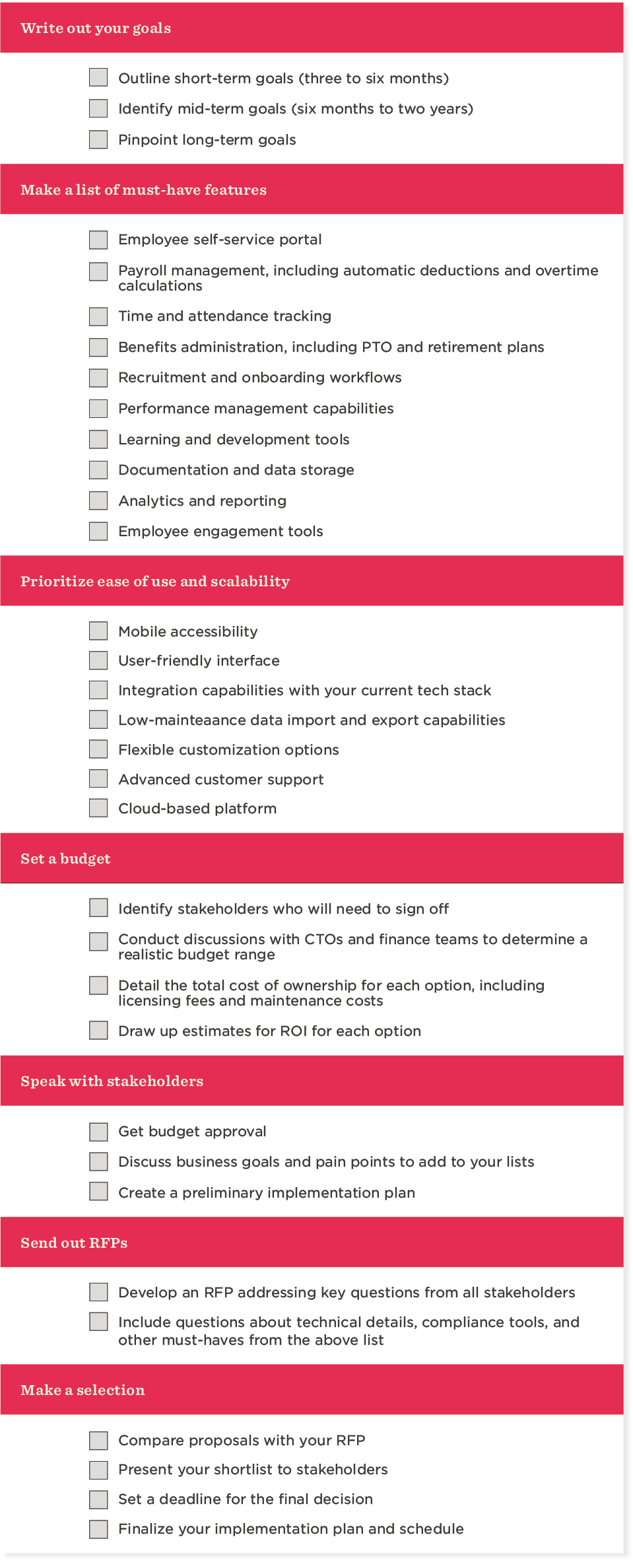
<<Download our printable checklist to choose the best HR software for small businesses.>>
How Bob measures up against this checklist
Bob brings together everyday HR operations and people information. If it’s on your shortlist, use the same checklist to test its fit:
- Records and self-service: Bob Core HR gives HR, managers, and employees a shared place to manage people information and everyday tasks.
- Onboarding: Workflows and automation support assigned tasks and approvals across joining, moving, and leaving processes.
- Time: Time and attendance supports leave requests, configurable policies, and working-hours tracking.
- Payroll: Explore Payroll and benefits, including native US and UK payroll and Payroll Hub connections to supported providers.
- Reporting: Data and analytics provides dashboards and reporting to help leaders understand workforce changes.
- Connections: Review Bob’s integrations against your payroll, accounting, hiring, and identity systems, then confirm the required data flows.
For example, Chili Piper’s customer story describes a 150-person company saving more than 20 hours of administration each month with Bob’s automated workflows. That’s one customer’s experience, rather than a guaranteed result.
Explore Bob for small businesses, then bring your priorities to a demo.
Mistakes to avoid when choosing HR software
- Buying for today’s headcount without checking your next stage
- Assuming payroll integration covers every required field and workflow
- Comparing subscription fees without implementation and add-on costs
- Skipping reference calls with customers who have similar requirements
- Letting one team choose without input from users, Finance, payroll, and IT
Questions to ask in every demo
Ask every shortlisted vendor the same five questions, then record the evidence in your scorecard:
- Can you demonstrate our onboarding process, including tasks, owners, and approvals?
- How do payroll, accounting, ATS, and SSO connections work, and what requires manual work?
- Can an employee update their details and a manager complete an approval using their own permissions?
- What will implementation involve, and what is the full first-year cost, including fees and add-ons?
- What changes if we add employees or countries, and how can we export our data if we leave?
Recommended For Further Reading
Choose the right online HR software for your small business with a criteria checklist
The right HR software fits your everyday work, connects to your essential systems, and supports your next stage at a cost you understand. Use the same requirements to compare every vendor, and make the decision with the people who will use and support the platform.
Ready to build your shortlist? Download the free checklist and weighted scorecard to organize your requirements and compare your options.
Want to evaluate Bob against those requirements? See Bob in action.
FAQs
HR software costs vary by headcount, features, billing model, and support package. Some vendors charge per employee per month; others use a base fee, tiers, or custom quotes. Compare subscription costs alongside implementation, integrations, and paid modules. Our HR software pricing guide explains the main models.
HR software implementation time depends on the scope of the rollout, the quality of existing data, and the integrations involved. Ask each vendor for a timeline covering migration, configuration, testing, and training, with responsibilities clearly assigned. Compare those plans against your team’s available time before agreeing to a launch date.
A small business can start by evaluating people records, employee self-service, onboarding, time off, and basic reporting. Payroll connectivity matters if payroll runs in a separate system. Attendance tracking, recruiting, and performance tools depend on your workforce and priorities. Build your must-have list around recurring work and demonstrated business requirements.
An HRIS generally focuses on people records and core administration. HRMS typically covers broader operational processes, while HCM emphasizes talent and workforce strategy. These labels overlap, and vendors use them differently. Compare actual capabilities rather than relying on the category name. Our HRIS vs HRMS guide explains the distinctions.
A small business can consider HR software when spreadsheets, inboxes, and separate tools make routine people processes difficult to manage. Useful indicators include duplicate data entry, missed onboarding tasks, slow approvals, and time-consuming reporting. There’s no single headcount threshold: Evaluate whether a system would solve recurring problems at a manageable cost.