If you’re looking for HR software, you’ve likely come across terms like HRIS, HRMS, and HCM. While they all help you manage your people, the scope of what they actually handle varies quite a bit.
Part of the reason is that these categories have started to overlap. Most companies already use some form of HR software. In fact, 79 percent of small businesses use HR tools, and that number rises to around 90 percent for mid-sized companies and enterprises.
However, adoption alone doesn’t guarantee impact. HiBob’s recent HR Investment Insights report found that HR and business leaders face growing pressure to prove ROI and connect people programs to measurable business outcomes. That makes it even more important to choose HR software that supports clear reporting, workforce visibility, and smarter investment decisions. This article clarifies the differences between HRIS, HRMS, and HCM systems and guides you in selecting the best option to meet your specific business needs.
HRIS vs. HRMS vs. HCM: What’s the difference?
The terms human resources information system (HRIS), human resources management system (HRMS), and human capital management (HCM) have many similarities. They broadly refer to comprehensive tools and strategies for managing an organization’s workforce and aligning its needs with its business objectives.
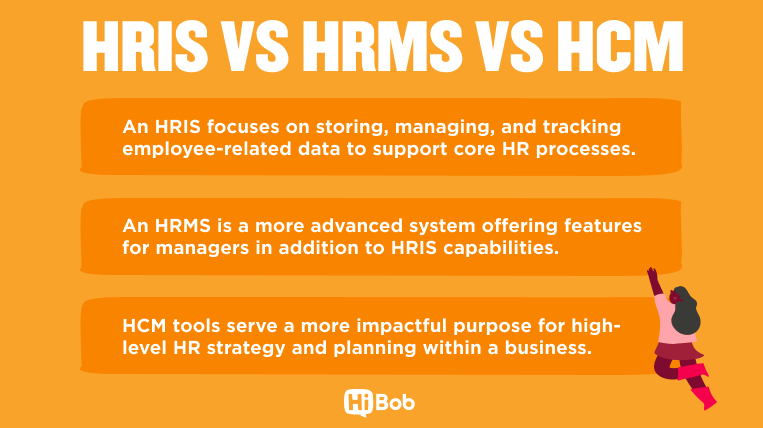
The key differences between HRIS, HRMS, and HCM lie in their detailed applications:
- An HRIS focuses on storing, managing, and tracking employee-related data to support core HR processes. This is the foundational HR software type.
- An HRMS is a more advanced system offering applicable tools for managers related to performance management, analytics, and employee engagement, in addition to HRIS capabilities.
- HCM tools serve a more impactful purpose for high-level HR strategy and planning within a business. They include capabilities in succession planning, industry benchmarking, and compensation management, and they address the entire team member lifecycle.
Today, though, these categories aren’t as clearly separated as they once were. Many modern platforms combine elements of all three, which is why the terms are often used interchangeably. That’s why it’s more helpful to think of HRIS, HRMS, and HCM as levels of capability rather than completely different systems:
| Category | HRIS | HRMS | HCM |
| Primary focus | People data and core HR admin | HR processes and workflows | Workforce strategy and growth |
| Best for | Small teams or companies starting to digitize HR | Growing companies managing payroll, performance, and operations | Larger or scaling orgs focused on talent, planning, and long-term growth |
| When to use | You need a system to store team member data, run payroll, and stay compliant | You need to manage day-to-day HR operations like onboarding, performance, and reporting | You want to plan workforce growth, improve retention, and use data for strategic decisions |
| When not to use | You need performance tools, analytics, or employee engagement features | You need advanced workforce planning or deep strategic insights | You only need basic HR admin and don’t require advanced features |
| Scope of capabilities | Narrow (data and admin) | Moderate (operations and workflows) | Broad (strategy, analytics, lifecycle) |
What is an HRIS?
An HRIS helps HR teams manage essential functions by storing team member data and automating workflows. Teams use HRIS software to help keep track of critical HR functions, including payroll details, benefits administration, attendance tracking, and document management.
How an HRIS works
An HRIS collects, stores, and manages human resources data. HR teams and individual team members can input personal information, employment history, and compensation details.
Then, the HRIS can automate processes like payroll and time tracking. Whenever the HR team or the team member needs to access a more comprehensive view of one of these elements, they can run reports in the HRIS to view helpful insights.
HRIS main features
Each HRIS solution has its own suite of features, but most HRIS tools cover a relatively focused set of capabilities centered around managing people data and automating core HR tasks. Common features include:
- Secure storage for team member data
- Automated payroll processing
- Organization for resumes, applications, and job postings
- Onboarding processes and training
- Tracking for time off and salaries
- User-friendly document management
- Benefits tracking and enrollment
- Time-tracking tools, like absence management software
- An employee self-service portal enabling profile updates, time off requests, and benefits management
- Customizable reporting and analytics
Modern HRIS platforms have also expanded beyond these basics to improve usability and visibility across teams, including:
- Automation: Workflow automation for approvals, onboarding steps, and payroll processes that reduces manual work and errors
- Real-time reporting: Live dashboards and reporting tools that give HR teams up-to-date insights into workforce data and trends
- Manager enablement: Tools that give managers visibility into their teams, helping them track progress, approvals, and performance without relying on HR
- Cross-functional visibility: A centralized system that connects HR, finance, and leadership through shared workforce data, improving decision-making
- Mobile accessibility: Access to HR tools on mobile devices so teammates and managers can complete tasks from anywhere
- AI capabilities: AI-driven insights and automation that help identify trends, surface risks, and support better workforce decisions
- User-friendly experience: Intuitive interfaces and dashboards that make it easier for HR, managers, and team members to complete tasks quickly and accurately
HRIS pros and cons
When deciding what type of HR software your organization needs, consider the following pros and cons.
| Pros | Cons |
| Lean and user-friendly, making it easy for small teams to adopt quickly without heavy training or long setup times | Limited analytics and reporting, which makes it harder to understand trends like engagement, performance, or retention without additional tools |
| Automates core tasks like payroll and time tracking, reducing manual errors and saving time on repetitive admin work | Minimal support for engagement and development, so teams often need separate tools for performance reviews, surveys, or learning programs |
| Supports compliance through centralized records and standardized processes, helping teams stay organized and audit-ready | Less flexibility in workflows, which can make it harder to adapt the system to more complex or unique HR processes as the company grows |
| Centralizes people data in one place, so HR teams don’t have to rely on spreadsheets or scattered documents | Limited strategic capabilities, meaning it doesn’t support workforce planning, succession planning, or long-term decision-making the way more advanced systems do |
What is an HRMS?
An HRMS enhances the basic functions of an HRIS by incorporating advanced management and analytics capabilities. Whether you take a soft HRM or hard HRM approach, a reliable HRMS will help you take a strategic approach toward acquiring, hiring, training, engaging, and retaining people.
How an HRMS works
An HRMS is a system that brings together multiple HR processes like hiring, onboarding, payroll, performance management, and reporting into one platform.
Instead of managing these tasks in separate tools, an HRMS connects them in a single system so data flows between them. For example, information collected during hiring feeds into onboarding, which then connects to performance tracking and reporting.
This allows teams to manage daily HR tasks in one place, reduce manual handoffs, and keep records consistent across processes. The most effective people programs depend on follow-through, not just measurement. HiBob’s investment research found that employee experience programs perform best when they are structured, proactive, and people-centered—while data-only approaches like engagement surveys can fall short without action.
HRMS main features
Most HRMS include customizable options to fit the company’s needs. They encompass functions for the entire suite of HR tasks, data, and analytics. HR teams typically look for HRMS solutions with the following features, in addition to core HRIS features:
- Navigation of laws and regulation
- Recruiting assistance
- Performance management tools
- High-level reporting
- Employee engagement analytics
- Support for learning and development initiatives
- Secure storage solutions for large amounts of data
- Extensive automation capabilities
- Vast integration options
- Data entry automation
HRMS pros and cons
The variety of HRMS solutions on the market can vary in terms of their core features, price, and capabilities. Here are some common pros and cons teams can weigh during the evaluation process.
| Pros | Cons |
| Integrated data analytics that connect HR processes, so managers can see how hiring, performance, and engagement data relate instead of pulling reports from multiple tools | Higher cost than basic HRIS systems, which can be unnecessary if you’re only managing core HR tasks like payroll and records |
| Better visibility into team member engagement and performance, making it easier to spot issues like low engagement or high turnover early | Longer implementation time, especially if you’re migrating from spreadsheets or multiple systems into one platform |
| Centralized and compliant team data, reducing the need to reconcile information across systems and helping teams stay audit-ready | Requires more training for managers and HR teams, since the system includes more features and workflows to learn |
| Robust reporting across HR activities, giving leaders access to data on hiring, performance, and retention in one place | Can add complexity for smaller teams, especially if they don’t need features like performance management or engagement tracking yet |
| Supports succession planning and internal growth, helping teams identify high performers and prepare them for future roles | Doesn’t fully cover long-term workforce strategy, so it may fall short for companies focused on advanced planning and forecasting |
| Includes learning and development tools, allowing teams to connect performance with skill-building and career growth | May still require additional tools for advanced strategic planning, which are typically handled by full HCM platforms |
What is an HCM?
An HCM balances logistical HR processes and data with high-level strategy and planning designed to move the organization toward larger goals. Organizations often turn to HCM systems when they need to connect HR processes with long-term workforce planning and talent strategy.
HCM tools help track each team member’s status and productivity throughout training, onboarding, and performance evaluations. They provide data points like cost per hire, employee engagement rate, and turnover rate. Leaders can use HCM tools to understand workforce trends, plan future roles, and identify talent needs.
How an HCM works
An HCM has broad applications, including talent acquisition, onboarding, company culture building, career pathing, succession planning, and more. HCM systems integrate with various data sources to create a comprehensive, user-friendly, secure, and compliant data source.
Strategic capabilities like succession planning features and business intelligence analytics set HCM tools apart from other HR solutions.
HCM main features
To make the most of an investment in HCM tools, look for the following capabilities:
- Workforce reporting and talent analytics
- Succession planning and career development tools
- Compensation and performance insights
- Industry benchmarks to support workforce planning
HCM pros and cons
HCM systems play an important role in a broader set of organizational practices and processes. Consider the following pros and cons to determine whether an HCM is the right investment for your organization.
| Pros | Cons |
| Manages the full employee lifecycle in one system, from hiring and onboarding to performance, development, and retention | Higher cost to implement and maintain, which can be difficult to justify if you’re still focused on basic HR operations |
| Treats your workforce as a strategic asset, helping leaders plan hiring, development, and retention based on real data instead of assumptions | Requires strong adoption from leadership, since many of the benefits depend on managers and executives actively using the system for planning and decision-making |
| Supports retention and culture initiatives, with tools for engagement, performance management, and career development built into one platform | Longer setup and change management effort, especially when shifting from basic systems or disconnected tools |
| Provides data-driven insights for workforce planning, such as headcount trends, turnover risks, and future hiring needs | Adds complexity for teams not ready for advanced planning, which can slow teams down if they only need core HR functionality |
| Scales with the organization, supporting more complex structures like multiple locations, global teams, and long-term growth planning | Requires ongoing training for new users, since the system includes more advanced tools and workflows than simpler platforms |
HRIS vs HRMS vs HCM feature comparison

How to choose between HRIS, HRMS, and HCM systems
The right choice depends on your company’s size, growth stage, HR maturity, and the level of workforce visibility you need.
Choose an HRIS if your main priority is getting team member data, payroll, compliance, time off, and documents into one secure system.
Choose an HRMS if your team needs to connect day-to-day HR workflows such as hiring, onboarding, performance, engagement, payroll, and reporting.
Choose an HCM if your organization needs a broader platform for workforce planning, compensation, talent development, analytics, and long-term business strategy.
Once you have a clear understanding of all of the above factors, ask yourself these questions:
- What are our most crucial HR challenges?
- How would advanced analytics change our broader strategy?
- What HR technology do we currently use, and what is working about it? What isn’t?
- How do we manage team member data?
- How do we keep team member data secure?
- Could our onboarding process improve?
- Would more strategic talent management benefit our business?
- Can our current system scale as we grow, or will we need to replace it in the next one to two years?
- How much manual work are we still doing, and where could automation save time and reduce errors?
- Do we need our HR system to support multiple locations, entities, or global teams?
- How well does our HR software integrate with finance, payroll, and other business systems?
- Do managers have the visibility they need to make decisions, or are they relying on HR for data?
- Are we able to access real-time insights, or are we working from outdated reports?
Use your answers to identify the system that fits your current stage, while still giving you room to grow.
<<Narrow down what your team needs with a free HRIS requirements template.>>
Recommended For Further Reading
How the right HR software improves HR and Finance alignment
The right HR software brings HR, payroll, benefits, planning, and Finance data together in one connected system. With one trusted source of truth, teams can improve forecasting accuracy, strengthen workforce planning, control costs, and make faster, better-informed decisions. In daily operations, this means:
- Finance can track how hiring decisions impact budgets and workforce costs in real time
- HR can plan headcount with a clear understanding of budget constraints and approval workflows
- Leaders can model scenarios such as hiring, restructuring, compensation changes, or workforce shifts before making decisions
- HR and Finance can rely on consistent, up-to-date data instead of reconciling reports from multiple systems
HiBob is a strong option for growing mid-market companies that want to connect HCM, payroll, benefits, compensation, workforce planning, and Finance workflows in one modern platform. It gives HR and Finance teams shared visibility into headcount, payroll expenses, workforce costs, budget impact, and planning assumptions, so both teams can work from the same data instead of separate reports.
HiBob’s AI is designed to empower people in the flow of work, enhance productivity, and elevate how HR teams and managers make decisions—not replace them. Its practical, trustworthy AI capabilities are embedded across the platform where work already happens, helping teams reduce manual work, increase efficiency, surface insights from people and finance data, guide better decision-making, and empower managers and team members.
Explore HiBob to see how one connected platform can help HR and Finance plan, approve, pay, and report with more speed, visibility, and confidence.
HiBob for HR and Finance management
HRIS vs. HRMS vs. HCM FAQs
Are HCM and HRIS the same thing?
While they are similar systems, an HRIS focuses on basic HR tasks, while HCM systems offer support for more advanced HR needs.
What is the difference between HCM and HRM?
HCM describes a broader suite of activities and functions that aim to manage talent, plan the workforce strategically, and ensure alignment between HR activities and business goals.
HRM, or human resource management, is a more basic and straightforward term encompassing core administrative HR tasks like recruitment and team member relations.
What are the two types of HCM?
HCM includes strategic HCM and operational HCM. Strategic HCM focuses on long-term workforce planning and performance management, while operational HCM centers on administrative tasks like tracking attendance.
What are the differences in cost between an HRIS vs. HCM vs. HRMS?
HRIS systems typically come at a more affordable cost because they focus on core HR functions like team member data storage, payroll, and compliance. This makes them a common starting point for smaller teams.
HRMS platforms fall in the middle, offering broader functionality like performance management and automation, which increases both cost and implementation complexity.
HCM systems come at the most expensive price points, as they include advanced analytics, workforce planning, and strategic tools designed for larger or scaling organizations.