
Headcount planning goes beyond tracking how many people are on your team. It includes key metrics like headcount by role, team capacity, upcoming vacancies, and the budget impact of future hires.
Managing all of this in spreadsheets can quickly become overwhelming, especially when roles change or business priorities shift. At the same time, HR leaders are supporting managers who need to make timely and strategic decisions about their teams.
This headcount planning template helps simplify the workforce planning process. It keeps role details, staffing needs, and hiring timelines in one place, making it easier for HR, Finance, and managers to stay aligned and plan with confidence.
<<Get started with a free headcount planning template.>>
Key insights
- Accurate headcount planning reduces last-minute hiring, improves budgeting, and supports more strategic workforce decisions
- Using a structured, shared template makes it easier to spot skill gaps, track hiring approvals, and plan for growth
- You can tailor the template to support backfills, new hires, or restructuring across teams and departments
- Download the free headcount planning template to simplify staffing decisions and bring more clarity to your workforce planning process
What is headcount planning?
Headcount planning is a workforce management process of understanding which roles you have today, which roles you’ll need soon, and when those hires should happen. It looks at your current team structure, upcoming projects, and budget to help you plan hires at the right time and avoid last-minute staffing gaps.
It also gives HR a clear view of why each role exists, whether the team has the skills it needs, and how changes like growth, turnover, or HR initiatives will affect staffing in the months ahead.

Headcount planning template
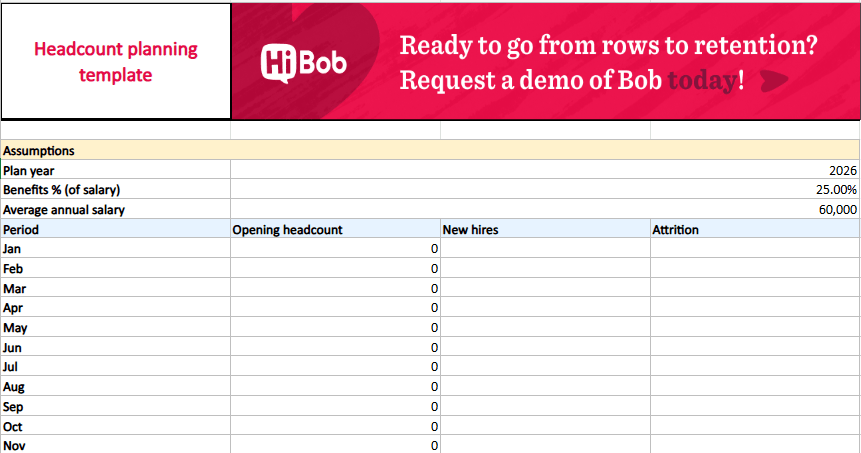
This template includes fields for opening and closing headcount, new hires, attrition, FTE calculations, salary, benefits, taxes, and total compensation. Customize the template for your specific team or planning scenario.
<<Download this headcount planning template.>>
Benefits of proper headcount planning
When headcount planning is consistent, it creates advantages that show up across budget conversations, hiring decisions, day-to-day team operations, and your entire workforce planning process.
As Dr. Dieter Veldsman, Chief Scientist (HR and OD) at AIHR, puts it, “Workforce planning is non-negotiable for organizations that want to be successful. Without a strategic WFP (workforce plan), you are always reactive and having to fight fires.”
Some of the most impactful benefits include:
Financial and operational benefits
Headcount planning helps you match staffing levels to real workload demands, reducing unnecessary hiring and preventing teams from being stretched too thin. It also improves budgeting accuracy because you know which roles are coming up, when they’re likely to be filled, and what they’ll cost.
In daily life, this means fewer emergency job postings, fewer budget surprises, and more predictable staffing cycles across the year. As headcount expert, Eric Guidice explains, “Your annual headcount closeout should be a repeatable operating model, not an end-of-year scramble.”
Strategic and talent-focused benefits
Only 15 percent of organizations have a fully implemented strategic workforce planning process, meaning most teams still respond to staffing needs as they arise. A clear plan helps HR see where skills are strong, where gaps are emerging, and which teams will need support as the organization grows.
This makes succession planning easier and helps you decide whether to hire externally or develop talent internally. Managers also get earlier visibility into the roles they’ll need, which shortens the time to fill critical positions.
Decision-making and compliance benefits
Hiring decisions become faster and more consistent when everyone uses the same headcount plan. HR can track approvals, document changes, and ensure hiring stays compliant with internal policy and budget.
It also creates a reliable audit trail, which is helpful when finance, leadership, or auditors need clarity on why certain roles were added, paused, or adjusted.
Recommended For Further Reading
How to conduct headcount planning
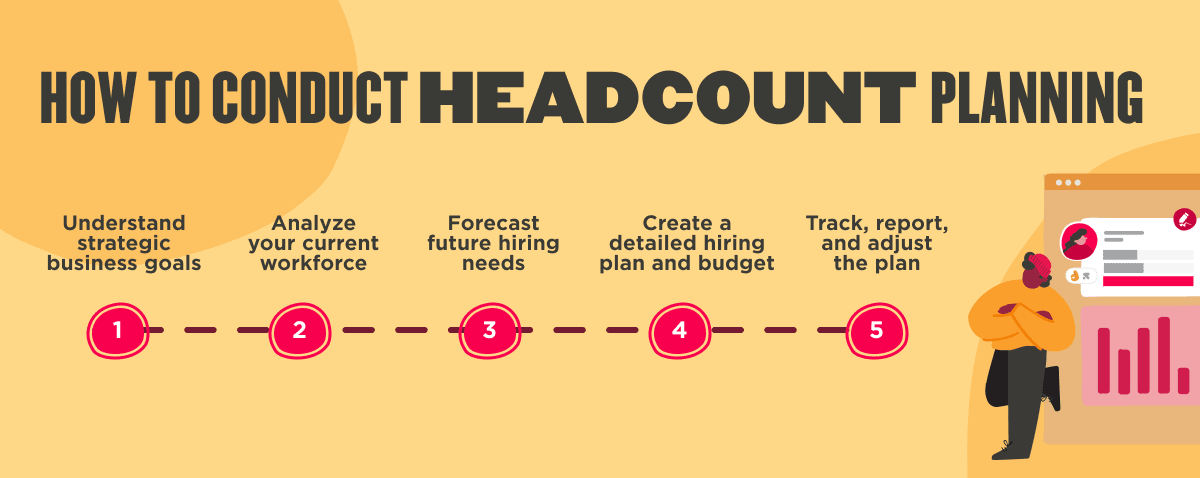
Headcount planning works best when the process is clear and easy for teams to follow. HR, finance, and managers all play a part, so having a shared structure keeps conversations focused and avoids confusion down the line. The five steps below outline a practical way to plan for the people you need today and the skills you’ll need as the organization grows.
1. Understand strategic business goals
Start by meeting with leadership to understand upcoming priorities—like new product launches, market expansions, or seasonal peaks—that will affect team capacity. Map out which departments will feel the impact first and which roles they may need to support that work. Turn these conversations into simple, measurable hiring objectives so managers and HR start from the same assumptions.
2. Analyze your current workforce
Review who you have today, what work they’re responsible for, and where workloads are starting to bottleneck. Examine turnover patterns, internal mobility, and skill gaps to understand where the team is strong and where additional support might be needed. Use this snapshot to identify the roles you truly need to backfill, expand, or redesign.
3. Forecast future hiring needs
Use historical data and past hiring patterns to estimate when roles typically open up due to growth or turnover. Combine that with upcoming projects or revenue targets to predict which teams will need support and when. Build simple “what if” scenarios like slower growth or faster expansion so you can adjust plans quickly when the business shifts.
4. Create a detailed hiring plan and budget
Once you’ve mapped out future needs, turn those estimates into a simple hiring timeline that shows when each role should be opened and why. Work with finance to review salary ranges, headcount limits, and timing so hiring doesn’t outpace your budget. From there, decide whether each role should be filled externally, developed internally, or supported by contractors, depending on what’s most productive for your specific team.
5. Track, report, and adjust the plan
Review your headcount plan regularly to see what’s on track, what’s delayed, and what’s no longer needed. Share quick updates with managers and finance to keep everyone aligned on hiring progress and any changes to priorities. Update the plan as budgets shift or workloads change. Headcount planning works best when it’s a living document, not a once-in-a-while exercise.
How to use a workforce planning template
Follow this simple step-by-step guide to make the most out of your workforce planning template:
- Set up your baseline: Enter your fiscal year, departments, and employment types so the template reflects your organization’s structure. Add current team details like title, department, start date, compensation, and employment status to create an accurate starting point.
- Add assumptions that affect staffing: Include known changes such as contract end dates, planned leaves, or roles already approved for hiring. These small details help the template better reflect real-world staffing needs.
- Review the headcount summary: Look at the monthly totals for opening headcount, new hires, attrition, and closing headcount. Use this to see where teams are growing, where capacity is tight, or where roles may need to be opened sooner than planned.
- Check the cost impact: Review salary, benefits, and payroll tax calculations to understand how planned hires affect total compensation. This gives finance and HR a shared view of costs before roles move forward.
- Create simple action items: Based on what you see, outline which roles need to be hired, backfilled, or adjusted. Assign owners and timelines so HR, finance, and managers know what comes next.
- Update regularly: Revisit the template as budgets shift, projects change, or hiring slows or accelerates. The template works best as a living document that evolves with your organization.

Best practices for headcount planning
Headcount planning isn’t just about filling roles. It’s a strategic process that connects hiring to business goals and keeps everyone aligned. Use these best practices to build a flexible, forward-looking plan that works across teams.
Start with a clear, flexible framework
Use a headcount planning template to keep job details, hiring timelines, and budget assumptions in one place. A shared format makes it easy to compare data across departments and track changes over time. Tailor the fields to match your internal workflows and approval process so it fits naturally into your planning cycle.
Flexibility is key. Build in scenarios that help you adjust when budgets shift, timelines change, or priorities evolve.
Connect roles to strategy
Every role should support a clear business need, whether it’s launching a new product, scaling a team, or preparing for peak demand. Align early with finance and leadership to balance immediate needs with long-term growth plans.
Consider external factors like market conditions or compliance updates to keep your plan grounded. Scenario planning helps you stay ready when things change.
For instance, ProRail used a data-driven workforce model to prepare for a projected 30 percent increase in rail capacity. By modeling retirement timelines, new technology requirements, and changing operations, their HR team could see when and where new roles would be needed.
Use data to guide decisions
Start with a quick audit of your current team. Look at skills, responsibilities, workloads, and structure. Use a few key metrics like time-to-fill, turnover risk, or skills gaps to understand what to prioritize. HR dashboards and real-time reports give visibility into what’s approved, delayed, or changing.
Don’t forget to account for total costs. Go beyond base salary to include benefits, onboarding time, tools, and ramp-up. This helps avoid budget surprises and keeps plans realistic.
For example, IBM shifted from traditional headcount tracking to a skills-based planning model powered by AI and analytics. Their HR team uses machine learning tools to understand team member skills, spot gaps, and guide future staffing decisions. This approach helps IBM match talent to upcoming business needs instead of reacting to shortages after they appear.
Collaborate across teams
Shared templates and regular check-ins help keep everyone aligned, reduce confusion, and speed up approvals. Without clear collaboration, plans stall, timelines slip, and roles may get requested more than once. A weekly 15-minute HR strategy meeting between HR and finance can prevent budget surprises before plans move forward.
For example, Google uses predictive modeling and “What If” scenario tools to help HR, finance, and managers stay aligned on future workforce needs. These models give teams a shared view of hiring timelines, retention risks, and the cost of adding or delaying roles.
Prioritize internal mobility
Before opening roles externally, check if existing team members can step in. Promoting from within builds engagement, speeds up hiring, and reduces costs. It also shows your people there’s a clear path to grow.
Instead of opening a senior role, review recent performance management data to identify a mid-level team member who could take on stretch responsibilities with some support.
Communicate consistently
Hiring plans only work when everyone’s in sync. Use shared templates, automated reminders, and real-time updates to keep your team informed. Clear communication helps prevent duplicated work, missed deadlines, or confusion about what’s been approved.
Achieve strategic workforce alignment with a headcount planning template
A headcount planning template gives you a clear place to organize roles, timelines, and staffing needs, making planning conversations easier for HR, finance, and managers. It helps you stay ahead of hiring needs instead of reacting to last-minute requests, and it brings more clarity to decisions about budget, skills, and team capacity.
Over time, using a structured template turns workforce planning into a smoother, more predictable part of your yearly cycle.
<<Download our free headcount planning template to plan your workforce.>>
Headcount planning template FAQs
Why use a headcount planning template?
A structured headcount template gives HR leaders one place to capture role details, timelines, and approvals so planning doesn’t rely on scattered notes or outdated spreadsheets. It keeps HR, finance, and managers working from the same information, which reduces misunderstandings and makes staffing conversations easier to navigate.
What is headcount planning vs workforce planning?
The terms “headcount planning” and “workforce planning” are often used interchangeably because both involve forecasting talent needs and aligning teams to upcoming work. Many of the same tools and techniques apply to both.
The difference is scope. Headcount planning focuses on the roles you expect to add, adjust, or backfill in the near term. Workforce planning looks further ahead, examining long-term skill needs, internal mobility, and potential gaps as the organization grows.
An easy way to frame it is that workforce planning maps the long-range talent direction, and headcount planning turns that direction into the week-to-week hiring and staffing decisions HR and managers act on.
How do you do headcount planning?
Start by speaking with leadership and managers to understand upcoming priorities, then review your current team to see where capacity or skills may already be stretched. Use a headcount planning template to list existing roles, planned hires, timelines, and costs so everyone is working from the same information.
From there, agree on which roles to prioritize, align with finance on budget, and revisit the plan regularly as projects, budgets, or staffing needs change.
What are the 7 R’s of workforce planning?
The 7 R’s of workforce planning help organizations check whether their workforce is set up to support upcoming goals. Each “R” highlights a different part of the staffing picture, making it easier to identify gaps and decide whether to hire, upskill, or reassign work.
The 7 R’s include:
- Right people: Do we have enough team members to support upcoming work?
- Right roles: Are positions structured correctly based on the responsibilities required?
- Right skills: Do team members have the capabilities needed for current and future projects?
- Right work: Are people focused on tasks that match their skills and job expectations?
- Right place: Are roles located where the work needs to happen—onsite, hybrid, remote, or in a specific region?
- Right time: Will we have the needed talent in place before workloads increase or projects launch?
- Right cost: Are staffing decisions aligned with budget and long-term financial plans?
What is the difference between headcount planning and workforce planning?
Headcount planning focuses on the roles you need to fill in the near term. This can help determine how many people, which teams, and when those hires should happen. Workforce planning looks further ahead by examining future skills, internal mobility, succession needs, and the long-term shape of the organization.