HR software is a digital system designed to assist HR professionals with managing people throughout the team member lifecycle.
Before modern HR technology, HR ran on paperwork, spreadsheets, and manual admin. Then HR software arrived, centralizing people data, automating routine tasks, and giving HR teams more time to focus on strategic work.
Today, HR technology is a core part of how organizations operate. According to HiBob research, 85 percent of organizations use HR technology, with adoption rising as businesses grow. As the technology has evolved, so has its role: from helping HR manage processes to helping people teams make better decisions, improve the team member experience, and support business performance.
In this guide, we’ll walk through what HR software is, the main types, what it costs, how to choose it, and where it’s heading.
Key insights
- HR software has transformed HR management by expanding its role beyond administrative tasks to strategic business influence
- The variety of HR software options, from comprehensive all-in-one platforms to specialized point solutions, caters to diverse organizational needs
- Effective HR software implementation helps create a positive workplace culture and supports informed, data-driven decision-making
- Trends like generative AI, increased HR and Finance team alignment, predictive analytics shape the future of HR practices
What is HR software?
HR software is a digital solution designed to assist HR professionals with managing people throughout the employment lifecycle. HR software tools help with:
- Streamlining administrative work
- Organizing people data
- Data sharing and collaboration
- Giving real-time feedback on pressing issues
- Facilitating a user-friendly online community
<< Choose the best HR software for your organization >>

HR software examples
With such a wide range of HR software applications available, it pays to become familiar with the different types of systems so you can understand which ones will best fit your needs. Here are examples of some of the top HR software you’ll find in the marketplace:
- HRIS (human resources information system): An HRIS stores all the data of an HR department. It contains vital information on team members, along with their pay, benefits, attendance, leave allowance, and performance. It helps with the day-to-day running of all core HR services, including recruitment, management, and legal compliance.
- HRMS (human resources management system): An HRMS is often used as another name for an HRIS, but there is a difference between the two. An HRIS focuses on storing information, while an HRMS software specializes in managing information and people.
- HCM (human capital management): HCM software offers features similar to HRIS but also includes more in-depth tools for reporting, analytics, and monitoring team member performance.
- ATS (applicant tracking system): An ATS is specialized software focusing on streamlining recruitment and hiring. It helps sort through a large number of applications so you can find the perfect candidates.
- Payroll software: Payroll software helps automate and manage payroll and assists with adhering to tax laws and financial regulations. Payroll and HR software often go hand in hand.
- Onboarding software: Onboarding software helps create a positive, consistent, and efficient onboarding experience for new hires, along with managing all the associated paperwork.
- Learning management system (LMS): LMS software manages training and development. It can automate training assignments, track people’s progress, and generate reports once team members complete their training.
- Employee management software: Employee management software makes it easier to look after your people. It handles onboarding, attendance, compensation, performance, and workforce planning, automates admin tasks, and provides in-depth people analytics.
- Employee experience software: Employee experience shapes satisfaction, productivity, and retention. These platforms help you collect feedback, recognize milestones, and create an environment where your people feel supported and appreciated.
- Talent management software: Identifying, nurturing, and retaining top talent can be one of the biggest challenges in HR. A talent management system can support all aspects of talent management, including recruitment, performance, and learning and development.
- Workforce planning software: Workforce planning software uses data analytics to forecast future workforce needs. It helps identify skill gaps, recruitment processes, and succession planning, ensuring your organization is prepared for the future.
- Compensation management software: This software helps you pay your people fairly, stay compliant with local regulations, and build more equity into how you set and review compensation.
Features of HR software
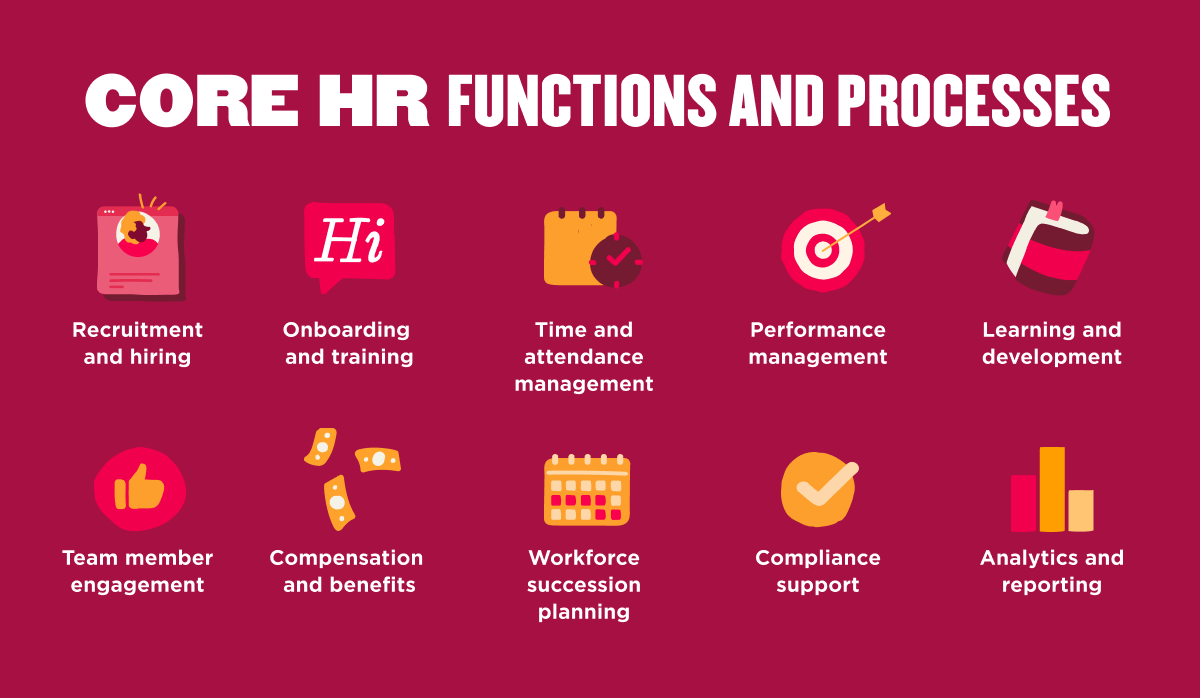
HR software can cover a wide range of people processes, from core administration to performance, payroll, and workforce planning. The right mix depends on your organization’s needs today and how you expect them to grow. Common HR software features include:
- Core HR and people data: People records, directories, document storage, company policies, contracts, and electronic signatures
- Employee self-service: Tools that let people update personal information, access documents, request time off, and find answers without relying on HR for every task
- Time, attendance, and leave: Time tracking, scheduling, attendance, and leave and vacation management
- Payroll and benefits: Payroll processing, payroll data management, benefits administration, enrollment, and related reporting
- Hiring and applicant tracking: Applicant tracking capabilities for recruitment, candidate management, hiring workflows, onboarding, and offboarding
- Performance and development: Performance reviews, goal setting, feedback, succession planning, and learning and development
- Culture: Surveys, engagement, recognition, company communications, and anonymous reporting
- Compensation: Compensation planning, review cycles, and pay management
- Analytics and reporting: Workforce analytics, dashboards, and insights that support better decision-making
The most effective HR platforms also embed AI and automation across these workflows to reduce manual work, surface useful insights, and make everyday tasks faster and easier without adding unnecessary complexity.
What are the benefits of HR software?
With HR software, HR leaders can keep pace with a workplace that keeps changing, and spend more of their time on people instead of processes. The main benefits include:
- Less time on administrative work. Automation handles the repetitive parts of HR, like data entry, approvals, and document routing. For example, Chili Piper, a 150-person remote company, automated its onboarding and offboarding workflows and freed up more than 20 hours a month that its People team now spends on culture and strategy instead of admin.
- Faster decisions. HR software gathers quantitative and qualitative data from across the organization in one place, so people teams can build strategies around what the data actually shows. MediaRadar, a 500-person company running HR across four global offices out of a patchwork of spreadsheets, moved to a single system and could finally spot workforce trends and flag risks before they became a problem, instead of finding out after the fact.
- Continuous improvement. Built-in metrics tracking makes it easier to measure the impact of HR initiatives over time and adjust before small issues grow into bigger ones. Rose Rocket, a 70-person logistics software company, used to rebuild its headcount and budget models from scratch every month because HR and Finance data lived in separate systems. When they used HR software, both teams could work off the same live data, and scenario planning became a simplified, routine monthly exercise.
- A more consistent team member experience. Centralized records and self-service tools mean people get the same accurate information and support, whether they’re in the office on day one or working remotely three years in. At Knix, a 358-person retail brand, corporate staff had access to company news and updates that retail staff at its stores did not. Moving everyone onto one HR platform gave retail teams the same visibility and sense of belonging as the corporate office.
- Stronger compliance. Centralized documentation and governance tools help HR teams keep pace with changing regulations across every market where they operate. Fulham F.C., a Premier League football club, used to pull its diversity and inclusion compliance data by hand, a process that could take days. Using HR software, the same report now takes minutes, freeing up time to prepare for audits instead of just keeping up with them.
How to choose the right HR software for your business
Start with the data on what buyers actually value. HiBob research found that teams choosing HR software prioritize features and functionality (28 percent), ease of use (27 percent), and integration (12 percent). Those three priorities make a practical framework for your own search.
With so many SaaS HR software options available, a clear process makes the decision far easier.
1. Map your HR needs first
Before you compare vendors, get specific about the problems you want to solve. A short internal audit keeps your shortlist focused on the features that matter, and it gives you a scorecard to hold every demo against. When you know exactly what “good” looks like for your team, you can tell the difference between a platform that fits and one that only looks impressive.
- Manual workload: Identify the repetitive or manual tasks taking up the most time, such as calculating PTO balances, managing paperwork, or updating org charts after every new hire
- Core requirements: Separate must-haves like payroll accuracy, compliance reporting, and reliable people data from features that would be useful but aren’t essential to your decision
- User needs: Include the requirements of HR, Finance, IT, and managers so the platform works for everyone who depends on it
- Reporting gaps: Ask vendors to build a report you currently struggle to produce, such as headcount by department or turnover by manager, during the demo
- Six-month goals: Set a measurable target, such as completing onboarding paperwork before day one, and assess whether each platform can help you reach it
- Growth needs: Check that the platform can support your expected headcount, organizational complexity, and geographic expansion without becoming difficult or expensive to manage
2. Weigh ease of use and adoption
A platform only creates value when people can use it, so test the day-to-day experience before you commit. The colleagues logging in every week—your managers, team members, and HR admins—tell you more in a hands-on trial than any sales deck.
- Real-world testing: Have the people who will use the system complete common tasks during the trial
- Employee self-service: Check whether team members can update personal information, access documents, view payslips, or request time off without contacting HR
- Task efficiency: Test how long common actions take, such as approving time off or completing a review, and compare the number of steps across platforms
- Implementation timeline: Ask for a realistic timeline based on an organization of your size and clarify who is responsible for setup and data migration
- Support model: Find out what support is available, how quickly the vendor responds, and whether you’ll have a dedicated point of contact
- User experience: Watch how easily managers and team members can navigate the system without extensive training
3. Check integrations
Your HR software sits at the center of a wider tech stack, so strong integrations protect both your data and your time. When systems share one source of truth, people records, pay, and time stay in sync without anyone rekeying them by hand.
- Current systems: List the payroll, recruiting, Finance, communication, and productivity tools the HR platform will need to connect with
- Integration types: Confirm whether important connections are native integrations, API-based, or dependent on a third-party tool
- Data sync: Ask how frequently information moves between systems and whether important data, such as headcount or payroll changes, updates in real time
- Migration process: Clarify who will map, clean, and transfer historical data into the new platform
- Critical integrations: Ask vendors to demonstrate connections with the specific tools your organization already uses rather than relying on broad integration claims
- Manual work: Check whether any integrations still depend on regular CSV exports, uploads, or other manual steps
4. Assess cost and scalability
Look beyond the initial price and consider the full cost of ownership as your organization grows. A platform that works for you today can become costly or restrictive if adding people, regions, or modules leads to unexpected fees or contract changes. Clear pricing and flexible scalability can help you plan ahead and avoid surprises.
- Pricing model: Confirm whether pricing is per person, per module, or a flat fee, and understand how costs change as headcount grows
- Plan coverage: Ask which capabilities are included in the base plan and which require additional modules or fees
- Implementation costs: Check for one-time costs related to setup, data migration, integrations, training, or support
- Future costs: Model how pricing could change as you add people, regions, entities, or modules over the next one to three years
- Global readiness: Confirm that the platform supports the languages, currencies, payroll requirements, and compliance needs of the markets where you operate
- Contract flexibility: Review renewal terms, volume discounts, and the process for adding, removing, or changing modules as your needs evolve
5. Validate with real-world evidence
Vendor materials can help you understand what a platform offers, but customer feedback and independent sources can give you a clearer view of how it performs in practice. Look for evidence from organizations with similar needs, and focus on patterns that can help you assess fit, implementation, support, and long-term usability.
- Read recent independent reviews: Look for recurring themes across multiple reviews rather than relying on individual ratings
- Ask for relevant customer references: Prioritize organizations that are similar to yours in size, industry, complexity, or stage of growth
- Review analyst recognition carefully: Focus on research and evaluations that are relevant to your market segment and use case
- Ask about the post-launch experience: Find out what changed after implementation, including any challenges, unexpected benefits, or gaps
- Understand implementation and support: Ask how the vendor handled data migration, rollout issues, and support escalations
- Match evidence to your priorities: Look for results that align with your goals, such as faster onboarding, better reporting, or reduced manual work
<< Download this free checklist on how to choose HR software. >>
How much does HR software cost?
Most HR software is priced per person per month (PEPM), typically landing between roughly $2 and $30 PEPM. The range depends on company size and how much the platform does, with lightweight small-business tools at the low end and full all-in-one or enterprise HCM suites at the high end.
A few factors drive where you land in that range:
- Number of people: Per-person pricing rises with headcount, though many vendors offer volume discounts
- Breadth of modules: Core HR costs less than a full suite with performance, engagement, and analytics
- Pricing model: Per-person and flat-fee structures suit different team sizes
- Add-ons: Payroll, benefits, and advanced analytics can sit outside the base price
- Implementation: One-time setup fees scale with company size and complexity
Many vendors add a monthly base fee, and enterprise rollouts can carry one-time implementation costs.
| Segment / software type | Typical price (PEPM) | Typical model | Notes |
| Small-business / core HR tools | ~$2-$8 per person/month | Per person, sometimes a free starter tier | Best for lean teams needing the basics |
| Mid-market all-in-one platforms | ~$8-$30 per person/month | Per person, often a monthly base fee | Broader modules: core HR, performance, engagement |
| Enterprise HCM suites | Custom, from ~$30+ per person/month | Custom quote, annual contracts | Global workforce planning, deep analytics |
| One-time implementation | ~10-30 percent of annual fee, higher for enterprise | One-time project fee | Covers setup, data migration, and training |
How to implement HR software successfully
Perhaps you’re preparing to choose your first HR software or looking to upgrade. You can incorporate the following steps to promote smooth software implementation:
- Design a plan. Take the time to outline your company’s needs and objectives. Write down a timeline with realistic expectations that make room for setbacks. Document the overall goals and short-term milestones. Incorporate a budget based on the service and vendor and consider all possible implementation costs.
- Garner stakeholder support. To successfully launch a new HR software, stakeholders must support it—from team members and managers to stockholders and senior executives. Informing, educating, and training people in advance enables them to feel more confident and prepared to adapt to the changes. HR can also target select individuals who can serve as ambassadors to encourage others to learn the new software system.
- Test out the software. Assemble groups of individual contributors, managers, and HR professionals. Different positions offer different perspectives. A variety of feedback can help HR and IT make adjustments so the software can function smoothly for everyone.
- Provide continuous support. After launching the HR software, the process is not over. Carve out time to help people, whether during lunch breaks or morning work hours, so they can ask questions about the new system. Track adoption over the first few months, like login rates and self-service use, and use what you find to guide the next round of training.
Recommended For Further Reading
The future of HR software
Just as HR software has changed how HR operates today, it will continue to evolve to better address our needs in the future. What does the future of HR software look like? There are several emerging trends:
- Generative AI: Generative AI is already embedded in HR work, drafting communications, answering common questions, and speeding up routine tasks. In HiBob research on AI in the workplace, 69 percent of HR professionals use AI to train people and 63.5 percent use it to support onboarding.
- Agentic AI: The next step is agentic AI, where tools carry out multi-step tasks with light oversight, coordinating workflows across systems so HR teams spend less time on manual follow-up.
- Predictive analytics: HR platforms are moving from reporting on what already happened to flagging what’s likely to happen next, like attrition risk or a widening skills gap, so HR teams can act before a pattern becomes a problem.
These shifts point in one direction: HR software that handles more of the routine work so HR teams can spend more time on the parts of the job that need a person, like coaching a manager through a hard conversation or building a culture people want to stay in. The platforms that get this right will look less like systems of record and more like a genuine second set of hands for HR.
HiBob reflects that direction with a people-first, AI-powered platform that connects HR, payroll, benefits, workforce planning, and Finance in one system. Embedded AI helps reduce manual work and surface insights from connected people and financial data, while HR, Finance, and managers remain in control of the decisions that affect their teams.
<< Download this free checklist on how to choose HR software. >>
See how Bob helps teams who have outgrown their HR tech
HR software FAQs
Which software is best for HR?
The best HR software depends on your company’s size, complexity, and priorities. HiBob is a strong choice for growing mid-market companies that want HR, payroll, benefits, workforce planning, and AI-powered capabilities in one connected platform without enterprise-level complexity. Other options include Gusto for small businesses, Deel for global hiring and EOR, and Workday for large enterprises.
What is the best payroll HR software?
The best payroll HR software connects payroll directly to your core HR data, so people records, time, and pay stay in sync without double entry. HiBob brings payroll together with the rest of your HR processes on one platform, which reduces admin and keeps you compliant across jurisdictions. That single source of truth makes it a strong fit for global teams managing pay across regions.
Is HR being replaced by AI?
No, AI isn’t replacing HR teams. AI takes on repetitive, time-consuming tasks so HR professionals can focus on the human work only they can do, like coaching managers, shaping culture, and supporting people. HiBob’s research on AI in the workplace found that HR teams use AI to train people (69 percent) and support onboarding (63.5 percent), extending their impact rather than shrinking their role.
What is the best HR software for managing HR and Finance?
The best HR software for managing HR and Finance connects both teams on shared, trusted data. When headcount, compensation, and planning live in one place, HR and Finance work from the same numbers instead of reconciling spreadsheets. HiBob offers a dedicated Finance solution alongside its HR platform, so people and financial planning stay aligned as the business grows.