
Payroll compliance is “arguably the most important function within any organization,” says Melanie Pizzey, CEO and Founder of the Global Payroll Association. “When people are paid accurately and on time, it directly supports wellbeing, builds trust, and strengthens compliance.” In the United Kingdom, achieving that level of trust and consistency means keeping pace with UK regulations while ensuring payroll accuracy and reliability for your people. Staying on top of every update helps reduce compliance risk and build confidence in payroll.
With the right payroll management tools at your disposal, staying aligned with requirements becomes routine. That’s why we’ve created this easy-to-use, straightforward guide and UK payroll compliance checklist to walk you through everything you need to know.
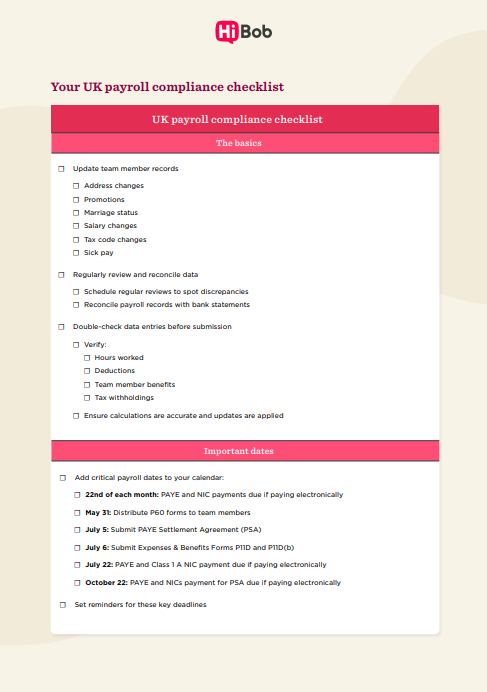
<< Download our comprehensive UK payroll compliance checklist in PDF format here >>
Key insights
- UK payroll compliance is the process of aligning pay and deductions with HMRC requirements
- Small payroll issues, like outdated records or incorrect tax codes, can turn into compliance risks if left unchecked
- Common payroll mistakes often stem from manual processes, missed updates, or inconsistent record-keeping
- A UK payroll compliance checklist helps teams manage ongoing requirements without adding complexity to each pay run
What is payroll compliance in the United Kingdom?
Payroll compliance in the UK refers to following the payroll legislation laid out by HM Revenue & Customs (HMRC), including requirements for wage payments and tax deductions.
HMRC-compliant payroll cycles typically bring together accurate payroll calculations, timely salary payments, and correctly applied PAYE deductions.

Importance of maintaining payroll compliance in the UK
Payroll is at the centre of how pay, tax, benefits, and reporting connect across an organization. When payroll follows the correct rules, the numbers it produces work everywhere else—payslips, RTI submissions, pension contributions, statutory payments, budgeting, and reporting all line up without extra handling.
That alignment benefits team members first. Pay reflects the right hours, deductions match current tax codes, and pensions and statutory entitlements track earnings accurately. As Ben Eubanks, Chief Research Officer at Lighthouse Research & Advisory, points out: “This really is our highest and best opportunity to remind people every single time it hits their bank account that this is about respect and appreciation.” They don’t have to question payslips or chase corrections, and payroll becomes something they trust by default.
Payroll compliance ensures your organization maintains accurate, reliable payroll data that teams can confidently use to generate insights. When payroll processes are compliant and consistent, Finance can forecast labor costs with greater precision. HR can track benefits, headcount, and reporting without data gaps. Leadership can make decisions knowing the underlying numbers are dependable and defensible over time.
Instead of turning payroll into a risk or bottleneck, strong compliance creates the foundation that allows payroll data to support smarter planning, reporting, and business decisions.
Common payroll compliance mistakes and penalties
Depending on the size of your organization, payroll-related fines and other payroll costs can range from a few hundred pounds to millions of pounds. “Payroll has fixed deadlines, and everything else stops when you get close to payday,” says Simon Davis, Global Director of Professional Services at HiBob. “That rigidity is why missing data or late changes cause such big compliance risks.”
Payroll compliance penalties to steer clear of include:
Late filing
A late filing occurs if you don’t submit your Real Time Information (RTI) – FPS/EPS on time. If you have up to nine people on your team, the penalty starts at £100 for the first missed deadline. For larger employers, penalties increase based on workforce size and repeated late submissions, typically ranging from £200 to £400 for subsequent missed deadlines.
Late payments
If you don’t pay PAYE to HMRC on time, you will owe a late payment penalty. The amount varies based on the length of the delay and the amount of tax owed. For example, paying one to three months late can result in a penalty of 1 percent of the outstanding amount.
Recommended For Further Reading
Inaccurate reporting
If your payroll reports contain mistakes or inaccuracies (such as incorrect team member details, earnings, or payroll deductions), HMRC classifies this as inaccurate reporting. The penalty is based on a percentage of the underpaid tax, ranging from 15 percent to 100 percent, depending on the severity of the inaccuracy.
Outdated record-keeping
HMRC may request payroll records at any time. If those records are out of date, HMRC can issue penalties of up to £3,000. The amount varies based on the number of team members affected and how long your records remain out of date.
<< Download our comprehensive UK payroll compliance checklist in PDF format here >>
Your payroll compliance checklist
Use this checklist to ensure your payroll processes meet HMRC requirements and stay compliant throughout the tax year.
1. The basics
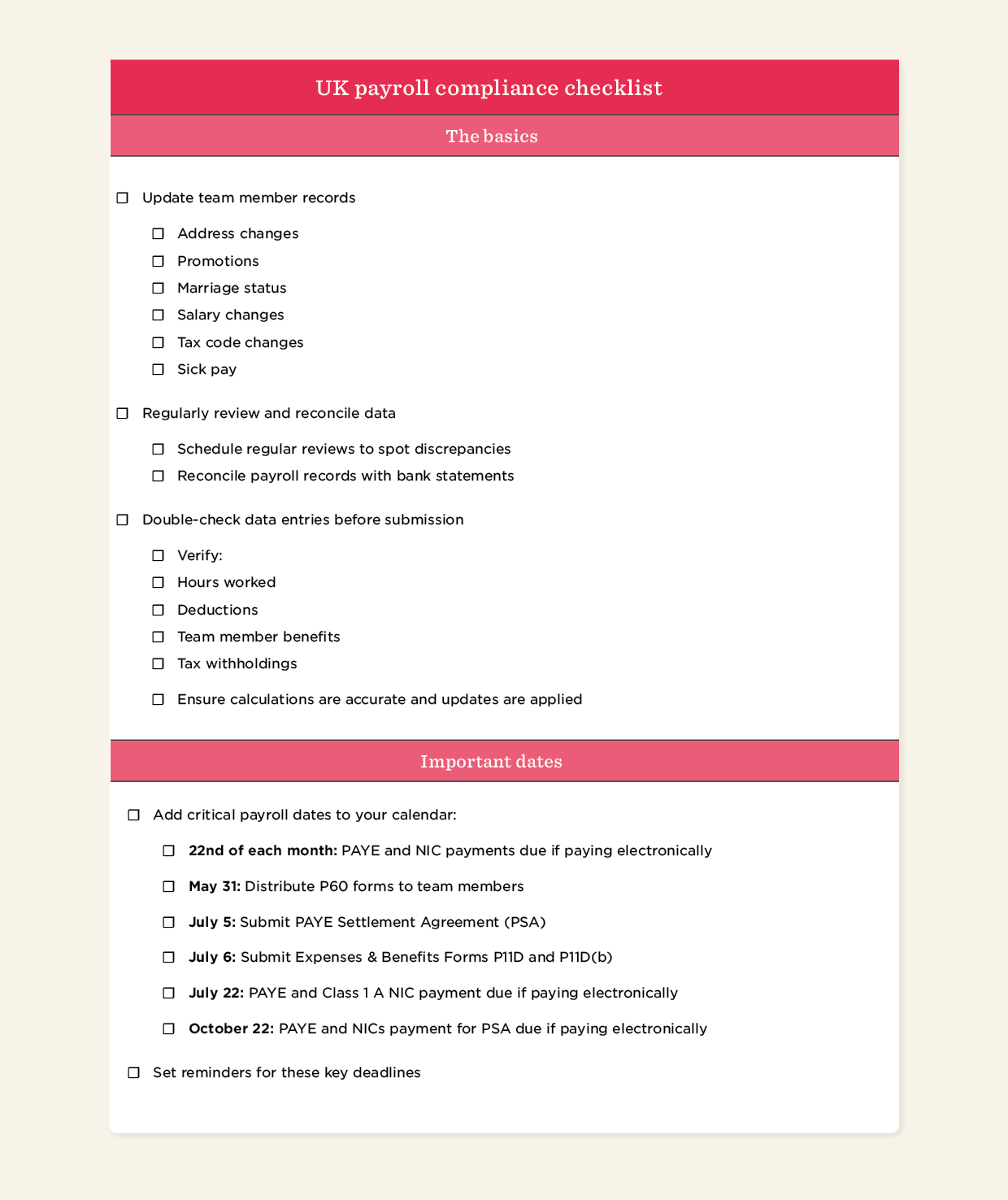
First things first: Is all of the data you have on your team members up to date?
As obvious as this sounds, if you’re still manually processing payroll, you can easily overlook small but costly details, especially when you’re overseeing payroll for a larger team. Because this personal data encompasses many different factors, updating your people’s records as changes happen helps keep inaccuracies to a minimum.
Register as an employer with HMRC
For first-time employers, setting up payroll involves registering with HMRC. This registration generates an employer PAYE reference number and an Accounts Office reference, both of which you use across payroll reporting and payments. Keep in mind that HMRC may take up to five working days to process your registration, so plan accordingly to ensure everything is in place when it’s time to run your first payroll.
As part of onboarding, collect new joiner information to set them up on payroll. This involves completing the HMRC new starter checklist and recording details like tax status, start date, and pay information. Storing this information alongside payroll records supports a smooth first pay run and ongoing payroll processing.
Set up Pay as You Earn (PAYE)
PAYE (Pay as You Earn) calculates and deducts income tax and National Insurance contributions (NICs) from team member earnings before they receive their wages. After PAYE registration, employers use their PAYE reference number for payroll reporting and payments to HMRC.
After employer registration is complete, PAYE Online access becomes available for managing payroll submissions and HMRC communications. PAYE setup starts with choosing a payroll method, such as payroll software, a payroll service provider, or HMRC’s Basic PAYE Tools for smaller teams. The payroll system applies tax codes and NIC categories, calculates deductions each pay cycle, and submits payroll data to HMRC through RTI.
From there, payroll runs capture team member earnings for each pay period, record tax and National Insurance deductions, and generate the figures due to HMRC. These records support RTI submissions and form the basis for PAYE payments after each pay run.
Classify workers correctly
How you classify a worker affects their pay and taxes as well as how you report both in payroll. HMRC generally distinguishes between employees and contractors based on factors such as control, working arrangements, and who handles tax and National Insurance.
Employees work under your direction, receive pay through payroll, and qualify for statutory benefits like holiday pay and sick pay. Contractors, on the other hand, work independently, invoice for their services, and manage their own tax and National Insurance outside of PAYE.
Contracts and invoices support accurate classification, but when the distinction isn’t obvious, HMRC’s Check Employment Status for Tax (CEST) tool can help clarify the correct status.
Ensure compliance with national minimum and living wage
National Minimum Wage and National Living Wage rules set the lowest hourly pay allowed in the UK. Rates change each April and vary by age and apprenticeship status, so payroll reflects both the worker’s age and the rate in force for that pay period.
Each pay run checks minimum wage when it’s time to calculate earnings. Payroll multiplies hours worked by the applicable rate, then adjusts for deductions taken from pay. Salary sacrifice, uniform costs, and accommodation charges reduce gross wages, while unpaid time and variable hours change the hourly calculation. Tips and gratuities remain separate and don’t offset minimum wage shortfalls.
Review pay rates regularly to confirm they meet the wage requirements for each age band and worker type. Check that deductions, unpaid time, and salary sacrifice arrangements don’t reduce effective hourly pay below statutory thresholds. Add a quarterly rate check to your payroll calendar to keep your systems aligned as rates change.
Manage benefits and deductions
Benefits and deductions change how payroll calculates tax and take-home pay. Statutory deductions run through payroll by default, while other deductions only apply when a team member opts in or becomes eligible. Benefits also affect payroll differently depending on whether they count as taxable income, which determines how they appear in tax calculations.
You can streamline the process by setting up pension auto-enrolment for eligible team members and adding benefits and expenses to payroll as they come up. From there, report taxable perks like company cars or private medical coverage through P11D forms and reflect them with tax codes. Expense handling follows the same logic, with teams keeping people costs such as travel or subsistence separate from business hospitality, where VAT treatment differs.
Review holiday pay for irregular hours workers
Holiday pay follows different rules for people with irregular hours or part-year contracts. Recent employment law changes clarified how to calculate entitlement and pay and removed blanket use of the 12.07 percent accrual method.
Holiday pay now uses a 52-week reference period to reflect actual earnings for professionals with variable hours, commission, or seasonal patterns. The calculation includes regular overtime, bonuses, and commission, not just base pay. Where someone hasn’t worked a full 52 weeks, the calculation uses the number of complete weeks worked. For leave years starting on or after 1 April 2024, a new accrual method applies to certain irregular-hours and part-year team members.
You can review holiday pay calculations for team members with irregular hours by applying the correct reference period or accrual method and including relevant earnings. Keep records of hours worked, pay received, and the calculation approach so holiday pay continues to reflect real working patterns as they change.
Key takeaway: Accurate payroll starts with strong foundations—keeping team member data up to date, registering and running PAYE correctly, classifying workers properly, and maintaining compliant records ensures payroll runs smoothly and withstands regulatory scrutiny.
2. Create a calendar
PAYE and RTI reporting add a steady stream of deadlines and submissions to the payroll cycle throughout the year. Mapping key reporting and payment dates in an annual calendar brings clarity to the schedule and helps keep each payroll run on track.
Other than payday (if you’re new to payroll, this is usually the last working day of the cycle), consider adding the following deadlines to your calendar.
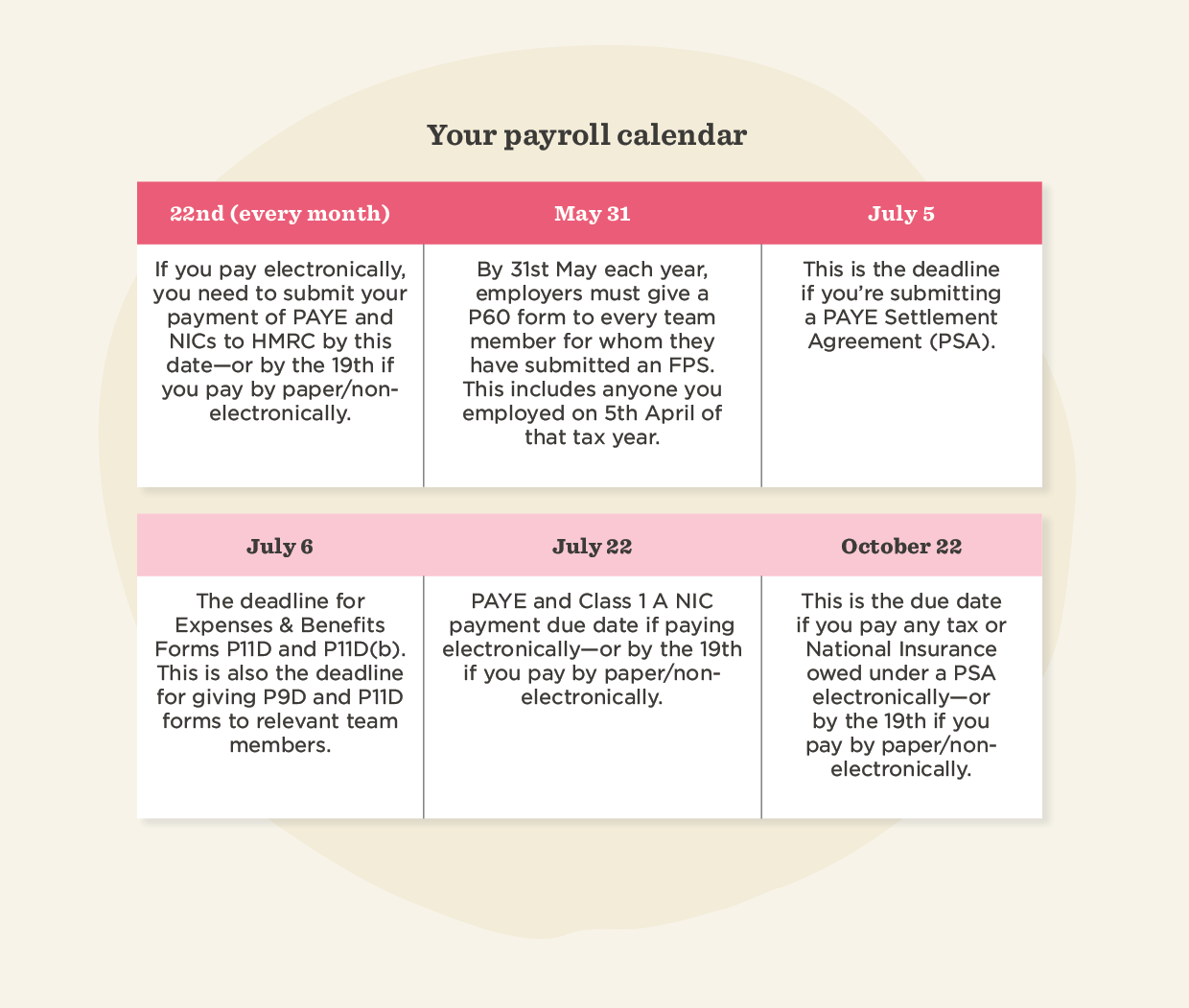
Key takeaway: Add paydays and HMRC deadlines to your calendar to avoid late submission penalties.
3. Stay on top of payroll legislation
Staying on top of the latest UK payroll legislation keeps your payroll processes compliant and penalty-free. Here’s how to stay up to date:
Check directly on the HMRC website
If you want to keep tabs on changes in legislation, the HMRC website is a reliable place to start. Their employer bulletins share updates on any major changes that might affect how you do payroll.
Join a community
If you’re looking for a less manual way to keep up with legislation, you can also join specialist communities and forums.
Here are a few popular UK payroll communities:
- The Chartered Institute of Payroll Professionals (CIPP) community: The CIPP offers a dedicated online community for payroll professionals, with discussion forums, blogs, events, and industry updates
- The Payroll Centre community: The Payroll Centre provides payroll training and resources, as well as a community section where you can connect with other payroll professionals
- LinkedIn groups: LinkedIn hosts several UK payroll-focused groups, including “UK-specific payroll,” where professionals share advice and insights
- UK Business Forums: UK Business Forums has a dedicated payroll section, where payroll professionals can interact, seek advice, and share insights
Use payroll software
Reputable payroll software applies legislation updates, tax rate changes, and reporting requirements automatically, keeping your payroll aligned with current rules.
Key takeaway: Payroll legislation changes frequently. Monitoring HMRC’s website and joining online payroll communities are practical ways to stay informed if you don’t have automation software in place.
4. Know your way around workplace pensions
No matter how big or small your business is, all employers have a duty to enroll eligible people into a pension scheme. This means offering your people the opportunity to save for retirement, with employer contributions applied in line with statutory requirements.
Assess your workforce to determine who is eligible
Identify which team members are eligible for auto-enrollment by assessing their age, earnings, and employment status. Most people will fall into one of the following three categories:
Eligible jobholders
Team members between 22 and State Pension age who earn over £10,000 per year qualify as eligible jobholders. They can opt out of the pension scheme after automatic enrolment and have a one-month window to receive a refund of their pension contributions.
Non-eligible jobholders
Team members between 16 and 21 or State Pension age and 74 who earn over £10,000 per year fall into this category, as do those between 16 and 74 who earn more than £6,240 but less than £10,000 per year.
Entitled workers
Entitled workers are team members between 16 and 74 who earn below £6,240 per year. They have the right to join the pension scheme, but you don’t have to make a contribution (though most employers generally do).
Familiarize yourself with the minimum contribution levels
Auto-enrolment comes with set minimum contribution levels for pensions:
Qualifying earnings basis
Calculate contributions as a set percentage of a team member’s qualifying earnings, which include a defined portion of pay such as salary, wages, commissions, and bonuses.
The minimum employer contribution is 3 percent of those qualifying earnings.
Total minimum contributions
Alongside the employer contribution, auto-enrolment sets a minimum total contribution that combines both the employer and team member payments. This total equals 8 percent of a team member’s qualifying earnings, made up of at least 3 percent from the employer and the remaining 5 percent from the team member.
* The numbers above are for banded-earnings pension schemes—other types of auto-enrolment schemes may have different minimum contribution rates.
Choose a qualifying pension scheme
When choosing a pension provider, look for a qualifying pension scheme that meets the requirements set by The Pensions Regulator. Qualifying schemes register with HMRC and include a default investment option for team members who don’t make an active choice.
Here are a few of the most popular schemes:
- National Employment Savings Trust (NEST)
- The People’s Pension
- Smart Pension
- Aviva Workplace Pension
- Royal London
- Standard Life
* These are just some of the most commonly used providers—consider professional advice if you’re unsure which pension scheme is the right fit.
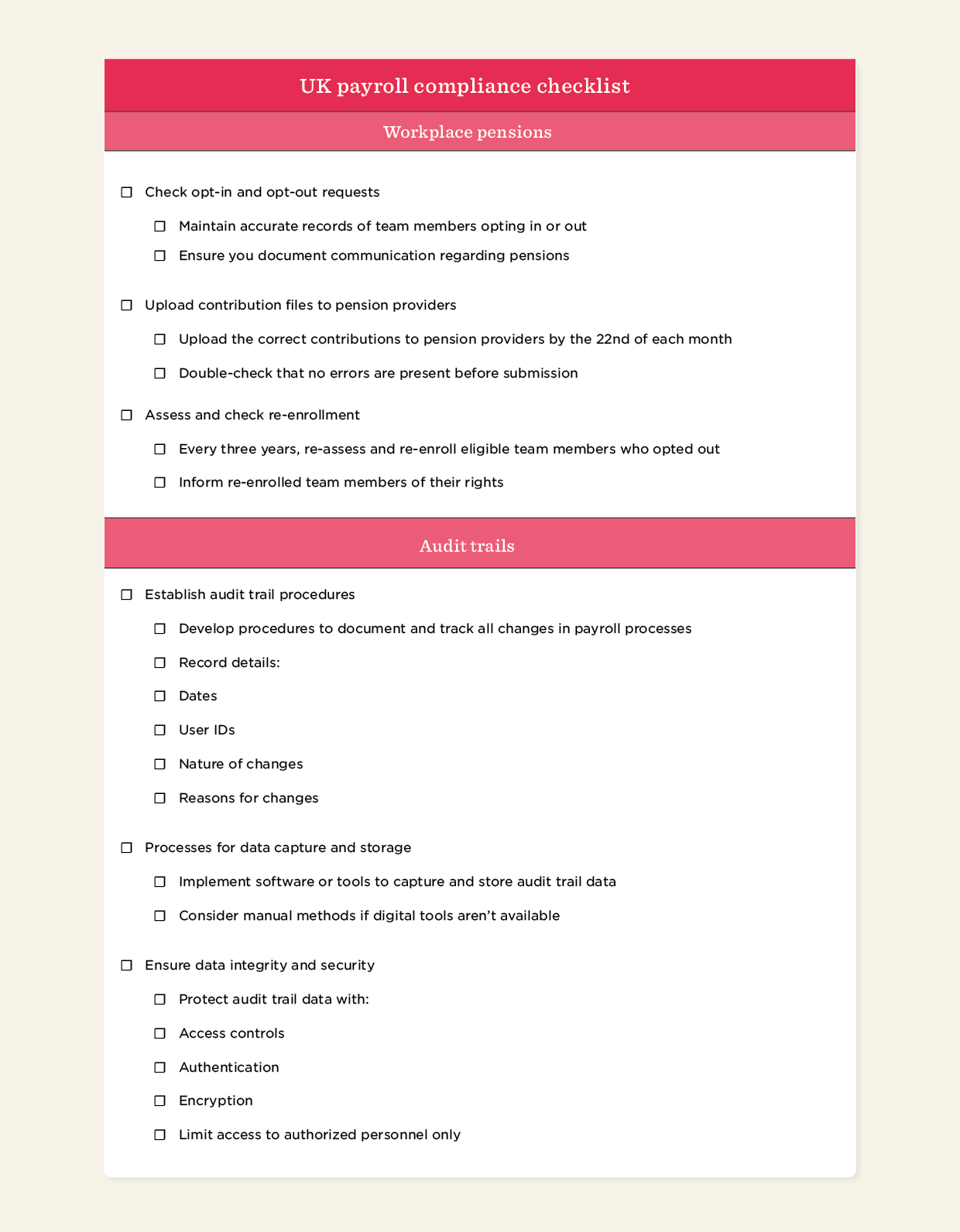
Check opt-in and opt-out requests
Keep clear records of opt-in and opt-out requests, along with any related team member communications. Process refunds for opt-outs within the allowed timeframe and update payroll as changes come through.
Upload contribution files to pension providers
Calculate and deduct the correct pension contributions from wages, including both employer and team member contributions. Upload contribution files to the pension provider by the 22nd of each month. (Once submitted, these files can’t be amended.)
Post-submission, confirm receipt and reconcile contribution totals against payroll records.
Don’t forget about re-enrollment
Every three years, reassess team members who previously opted out or ceased active membership. Re-enroll those who are eligible, then notify them so they understand what re-enrollment means and the options available to them.
Key takeaway: Ongoing pension administration involves enrolling eligible team members, keeping records and requests up to date, and submitting contribution files by the 22nd of each month.
5. Make use of audit trails to minimize risk
Audit trails record events, procedures, and operations, giving you a way to monitor and verify the accuracy and compliance of your processes.
If HMRC does come knocking, an audit trail gives you the documentation to prove you collected the right personal data for team members, applied the correct tax codes, and paid the National Minimum Wage.
Think of it as an extra layer of safety that shows who made changes, what they changed, and when. If questions come up, the audit trail makes it easy to trace what happened and who took action.
Note: A routine HMRC audit can happen once every five years or so, depending on the industry you’re in.
If you do happen to face an audit, preparation typically focuses on the following areas:
- Tracking payroll changes: Document and track all payroll changes, including the date, the user who made the change, what they changed, and why they made that change.
- Collecting and storing audit data: Use payroll software or other tools to collect and store audit trail data. Where software isn’t available, maintain manual records using spreadsheets or paper logs.
- Securing audit trail access: Apply access controls, authentication, and encryption to restrict unauthorised access and keep audit data secure.
- Maintaining documentation: Keep detailed records of audit trail processes, procedures, and outcomes, including any actions taken. Use this documentation to respond clearly to audit queries.
Key takeaway: Organize your audit trail data and practice regular reviews so you can show exactly what changes occurred if HMRC conducts an audit.

6. Double-check expenses
Business expenses run through payroll and affect tax and National Insurance calculations. Use the steps below to manage expenses and deductions accurately:
Check tax deductions for accuracy
Match team member expense claims against HMRC rules and keep supporting receipts or records with each claim. Code each claim correctly in payroll so it doesn’t inflate taxable pay or National Insurance calculations.
Use gross pay figures to calculate statutory deductions alongside team member expenses. Once earnings pass the relevant thresholds, deduct student loan repayments (Plan 1 and Plan 2). Apply Attachment of Earnings Orders (AEOs) using the stated deduction amounts, priority order, and payment timelines. Then process any additional deductions—such as court fines, child maintenance, pension arrears, or salary sacrifice—according to the rules that apply to each.
Review the payroll run to confirm expense claims and deductions calculate correctly, appear in the right order on payslips, and match the figures reported to HMRC.
Keep receipts
To claim expenses, team members typically submit receipts or other supporting evidence. These records support verification during audits, compliance checks, and internal reviews.
Collect receipts or digital evidence for all expense claims as part of the payroll process. Align submission deadlines with payroll cut-off dates so claims fall into the correct pay run.
Have a process for approval and authorization
Expense claims usually pass through an approval step before payroll pays them out. That approval step tells payroll which claims qualify for reimbursement and prevents unapproved or unclear expenses from entering the pay run.
Set out who can approve expenses, the limits they can approve, and how approvals are recorded so payroll has a clear signal on what to process. Run every claim through the same approval flow and keep approval records accessible in case compliance questions come up later.
Don’t drop the ball on expense reporting and record-keeping
Capture expense claims as they come in and tie receipts to each claim. This gives payroll a real-time view of incoming claims and keeps reconciliation and reviews from turning into a manual clean-up job.
With a payroll software solution, you can run expense claims through the same system to avoid re-entering data or chasing approvals across tools. Record claims once, carry them through approval, and feed them straight into the pay run.
Key takeaway: Set clear processes and policies for expenses, and record each claim consistently so payroll has reliable information to work with.
7. Conduct regular administrative maintenance
Think of administrative maintenance cycles as routine health checks for your payroll system, keeping processes aligned, accurate, and running as expected.
“Payroll is no longer something you can just tidy up at the end of the year,” says Peter Bickley, Technical Manager at The Institute of Chartered Accountants in England and Wales (ICAEW). “It’s continuous, and employers need to be ready for that.” Build these checks into your regular payroll routine:
Regularly review and reconcile data
Run a payroll data check at the same point in every pay cycle, ideally before finalizing the pay run. Compare current payroll records against recent team member changes, including address updates, promotions, salary changes, tax code updates, changes in marital status, and any periods of sick pay. Confirm each change appears correctly in payroll before processing payments.
After running payroll, match total pay, deductions, and net pay against bank statements to confirm amounts align with what left the account. Resolve any differences before moving on to the next pay run.
Double-check data entries
Before submitting a payroll run, take a final pass through the data that drives pay calculations. Start with worked hours and pay rates, using timesheets or attendance records as the reference point, particularly where schedules vary from period to period. This sets a clean baseline before deductions and adjustments come into play.
From there, scan deductions and benefits with current rates in mind. Look for anything that may have changed since the last run, such as updated tax codes, new pension contributions, or adjustments tied to salary sacrifice or statutory payments. A quick comparison against the previous pay run helps surface unexpected jumps or drops that deserve a closer look.
For changes that affect multiple records at once, such as salary reviews or onboarding new starters, add a second review step before submission. This extra check helps catch input errors or missed updates before payroll is finalised.
Key takeaway: Update team member records as soon as changes occur and implement a verification protocol before finalizing your payroll.
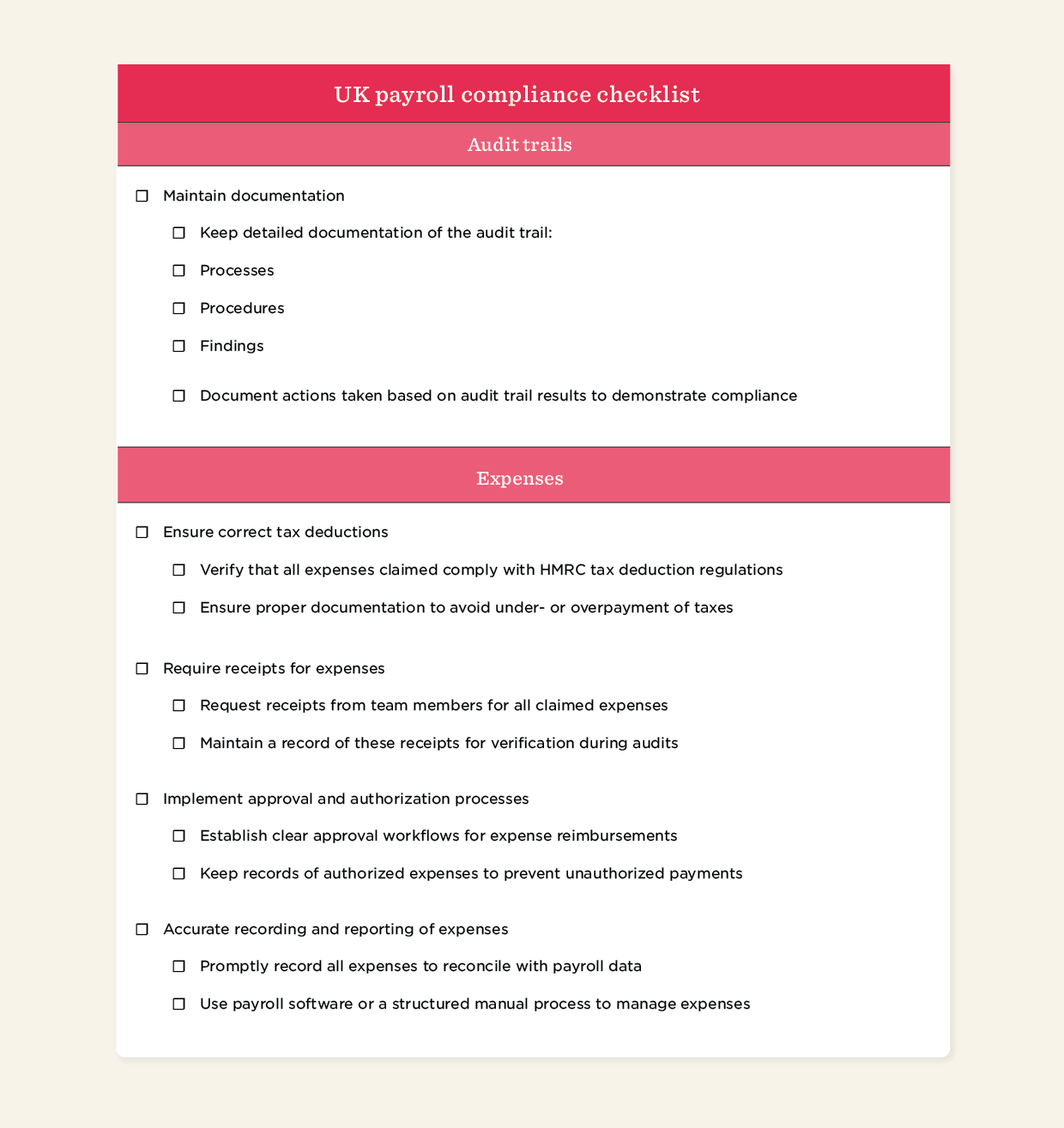
<< Download our comprehensive UK payroll compliance checklist in PDF format here >>
Master UK payroll with an essential compliance checklist
UK payroll compliance underpins accurate and reliable pay, bringing data accuracy, reporting requirements, deductions, and ongoing maintenance into a single operational discipline. From keeping records up to date to managing expenses, deductions, and audits, each step supports a smooth, consistent payroll process.
A UK payroll compliance checklist helps maintain that stability as payroll rules continue to evolve. It anchors day-to-day payroll in a repeatable process, keeping compliance current without adding complexity or slowing teams down. Used consistently, a checklist makes compliant payroll the default outcome, giving teams confidence that every pay run meets the mark.
<< Download our comprehensive UK payroll compliance checklist in PDF format here >>
How HiBob handles payroll compliance
We know that keeping on top of payroll compliance requires some serious manual legwork.
That’s why we built HiBob’s UK Payroll, built specifically for UK legislation. HiBob provides automation and payroll expertise to help remove human error and time-consuming admin work, so HR and payroll professionals can concentrate on the bigger picture.
With HiBob, you get:
Automated compliance calculations
HiBob automates payroll calculations, so you can be sure all records are accurate and compliant across wages, taxes, and deductions. We’ll adjust for all the latest tax rates, employment regulations, and statutory requirements.
Real-time compliance monitoring
We’ll provide real-time compliance monitoring by flagging potential issues and errors as they occur.
HiBob performs extensive validations and checks on payroll data to identify discrepancies, inconsistencies, or violations of legal requirements. So you can quickly address any potential risks.
Regulatory updates and compliance reporting
Want to take the hassle out of payroll compliance?
Our CIPP-certified payroll professionals help you with any payroll queries and keep you up to speed with any regulatory changes and updates relevant to you—whether it be the latest tax laws, employment regulations, or reporting requirements.
HiBob will generate accurate compliance reports, such as RTI filings, P60s, and other statutory reports, so you never miss a deadline.
UK payroll compliance checklist FAQs
What are the laws governing payroll?
In the United Kingdom, several key laws guide payroll. The Income Tax (Earnings and Pensions) Act 2003 regulates income tax and National Insurance contributions, while the National Minimum Wage Act 1998 ensures fair wages. For pensions, the Pensions Act 2008 mandates auto-enrollment. Staying compliant means aligning with these laws, along with HMRC guidelines like PAYE and RTI reporting, which govern how you submit payroll data each pay cycle.
How do you ensure payroll compliance?
Payroll compliance depends on how well team member data, payroll processes, and reporting work together from one pay cycle to the next. Teams that run payroll on a clear cadence, review data as part of each run, and use systems that reflect legislative updates tend to stay aligned with HMRC requirements. Regular internal checks add another layer of confidence by surfacing issues early and reducing repeat errors over time.
What are five things that must be documented in an employee payroll record?
A team member payroll record contains key details that show how you calculate pay each period. It includes basic personal details, pay rate and hours worked, gross and net pay, deductions for income tax and National Insurance, and any pension contributions. Together, these details provide a clear picture of each pay run and support accurate reporting to HMRC.