
Payroll calendars help HR and finance plan paydays, stay ahead of cutoffs, and keep payroll work organized all year. A shared calendar keeps schedules consistent, visible, and easy to reference across the company.
Most United States businesses run payroll biweekly, but weekly, semi-monthly, and monthly schedules are also common. Each schedule changes the number of pay periods and the deadlines your teams need to manage, which is why we included templates for each option.
This guide breaks down the most common payroll schedules, explains how teams use payroll calendars in practice, and includes ready-to-use payroll calendar templates you can apply right away.
<<Download this free payroll calendar template.>>
What is a payroll calendar?
A payroll calendar maps your payroll tasks across the year. It lists paydays, processing dates, and cutoff deadlines for timesheets, bonuses, and pay changes. Many teams also add tax filing dates, banking holidays, and internal review windows that can shift timing. These details help teams spot risks early and build in time for delays.
HR and payroll teams use a payroll calendar to plan ahead instead of reacting to each cycle. When you lay out the full year, you can see deadlines at a glance, adjust timelines, and avoid rushed approvals or last-minute corrections.
Why use a payroll calendar template?
Instead of deciding what to include, how to format dates, or where to place deadlines, a payroll calendar template lays out the key payroll checkpoints teams need to track. This helps reduce the risk of missing important cutoffs, especially during busy periods like year-end, bonus cycles, or periods of high employee turnover.
A shared template also creates consistency across teams. When HR, finance, and managers reference the same payroll calendar, expectations are clearer, handoffs are smoother, and payroll work is easier to coordinate throughout the year.
<<Download this free payroll calendar template.>>
Payroll calendar templates by schedule
Each template follows a specific payroll schedule, but you can adjust the dates and cutoffs to match how your business runs payroll. Most teams tailor templates around banking holidays, approval timing, time-off policies, and their internal payroll workflow.
Start with a clear structure, then customize it so everyone knows what’s due and when.
Weekly payroll calendar template
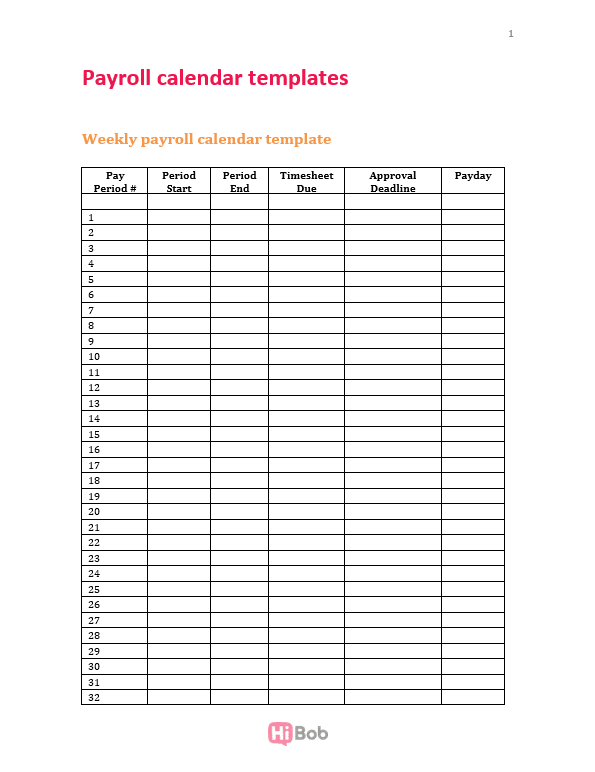
This template maps paydays and key deadlines across all 52 pay periods. It’s a strong fit for hourly or shift-based teams that submit and approve time frequently. A weekly calendar keeps cutoffs steady and reduces last-minute payroll scrambles.

Recommended For Further Reading
Biweekly payroll calendar template
This template lays out 26 pay periods, including months with three paydays. It helps teams plan processing dates, approvals, and cash timing further in advance. It also works well for organizations that pay a mix of hourly and salaried team members on a consistent cadence.

Bimonthly payroll calendar template
This template supports semi-monthly payroll with two set paydays each month, often the 15th and the last day. It helps teams manage uneven pay periods and adjust deadlines when weekends or holidays affect processing. It’s common for salaried teams with structured pay policies.

Monthly payroll calendar template
Use this template to plan one payday per month plus the processing and approval deadlines that support it. Teams often align monthly payroll with accounting close and reporting cycles. Even with a simpler cadence, a shared calendar keeps expectations clear and timing consistent.

Benefits of using a payroll calendar
Mapping payroll dates for the year does more than organize deadlines. Let’s look at the day-to-day differences it makes for the whole team.
Strategic cash flow
Payroll represents one of the largest recurring expenses in most organizations. In fact, payroll can account for up to 70 percent of total operating costs. A payroll calendar gives finance teams fixed payment dates they can align with revenue timing, funding schedules, and tax remittances.
It also helps leaders anticipate months with higher payroll costs, such as biweekly cycles that include an extra pay period.
Organization and efficiency
Payroll depends on inputs from HR, managers, and finance. A shared calendar defines who is responsible for timesheets, bonus approvals, compensation updates, and off-cycle adjustments—and by when. Clear timing reduces last-minute escalations and limits rework during payroll processing.
Better budgeting
Payroll calendars anchor workforce cost forecasting to actual payment dates. Finance models salary expenses, benefit deductions, overtime, and bonuses against real payroll cycles instead of estimated monthly averages. That alignment improves variance tracking and strengthens compensation planning across departments.
Clear communication
A documented payroll calendar removes ambiguity. Team members know when pay arrives. Managers know when approvals close. And HR knows when changes must be finalized. Fewer surprises reduce payroll-related questions during busy weeks.
How to keep your payroll organized
Payroll stays organized when timing, data, and ownership are clear. Follow these steps to reduce handoffs, limit rework, and make payroll easier to manage from one pay period to the next.
1. Use unified HR and payroll software
Start by using a system that connects team member data, payroll inputs, and approvals in one place. Payroll relies on information from HR, time tracking, benefits, and compensation, so when those details live in separate tools, errors usually come from manual handoffs.
Choose HR and payroll software that keeps records centralized and updates payroll data automatically when changes happen. For example, when a role change, salary update, or time-off adjustment is approved, that information should flow directly into payroll without re-entry. This shared visibility makes reviews faster and helps teams catch issues early instead of fixing them after payroll is processed.
Once the system is in place, define clear ownership for who updates information and when.
2. Create your payroll calendar
Start by selecting the payroll calendar template that matches your payroll schedule and listing every payday for the year. Next, check the calendar against holidays and non-working days that could affect processing or payment dates. Adjust deadlines in advance so payroll doesn’t get compressed into shorter windows.
Once finalized, store the payroll calendar in a shared location and make it the reference point for payroll timing. All payroll-related work should follow the dates in this calendar, not ad hoc reminders.
<<Manage your payroll with this free template.>>
3. Cleanse and consolidate your data
Begin by reviewing records for accuracy before payroll is processed. Check job titles, pay rates, employment status, tax details, and benefit enrollments.
Remove duplicate records and resolve mismatches between systems, especially if HR, payroll, and time tracking store information separately. Paychex notes that inaccurate or outdated team member information—such as incorrect names, tax details, or pay rates—can create compliance issues and complications with the IRS. Reviewing and correcting those fields before each payroll run reduces the risk of errors carrying through to payments and reporting.
4. Automate processes
Start by identifying repetitive payroll tasks that happen every pay cycle. This usually includes timesheet reminders, approval requests, payroll data syncing, and report generation. Set up payroll automation so these steps run automatically, eliminating the need for manual follow-ups. For example, schedule reminders for timesheet submissions, trigger approval requests when data is ready, and sync approved changes directly into payroll.
5. Conduct regular payroll audits
Schedule regular payroll reviews to check that payroll data and processes are still accurate. These audits don’t need to be complex, but rather focus on verifying pay rates, hours worked, deductions, and recent changes.
Compare payroll reports against source data such as team member records, time tracking, and benefits information. This helps catch discrepancies before they repeat across multiple pay periods.
Use audits to confirm that approvals are happening on time and that payroll follows the dates in your payroll calendar. Regular checks help teams identify gaps early and keep payroll running consistently throughout the year.
Keep your payroll on track with a payroll calendar template
A payroll calendar helps turn payroll into a planned, repeatable process instead of a series of last-minute tasks. With dates and deadlines mapped out in advance, teams can work more consistently and avoid surprises throughout the year.
Rather than building and maintaining your own calendar, start with a format that already reflects how payroll runs in practice and adapt it to your schedule as your team grows or policies change.
<< Download this free payroll calendar template to get started.>>
Payroll calendar template FAQs
How many pay periods are there in a year?
The number of pay periods depends on the payroll schedule you use. Weekly payroll has 52 pay periods per year, biweekly payroll has 26, semi-monthly payroll has 24, and monthly payroll has 12.
In some years, weekly and biweekly schedules include an extra payday due to how the calendar falls. Payroll calendars help teams identify those years in advance so they can plan budgets, cash flow, and approvals accordingly.
What is the most common payroll schedule?
Biweekly payroll is the most common payroll schedule in the US, with people paid every two weeks for a total of 26 pay periods per year. Many organizations use it because it offers predictable paydays while keeping payroll processing manageable.
It also works well for companies with a mix of hourly and salaried team members, since overtime can still be tracked on a weekly basis. That said, weekly, semi-monthly, and monthly payroll schedules are widely used depending on workforce structure, industry norms, and regional requirements.
How do you create a payroll spreadsheet?
Creating a payroll spreadsheet is about laying out paydays and deadlines in a way your team can follow consistently throughout the year. Follow these steps to build a simple payroll spreadsheet that covers timing, approvals, and exceptions without overcomplications:
- Choose your payroll schedule: Confirm whether payroll runs weekly, biweekly, semi-monthly, or monthly.
- List every payday for the year: Create a row for each pay period and enter the actual pay date. If a payday could fall on a weekend or bank holiday, note the adjusted pay date you’ll follow.
- Add payroll processing and cutoff dates: For each payday, work backward and include key deadlines such as timesheet submission cutoffs, manager approval deadlines, and payroll processing dates.
- Include fields for common changes and exceptions: Add a column for notes so you can flag items like bonus payouts, commissions, benefit changes, new joiner first-pay timing, terminations, or off-cycle payroll runs.
- Standardize ownership and version control: Decide who updates the spreadsheet and where it lives. Lock formatting where possible and avoid multiple versions floating around.
- Review and update the spreadsheet regularly: Re-check dates each quarter and before busy periods like year-end or open enrollment. Small timing changes can create payroll issues if they aren’t updated everywhere.
Spreadsheets can work for basic tracking, but they require ongoing manual upkeep. As payroll complexity grows, many teams move to systems that keep payroll inputs connected to HR and time data to reduce re-entry and mismatches.