When outdated tools, disconnected data, and recurring errors create more work for HR and Finance, it may be time to switch payroll providers. PayrollOrg’s 2025 “Getting the World Paid” survey identified the top three causes of decreased payroll accuracy as bad data inputs, late or inaccurate time tracking data, and inputs after payroll cut-off. These causes often trace back to the payroll setup itself: disconnected systems let bad data through, outdated time tracking arrives late or wrong, and manual processes can’t absorb last-minute changes. If your current provider is contributing to any of these, switching may be the fix.
The right payroll setup can help teams reduce manual work, improve accuracy, and keep people paid correctly and on time. Connecting HR and payroll data in one system can also reduce duplicate data entry and simplify payroll management.
Switching payroll providers may feel complex, but a well-planned payroll migration can minimize disruption. This guide covers how to switch payroll providers, including how to recognize when it’s time to switch, prepare your payroll data, choose the right timing, and guide your people through the change without disrupting a pay cycle.
Key insights
- Switching at the start of a new calendar year is the cleanest option, but mid-year switches are doable with the right data preparation
- Your current provider may require 30–90 days’ notice before you can exit—don’t cancel until your new system is fully tested
- Processing one pay cycle on both systems simultaneously is the most reliable way to catch errors before they affect your people’s pay
- Letting your people know what’s changing protects trust and prevents confusion on payday
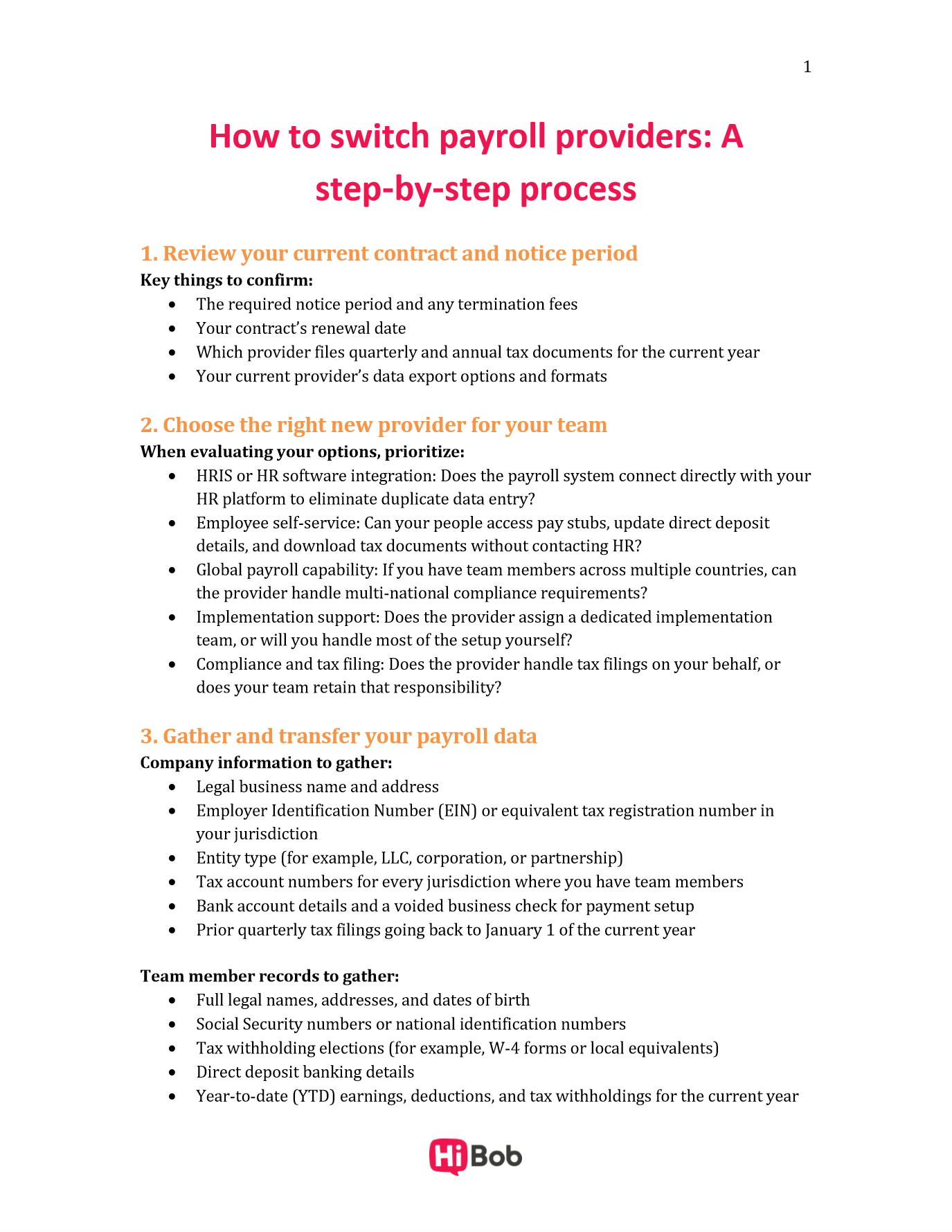
<< Download the free step-by-step checklist for switching payroll providers >>
What is payroll migration?
Payroll migration is the process of moving your organization’s payroll operations from one provider or system to another cleanly, compliantly, and without interrupting pay. It covers everything from selecting a new provider and reviewing your existing contract to transferring historical payroll data, configuring the new system, running test payrolls, and communicating the change to your people.
Done well, payroll migration is a smooth upgrade—an opportunity to streamline how your team manages pay, reduce manual work, and choose a system that actually fits how you operate.
Signs it is time to switch your payroll provider
The table below outlines the most common signals HR teams encounter, along with how urgently each one warrants action.
| Signal | What it looks like | Urgency |
| Recurring payroll errors | Incorrect pay amounts, missed deductions, or tax filing mistakes that repeat despite corrections | High—act now |
| Poor customer support | Long response times, unhelpful resolutions, or no dedicated support contact | High—act now |
| No HRIS integration | Payroll and HR data live in separate systems, requiring manual data entry and reconciliation | High—act now |
| Limited global capability | The system can’t support payroll across multiple jurisdictions as your team expands internationally | High—act now |
| Growth outpacing the tool | What worked at 50 people is creating bottlenecks at 150 | High—act now |
| Outdated or clunky interface | Your team spends more time navigating the system than running payroll | Medium—start evaluating |
| No employee self-service | People can’t access their own pay stubs, tax documents, or direct deposit details without contacting HR | Medium—start evaluating |
If more than one of these sounds familiar, it’s worth exploring your options. The payroll challenges that feel manageable today tend to compound as headcount grows.
How to switch payroll providers: a step-by-step process
Switching payroll providers comes down to six core steps: reviewing your current contract, choosing a new provider, gathering your data, running a test payroll, communicating the change to your people, and going live. Follow this sequence, and you’ll protect every pay cycle along the way.
1. Review your current contract and notice period
Pull your existing payroll provider agreement and look for cancellation clauses, notice periods (typically 30–90 days), auto-renewal dates, and any early termination fees.
Cancel your current service once you’ve fully configured and tested new payroll software—running both in parallel for at least one cycle is the safest approach.
Key things to confirm in this step:
- The required notice period and any termination fees
- Your contract’s renewal date
- Which provider files quarterly and annual tax documents for the current year
- Your current provider’s data export options and formats
2. Choose the right new provider for your team
The right payroll provider for a fast-growing team looks different from the right one for a stable, single-location business, and the best way to find out is to bring your specific use cases to a demo rather than a generic checklist. Ask things like: “What happens when a team member changes roles mid-pay period?” or “How does the system handle payroll across multiple jurisdictions?”
Request demos from at least two or three providers. When evaluating your options, prioritize:
- HRIS or HR software integration: Does the payroll system connect directly with your HR platform to eliminate duplicate data entry? HiBob connects payroll data with your broader people data, so changes in headcount, compensation, or employment status sync automatically.
- Employee self-service: Can your people access pay stubs, update direct deposit details, and download tax documents without contacting HR?
- Global payroll capability: If you have team members across multiple countries, confirm the provider can handle multi-national compliance requirements.
- Implementation support: Does the provider assign a dedicated implementation team, or will you handle most of the setup yourself?
- Compliance and tax filing: Does the provider handle tax filings on your behalf, or does your team retain that responsibility?
3. Gather and transfer your payroll data
This is the most detail-intensive step, and getting it right protects your compliance standing and your people’s pay accuracy. Your new provider will need two categories of data: company information and individual team member records.
Company information to gather:
- Legal business name and address
- Employer Identification Number (EIN) or equivalent tax registration number in your jurisdiction
- Entity type (for example, LLC, corporation, or partnership)
- Tax account numbers for every jurisdiction where you have team members
- Bank account details and a voided business check for payment setup
- Prior quarterly tax filings going back to January 1 of the current year
Team member records to gather:
- Full legal names, addresses, and dates of birth
- Social Security numbers or national identification numbers
- Tax withholding elections (for example, W-4 forms or local equivalents)
- Direct deposit banking details
- Year-to-date (YTD) earnings, deductions, and tax withholdings for the current year
- Benefit deduction amounts and schedules
- Paid time off (PTO) balances and accrual rules
If your current payroll system doesn’t connect to your HR platform, expect some manual work. You’ll likely export records from each system, then reconcile mismatches (like a salary change HR recorded but payroll didn’t) before importing. It’s a one-time lift, and it’s also a strong reason to choose a provider that integrates with your HR platform. When your HR and payroll systems share a single source of data, updates to compensation, job details, and banking information sync automatically, and payroll automation takes over the repetitive entry that created the reconciliation work in the first place.
4. Run a parallel or test payroll
A parallel payroll run means processing one complete pay cycle on both your old and new systems simultaneously, then comparing the outputs line by line. It’s the single most effective way to catch configuration errors before they affect your people’s pay.
During the parallel run, verify gross pay, net pay, tax withholdings, benefit deductions, and direct deposit amounts for every team member. If the numbers match, you’re ready to go live. If they don’t, you have time to investigate and correct the discrepancy without anyone missing a paycheck.
Key steps for the parallel run:
- Schedule it at least one full pay cycle before your planned go-live date
- Compare outputs for every team member
- Document and resolve every discrepancy before proceeding
- Confirm your new provider’s tax filing setup is accurate for every jurisdiction where you operate
5. Communicate the change to your people
Payroll changes affect everyone. Announcing changes early and clearly builds trust and gives your people time to take action before the first payroll runs on the new system.
Send a communication at least two weeks before the go-live date. Keep the message straightforward: what’s changing, when it takes effect, what (if anything) your people need to do, and who to contact with questions.
What to include in your communication:
- The name of the new payroll provider and the go-live date
- Whether the pay schedule is changing
- Whether team members need to re-enter direct deposit details or create a new account in a self-service portal
- A clear point of contact for payroll questions during the transition
HR teams that treat this step as a people experience moment promote a smoother and calmer transition within their organization.
6. Go live and confirm the first payroll
Your first live payroll run on the new system is a milestone worth monitoring closely. Before approving it, do a final review of all pay amounts, deductions, and tax settings even if the parallel run was clean.
After the payroll processes, confirm that direct deposits landed on time and in the correct amounts. Set up a brief check-in with your Finance team to verify the bank reconciliation, and keep a direct line open for team members to flag anything unexpected. The first two or three pay cycles are when most post-migration issues surface, so staying attentive during this window pays off.
Final go-live checklist:
- Review and approve the first live payroll run before it processes
- Confirm direct deposits landed correctly for all team members
- Reconcile payroll with your finance team
- Officially close your account with the previous provider after confirming all data has been exported and archived
- Confirm which party is responsible for any remaining tax filings from the prior provider
<< Download the checklist to keep every pay cycle on track during your switch >>
When is the best time to switch payroll providers?
The best time to switch payroll providers is at the start of a new calendar year, with the start of the quarter as the second-best option. Sometimes, neither option is possible and a mid-year transition is necessary, even if not ideal. Here are a few things to consider as you choose the right moment for your transition.
Switching at the start of the year or quarter
Starting fresh on January 1 means your new provider owns the full tax year from the beginning—no split filing responsibilities, no mid-year data handoffs. It’s the simplest scenario for both your team and your provider’s implementation team.
Starting at the beginning of a new quarter (April 1, July 1, or October 1) is the next cleanest option. Your previous provider files the tax documents for the quarters they ran, and your new provider takes over from the new quarter’s start date. Confirm this responsibility split in writing with both providers before you finalize the transition date.
Switching payroll providers mid-year
You can switch payroll providers mid-year, and sometimes it’s the right call, especially when payroll errors are ongoing or a provider relationship has broken down. The process just requires more careful data handling.
Any switch after January 1, including one at the start of Q2, Q3, or Q4, requires your new provider to have complete YTD payroll records for every team member, from January 1 through the last payroll your previous provider ran. This includes gross wages, tax withholdings, benefit deductions, and employer contributions. Your new provider uses these figures to track annual wage limits for taxes like Social Security and unemployment insurance, and to issue accurate year-end tax forms.
Switching partway through a quarter makes tax filing harder because it splits the filing. At a quarter boundary, each provider files complete returns for the quarters it ran. Mid-quarter, both providers process payroll within the same quarter, so confirm in writing who files that quarter’s returns, how wages from both systems will be combined, and who issues year-end forms like W-2s or local equivalents.
How to avoid common payroll switch challenges
The payroll challenges that arise in a migration are almost always both predictable and preventable. Here’s how to get ahead of the most common ones.
| Challenge | How to prevent it |
| Data errors during migration | Export a full data audit from your current provider before migration begins. Reconcile every team member’s YTD figures before importing into the new system. |
| Missed or duplicate tax filings | Confirm in writing which provider is responsible for each quarterly and annual filing. Get this agreement documented before you close your old account. |
| Compliance gaps across jurisdictions | Verify your new provider’s compliance coverage for every jurisdiction where you have team members, especially if you operate across multiple countries or regions. |
| Team member confusion | Communicate early, clearly, and proactively. Confirm pay dates and amounts won’t change, and give people a clear point of contact for questions. |
| Integration failures with your HRIS | Test the integration between your new payroll provider and your HR platform before go-live. Confirm that data flows correctly in both directions. |
| Rushed implementation timelines | Build in at least four to eight weeks for implementation, data migration, and testing. Rushed timelines are the most common source of first-payroll errors. |
HR automation plays a meaningful role in reducing these risks. When your payroll system connects directly to your HR platform, data stays consistent across both systems, reducing the manual reconciliation that creates errors during a migration.
Recommended For Further Reading
- HR and payroll: How connected systems reduce risk and turn data into Organizational Intelligence
- What is payroll in HR systems?
- What is payroll software?
- Payroll software features: The essential guide and checklist
- Beyond the Paystub: Why Payroll Accuracy Is the Bedrock of Employee Experience
- Payroll implementation checklist: 7 steps for a smoother migration
Make your payroll migration simple
Switching payroll providers is one of the most operationally significant decisions an HR team makes, and it’s one of the most rewarding when it goes well. A better payroll system means less manual work, more confident compliance, and a better experience for every person on your team. The key is treating the migration as a project, not a task. Give it a timeline, a checklist, a communication plan, and the right technology underneath it.
HiBob’s payroll integrations connect people data directly with your payroll provider, so changes in headcount, compensation, or employment status flow through automatically—no duplicate entry, no reconciliation headaches. HR teams using HiBob spend less time managing data and more time supporting the people behind it.
<< Discover HiBob and see how a connected approach can make payroll easier to manage. >>
Switching payroll providers FAQs
Switching payroll providers isn’t inherently complicated, but it requires careful planning, particularly around data migration, timing, and tax filing responsibilities. With a clear checklist and strong implementation support from your new provider, most HR teams complete the transition without disrupting a single pay cycle.
Yes, you can switch payroll providers mid-year. The main consideration is ensuring your new provider receives complete YTD payroll data for every team member from January 1 through the switch date, and that both providers agree in writing on who is responsible for filing tax documents for the periods each covered.
The start of a new calendar year is the easiest time to switch, because your new provider takes over with no prior-year earnings history to import. The start of a new quarter is the next best option, as it creates a clean division of tax filing responsibilities between your old and new providers.
You’ll need your business tax identification number, tax account numbers for every jurisdiction where you have team members, YTD payroll reports, individual team member tax elections and direct deposit details, prior quarterly tax filings, and your bank account information for payroll funding setup.
Most payroll migrations take four to eight weeks from contract signing to first live payroll run, depending on team size, payroll complexity, and how quickly data can be exported and validated. Larger or multi-jurisdiction organizations may need additional time for compliance configuration and testing.