
Payroll errors happen more often than most HR teams would like. ADP’s 2024 survey of global payroll leaders found that average payroll accuracy sits at just 78 percent, and a third of organizations need two or more pay cycles to fix an underpayment. Each of those errors lands on someone’s paycheck, and each one chips away at your compliance and your people’s trust in HR.
Switching payroll systems raises the stakes on both fronts. A rushed migration can introduce new errors, while a well-planned one gives you the chance to close the gaps your old setup left behind. The difference comes down to preparation: a clear implementation plan helps you protect payroll accuracy and keep disruption to a minimum as you make the move.
This guide explains what payroll implementation involves and why it matters and walks you through a seven-step payroll implementation checklist from initial scoping through go-live. You’ll also find a free downloadable template that can help keep everyone aligned throughout the migration.
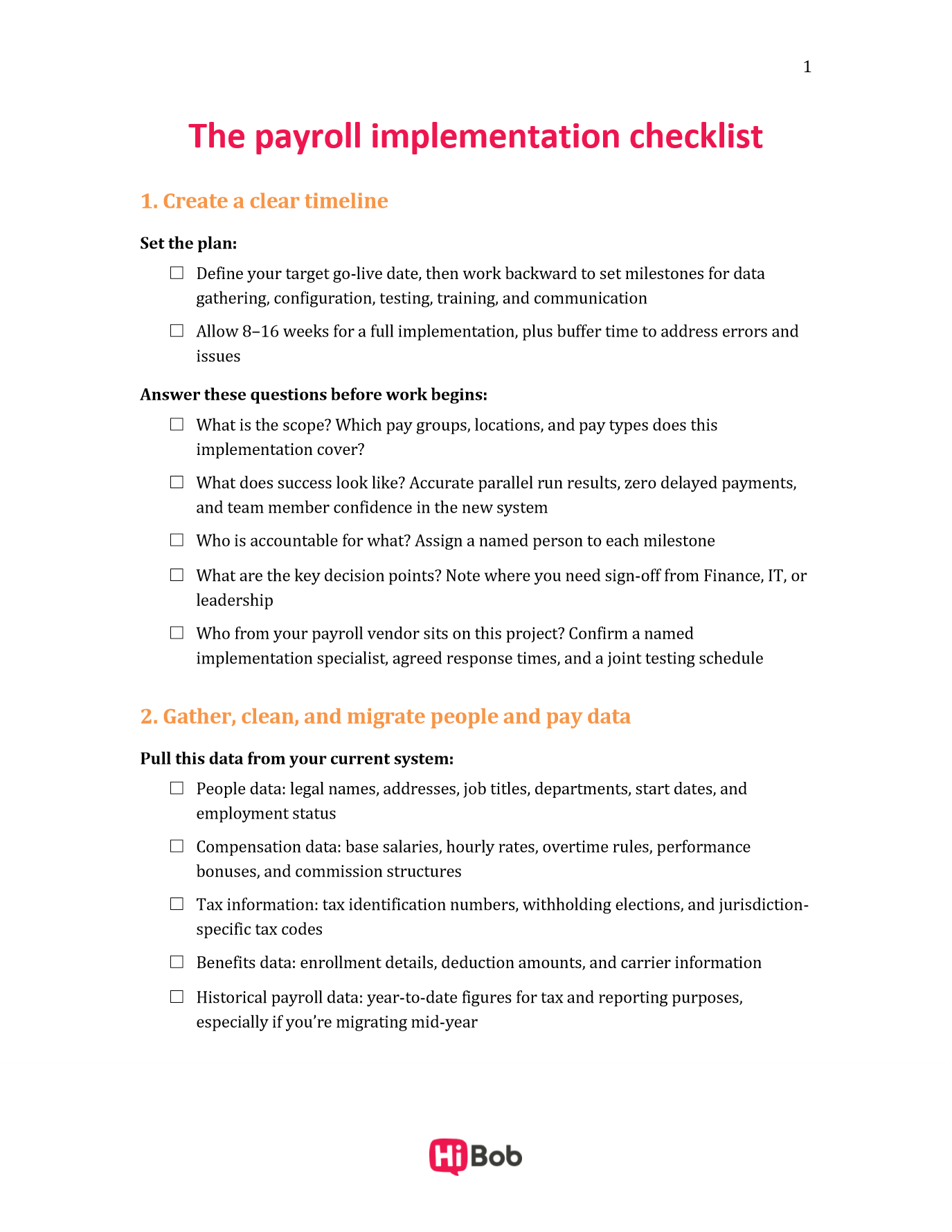
<< Download a free payroll implementation checklist for an effective migration process >>
Key insights
- Payroll implementation is often HR-led. HR owns the people data, communication strategy, and change management that make a migration succeed.
- A structured checklist reduces risk. Working through a defined sequence of steps keeps compliance gaps, missed deadlines, and data errors from surfacing at go-live.
- Parallel payroll is your safety net. Running the old and new systems simultaneously for at least one full pay cycle is the most effective way to validate accuracy before you switch over.
- Change management starts on day one. Communicating early and consistently with your team keeps confidence high throughout the entire migration.
What is payroll implementation and why does it matter?
Payroll implementation is the process of getting a new payroll system ready to run your organization’s pay. It covers everything from gathering and validating people data to configuring pay rules, integrating systems, testing outputs, and training your team. A strong implementation process helps your organization process pay accurately, on time, and in compliance with applicable regulations.
Payroll migration is one part of implementation: moving your existing data from a legacy system into the new one. When you switch systems, that means extracting historical data, mapping it to the new platform’s structure, and verifying nothing is lost or altered in the transfer. For organizations setting up payroll for the first time, the process is similar, but you often start with a spreadsheet or manual record rather than an outgoing system.
A full implementation typically includes:
- People and pay data migration: Moving or entering all team member records, salary details, tax information, and benefits data into the new system
- System configuration: Setting up pay schedules, pay rules, tax and compliance settings, and payslip formats
- Integrations: Connecting payroll to your HR, time and attendance, and finance tools so data flows without manual re-entry
- Testing: Running parallel payrolls to validate outputs before the system goes live
- Training and communication: Preparing HR teams, managers, and team members for the change
Who owns payroll implementation and migration?
Payroll implementation touches multiple teams, and clear ownership keeps the project on track. HR often leads the process, but Finance, IT, and your payroll vendor each play a defined role.
Your payroll vendor is a project partner during implementation. The best vendors assign a dedicated implementation specialist, provide data migration templates, and run joint testing sessions.
| Owner | Primary responsibilities |
|---|---|
| HR | Project lead; owns people data accuracy, change management, team member communication, and training coordination |
| Finance | Validates pay calculations, reconciles payroll outputs against the general ledger, and approves go-live sign-off |
| IT | Manages system integrations, data security, access permissions, and technical troubleshooting |
| Payroll vendor | Assigns a dedicated implementation specialist, provides data migration templates and configuration guidance, runs joint testing sessions, and stays on through the first live pay cycles |
The payroll implementation checklist: 7 steps for a smooth migration
Whether you’re migrating from a legacy system or setting up payroll for the first time, these seven steps give you a structured path to a successful go-live. Each step builds on the last, so working through them in order keeps your project on solid footing.
1. Create a clear timeline
Start with a project plan everyone agrees on before the work begins. Define your target go-live date first, then work backward to set milestones for each phase: data gathering, configuration, testing, training, and communication.
A realistic timeline for a full payroll implementation typically spans 8–16 weeks, depending on your organization’s size, the complexity of your pay rules, and the number of integrations you plan to configure. Build buffer time in your schedule to address errors and issues when they arise.
A good project plan addresses these questions clearly:
- What is the scope? Which pay groups, locations, and pay types does this implementation cover?
- What does success look like? Define your success measures upfront. Accurate parallel run results, zero delayed payments, and team member confidence in the new system are strong starting points.
- Who is accountable for what? Assign a named person to each milestone, even if they have a team working with them.
- What are the key decision points? Identify where you’ll need sign-off from Finance, IT, or leadership before moving to the next phase.
- Who from your payroll vendor sits on this project? Confirm you have a named implementation specialist, agreed response times, and a joint testing schedule before you lock the timeline
Timelines slip when vendor support is thin. Ask what the implementation team actually does: whether you get a named specialist for the whole project or a rotating support queue, how many joint working sessions come with the contract, and who stays with you through the first two or three live pay runs. Payroll is mission-critical, and the answer shapes every date on your plan.
With a shared timeline, every stakeholder knows what’s happening, when, and who’s driving it.
2. Gather, clean, and migrate people and pay data
Data quality is the foundation of a successful payroll migration. Before you move a single record into the new system, audit what you have. Inaccurate data carried over from an old system creates inaccurate payroll outputs in the new one.
Start by pulling all relevant data from your current system. This includes:
- People data: Legal names, addresses, job titles, departments, start dates, and employment status
- Compensation data: Base salaries, hourly rates, overtime rules, performance bonuses, and commission structures
- Tax information: Tax identification numbers, withholding elections, and jurisdiction-specific tax codes
- Benefits data: Enrollment details, deduction amounts, and carrier information
- Historical payroll data: Year-to-date figures for tax and reporting purposes, especially if you’re migrating mid-year
Once you’ve gathered the data, clean it. Look for duplicates, missing fields, outdated records, and formatting inconsistencies. If you’re setting up payroll for the first time rather than migrating, you’ll build this dataset from scratch using spreadsheets or existing HR records. Still, the validation process is the same: Verify every field before it enters the new system.
Payroll software platforms like HiBob centralize people data in a single source of truth, which makes this step faster. Your HR records, compensation details, and org structure are already in one place, reducing the risk of data discrepancies during migration.
3. Configure the new system
With clean data ready to migrate, the next step is configuring the new payroll system to reflect how your organization actually pays its people. This is where you translate your pay policies into system settings, working session by session with your vendor’s implementation specialist.
Work through these configuration areas together:
- Pay schedules: Set up your pay frequencies—weekly, biweekly, semimonthly, or monthly—for each pay group.
- Pay rules: Configure overtime thresholds, shift differentials, on-call pay, and any other pay rule specific to your workforce.
- Tax and compliance settings: Enter jurisdiction-specific tax codes, statutory deductions, and any multi-location or multi-national compliance requirements. In the United States, employers must also deposit and report federal employment taxes, so build those rules into your configuration from day one.
- Deductions and benefits: Map benefit deductions, retirement contributions, and voluntary deductions to the correct pay codes.
- Payslip formats: Configure what team members see on their payslips, including how earnings, deductions, and net pay are displayed.
Configuration is where a hands-on vendor makes the biggest difference. A strong implementation team builds the first pay group with you rather than handing over a setup guide. They review your pay rules against how you run payroll today, and they surface the edge cases early. Watch for retroactive pay, mid-cycle salary changes, multiple pay groups on different frequencies, and team members who move between locations mid-year.
As you configure the system, keep a running log of every decision you make: which pay rules you set, which tax codes you applied, and why. This documentation becomes invaluable during testing, audits, and any future system updates.
Once configuration is complete, train your HR team and any managers who’ll interact with the system. Plan for an initial training session covering core workflows, followed by role-specific sessions for managers handling approvals or time tracking.
<< Set up your pay frequencies with a free payroll calendar template >>
4. Integrate with your HR and finance tools
Payroll draws on data from your core HR system, time and attendance platform, and benefits administration tools—and it feeds outputs into your general ledger. Set up integrations before you run your first test payroll. The key connections to prioritize are:
- Core HR system: Syncs people records, org structure, and compensation changes so payroll always reflects the most current data.
- Time and attendance: Feeds approved hours, paid time off (PTO), and absence data directly into payroll calculations.
- Benefits administration: Passes deduction amounts and enrollment changes to payroll automatically, eliminating manual updates.
- General ledger/finance system: Exports payroll journal entries to Finance so reconciliation is fast and accurate.
One of the strongest arguments for an all-in-one HR and payroll platform is that these integrations are built in. HiBob connects HR, time tracking, benefits, and payroll in a single system, so when a team member’s compensation changes or a new joiner completes onboarding, payroll reflects it automatically, without a manual handoff. This saves time and significantly reduces the chance of a calculation error caused by data that didn’t make it across systems.
5. Run a parallel test
A parallel test run means processing payroll on both your old system and your new one simultaneously for at least one full pay cycle, then comparing the results. It’s the most reliable way to catch configuration errors, data gaps, and calculation discrepancies before they affect your people’s pay.
Here’s how to run an effective parallel test:
- Process a full pay cycle on both systems using the same input data—same hours, same deductions, same pay period.
- Compare outputs line by line. Net pay, tax withholdings, deductions, and employer contributions match between the two systems; any variance needs an explanation.
- Investigate every discrepancy, no matter how small. A rounding difference in one line item can indicate a systemic configuration error.
- Document your findings and resolve them with your vendor before proceeding; don’t carry unresolved discrepancies into go-live.
- Run a second parallel cycle if your first round surfaces significant variances; one clean parallel run isn’t always enough.
Your vendor sits on this step with you. Ask them to review parallel results alongside your team rather than waiting on a ticket, and agree in advance who investigates which category of variance. Vendors that run structured parallel reviews catch configuration errors your team has no reason to recognize, because they have seen the same misconfiguration across hundreds of implementations.
Finance plays a critical role here—reconciling payroll outputs against the general ledger is their sign-off step before the project moves forward. Build this review into your timeline to allow plenty of room in the schedule.
6. Prepare people for the change
Change management runs in parallel with every phase of your implementation. Team members notice when something changes about how they get paid, and proactive communication is what keeps confidence high throughout the transition.
Your HR team and people managers are the first line of support when team members have questions about the new system. Run training sessions before go-live that cover:
- How to process payroll in the new system, including approvals and corrections
- How to answer common team member questions about payslip changes
- Who to escalate to when they encounter something they can’t resolve on their own
Give managers a simple FAQ document they can reference in the first few pay cycles. It reduces the volume of queries that land back with HR.
A clear communication plan might look like this:
- Four to six weeks before go-live: Send an all-team announcement explaining that payroll is moving to a new system, when the change takes effect, and who to contact with questions
- One to two weeks before go-live: Share a brief guide explaining any changes to how team members access their payslips or submit time-off requests
- Go-live week: Send a reminder with the new payslip access instructions and a clear point of contact for pay queries
- First pay cycle after go-live: Follow up with a short message confirming that payroll has processed and inviting team members to reach out with questions
7. Go live
This is the moment your new payroll system becomes the system of record. Before you flip the switch, confirm every prior step is complete: valid data, complete configuration, integrations live, and your team clear on what’s next.
On go-live day, run a final pre-launch check:
- Confirm all team member data is accurate and complete in the new system
- Verify integrations are pulling live data from your HR and time systems
- Confirm tax settings and deduction configurations are correct for the current pay period
- Get written sign-off from finance and your payroll vendor before processing the first live payroll
After the first live pay cycle completes, reconcile the outputs immediately. Send your team members a confirmation that payroll has processed and remind them how to access their payslips and who to contact with questions.
Day one matters for your administrators too. Before the first live run, have each person who touches payroll complete one real task in the new system while support is still on hand: approve a timesheet, process a correction, export the journal to Finance. Teams that do this walk into the first live cycle already comfortable with the system rather than learning it under deadline pressure.
The first few pay cycles after go-live matter most for building confidence in the new system. Keep your implementation team available and monitor closely. Most issues surface in the first 30–60 days, and catching them early makes them far easier to resolve.
Recommended For Further Reading
Download your payroll implementation checklist template
A payroll migration runs on dozens of small tasks spread across HR, Finance, IT, and your vendor, and the ones that get missed are rarely the obvious ones. A single shared checklist keeps every owner, deadline, and sign-off visible from kickoff through the first live pay run.
The free payroll implementation checklist template covers:
- Pre-implementation scoping: Project scope, success measures, target go-live date, and a named owner for each milestone
- Data gathering and validation: Field-by-field checks for people, compensation, tax, benefits, and year-to-date records
- System configuration: Pay schedules, pay rules, tax settings, deductions, and payslip formats, with space to log every decision as you make it
- Integrations: Core HR, time and attendance, benefits, and general ledger connections, with a test status for each
- Parallel runs and testing: A reconciliation log for comparing outputs line by line and tracking every variance through to resolution
- Communications: A ready-made timeline for team member and manager updates, from four weeks out through the first pay cycle after go-live
- Go-live sign-off: Final pre-launch checks and the approvals you need from Finance and your vendor before processing live pay
Download it free as a Word document. Assign owners and track status as the project moves, or print it and work through it as a team.
<< Download the free payroll implementation checklist to simplify your payroll transition >>
Payroll migration FAQs
The payroll implementation process is the structured process of setting up a new payroll system so it can run accurate, compliant payroll. It typically follows seven steps:
- Create a clear timeline
- Gather, clean, and migrate people and pay data
- Configure the new system
- Integrate with your HR and finance tools
- Complete a parallel payroll run
- Prepare people for the change
- Go live and monitor the first pay cycles
A well-planned payroll implementation helps protect data accuracy, maintain compliance, and give HR and Finance a reliable foundation for managing payroll.
Payroll migration is the process of securely transferring payroll data from an existing system to a new payroll platform. This can include team member details, salaries, tax information, deductions, benefits, bank details, year-to-date figures, and historical payroll records.
Teams typically clean and validate the data, map it to the new system, transfer it securely, and reconcile the results. Careful payroll migration helps ensure accurate pay and reporting while creating a trusted source of payroll data for HR and Finance.
Most HR teams time their switch to the start of a new tax year or the beginning of a new quarter to minimize the complexity of mid-year tax calculations. Starting your implementation at least 3–4 months before your target finalization date gives you enough runway for a thorough parallel run.