Enterprise workforce management software helps large organizations schedule, track, and manage their workforce across locations, while supporting labor compliance, labor cost visibility, and payroll integration.
For large organizations, managing a workforce effectively is one of the most operationally important areas of the business. Labor costs typically represent about 70 percent of total operating expenses in the United States. Yet many enterprises still rely on disconnected systems for scheduling, time tracking, compliance, and workforce reporting, creating data silos and limiting the real-time visibility leaders need.
Enterprise workforce management (WFM) software is built to fix that by replacing disconnected tools with a single system that connects scheduling, time tracking, and labor data. This gives teams a consistent, real-time view of workforce activity and costs across the organization.
This guide covers what enterprise WFM software does, how it differs from HCM platforms, what features matter most at scale, and how to measure whether your investment is working.
Key insights
- Enterprise workforce management software helps organizations handle multi-site compliance, monitor labor costs in real time, and connect workforce decisions to payroll and Finance.
- The difference between WFM software and an HCM platform comes down to scope: WFM tools support day-to-day workforce execution, while HCM platforms manage the full team member lifecycle.
- Successful implementation depends on early planning for integration, data migration, and global compliance configuration.
- To measure WFM success, organizations should track core operational metrics such as labor cost as a percentage of revenue, schedule adherence, overtime rate, and absence rate.
What is workforce management software?
Workforce management software helps organizations coordinate daily work tasks while improving visibility, compliance, and control across the workforce. For enterprise organizations, that goes far beyond scheduling shifts or recording hours. It enables teams to manage operations across locations, stay compliant with local labor laws, and track labor costs in real time.
Different teams use it in different ways. HR teams manage time tracking, leave, and compliance. Managers build schedules and adjust coverage. Finance monitors labor costs and budget impact. Team members use self-service tools to view schedules, request paid time off (PTO), and update availability.
Workforce management software vs. human capital management platforms
Because workforce management overlaps with HR, payroll, and workforce planning, many organizations confuse WFM software with broader human capital management (HCM) platforms. Workforce management software focuses on the day-to-day execution of work like scheduling, time tracking, and labor cost control. HCM platforms take a broader view, covering the entire employee lifecycle including hiring, learning and development, performance management, and long-term workforce planning.
| Core function | Target user | Scope | Best for | |
|---|---|---|---|---|
| WFM software | Operational scheduling, time tracking, and labor cost management | Operations, line managers, HR, payroll, Finance, IT | Day-to-day workforce execution across shifts, sites, and locations | Organizations managing scheduling, time tracking, compliance, and labor costs for large, shift-based, or multi-location teams |
| HCM platform | Full team member lifecycle from recruiting to offboarding | HR, Finance, C-suite, managers across all functions | All people management activity from hire to offboard | Organizations focused on managing the full team member lifecycle |
In practice, many enterprise organizations historically relied on separate systems, but modern platforms increasingly unify workforce management, HR, payroll, and Finance in one connected experience.
How do you know if you’re ready for enterprise WFM software?
Enterprise WFM software requires meaningful investment across budget, implementation, and change management, so not every organization is ready for it. As organizations grow in size and complexity, workforce management becomes harder to coordinate manually. Here are some signs that the need for a more scalable approach may be becoming urgent:
- You manage 500 or more team members across multiple sites, countries, or time zones
- Your team still uses spreadsheets or disconnected tools to build schedules and reconcile workforce data manually
- Overtime costs keep rising, and you cannot predict or control them consistently
- Compliance requirements vary by location, and manual tracking no longer feels reliable
- HR and Finance work from different data sets, which slows planning and creates friction
- Managers spend hours each week building or adjusting schedules manually
- Payroll errors or compliance issues have exposed weaknesses in time tracking
- Leadership wants workforce analytics that your current tools cannot provide
If three or more of these challenges sound familiar, the cost of doing nothing may already be higher than the cost of change. At that point, comparing the best HR software solutions is a practical next step.
Key features of workforce management software for enterprises
The features that matter most for large organizations go well beyond what small and medium-sized business (SMB) scheduling tools offer. Here’s what to look for when evaluating enterprise WFM software:
Strategic workforce planning and forecasting
At the enterprise level, workforce planning is a strategic function, not an operational one. The right WFM software uses historical data, business projections, and demand patterns to help organizations forecast headcount needs weeks or months in advance.
This allows HR and Finance to plan hiring and labor costs proactively, rather than reacting to gaps after they appear. Tracking the right workforce management metrics helps teams adjust plans using real operational data rather than assumptions.
Enterprise-grade time and attendance tracking
Accurate time and attendance tracking is foundational for payroll accuracy, compliance, and labor cost management. Enterprise WFM tools track hours across locations and roles, flag anomalies automatically, and integrate directly with payroll software to reduce manual work and errors. For organizations managing large, distributed teams, this level of automation helps teams process payroll faster, reduce discrepancies, and keep workforce records consistent across all locations.
Multi-site scheduling and shift optimization
Managing schedules across dozens or hundreds of locations requires more than a shared calendar. Enterprise WFM software provides tools for building complex schedules, managing coverage across shifts, and reducing overtime exposure. AI-powered scheduling optimization can cut the time managers spend building schedules while improving coverage outcomes.
Built-in labor law and compliance controls
For enterprises operating across multiple countries or jurisdictions, HR compliance is one of the most significant operational risks in workforce management. Leading enterprise WFM tools include built-in rules for local labor laws covering working hours, break requirements, overtime thresholds, and mandatory rest periods, and they flag potential violations before they occur. This shifts compliance from a reactive problem to proactive control.
Advanced data governance
Enterprise organizations handle large volumes of sensitive workforce data across many jurisdictions. WFM software built for this scale includes role-based access controls, audit logs, encryption standards, and data retention policies that meet regulatory requirements in multiple markets. For organizations subject to General Data Protection Regulation (GDPR), SOC 2 (System and Organization Controls), or similar standards, governance is as critical as functionality.
System integrations and API connectivity
Enterprise platforms need clean API connectivity to integrate with Human Resource Information Systems (HRIS), payroll engines, Enterprise Resource Planning (ERP) platforms, and business intelligence tools. The best enterprise WFM software acts as a hub, not an island, sharing data cleanly with the systems that depend on it and eliminating the manual reconciliation that comes from disconnected point solutions.
AI-powered analytics and reporting
The shift from manual reporting to real-time analytics is one of the most consequential changes in enterprise workforce management. Modern WFM platforms surface labor cost trends, absence patterns, overtime risks, and scheduling efficiency metrics automatically, giving HR and Finance teams actionable insights without building custom reports.
Team member self-service and mobile access
Enterprise workforces are increasingly distributed. WFM software that includes self-service portals for shift requests, PTO requests, schedule visibility, and availability updates reduces administrative burden. It also gives team members more transparency and control over their schedules.
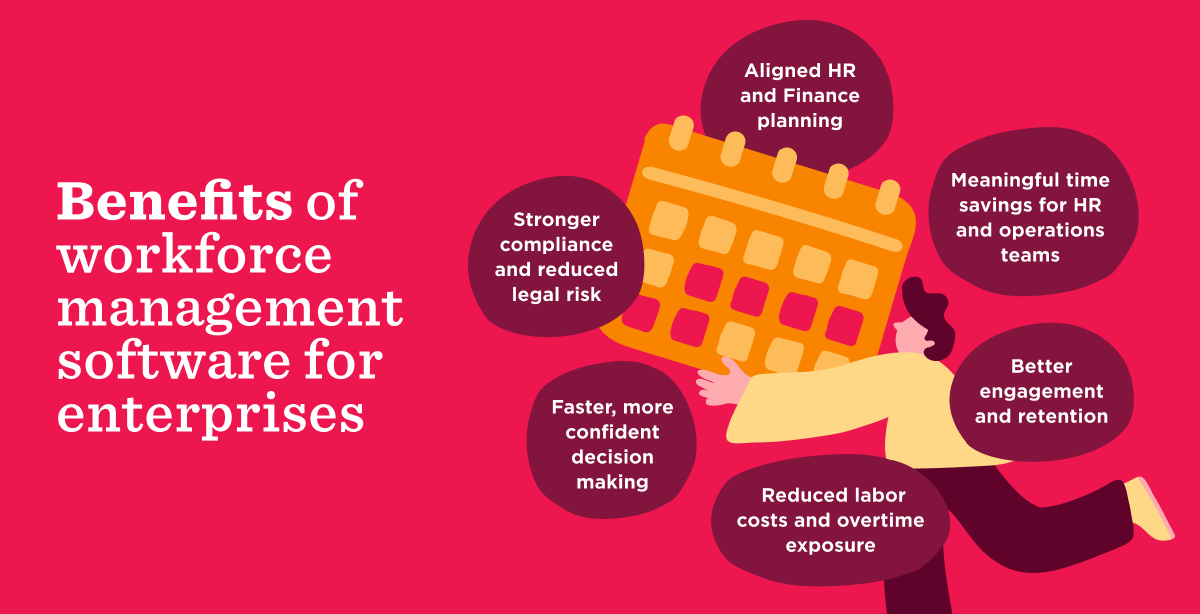
Benefits of workforce management software for enterprises
The case for enterprise WFM software isn’t just about capabilities; it’s about the outcomes those capabilities make possible. Done right, the right platform delivers:
Reduced labor costs and overtime exposure
When scheduling is data-driven and automated, organizations can reduce overstaffing and align labor spend more precisely with demand. Without a clear view of labor demand, managers often over-schedule “just in case,” which can inflate payroll costs by 10 to 15 percent unnecessarily.
Businesses that improve schedule accuracy and reduce last-minute coverage gaps can lower labor costs by up to 20 percent while giving managers more predictable control over staffing levels and payroll spend.
Stronger compliance and reduced legal risk
Manual compliance management across multiple jurisdictions is inherently error-prone, and the consequences of getting it wrong are steep. The U.S. Department of Labor’s Wage and Hour Division recovered more than $259 million in back wages for nearly 177,000 employees in fiscal year 2025 alone. Enterprise WFM software automates the enforcement of local labor law requirements, reducing the risk of violations, audits, and financial penalties before they occur.
Better engagement and retention
Fair and predictable scheduling has a direct impact on how people experience their work. In fact, 65 percent of managers say fair outcomes are impossible without unified visibility across HR and Finance data. WFM software that creates that visibility helps managers make more equitable decisions, which drives loyalty.
Faster, more confident decision making
Real-time workforce data eliminates the lag between what’s happening on the ground and what leadership can see. Instead of waiting for end-of-month reports, HR and Finance can monitor labor costs, absenteeism rates, and scheduling gaps as they develop and respond before they become expensive.
In fact, 60 percent of managers spend three or more hours just assembling data before they can make a meaningful decision. Enterprise WFM software cuts that overhead significantly.
Meaningful time savings for HR and operations teams
Manual scheduling, time tracking, and leave management consume hours that HR and operations teams could spend on higher-impact work. WFM software automates these processes, freeing up time for coaching managers, improving processes, and supporting team member development.
That reinvestment matters: with about 90 percent of organizations saying retention is a significant focus, the ability to redirect time toward the work that actually moves the needle on engagement is a meaningful advantage.
Aligned HR and Finance planning
“When data and systems are fragmented, both teams are forced to work around each other instead of working together, which slows down decision-making, increases risk, and erodes confidence,” notes Tali Sachs, Senior Content Manager at HiBob.
Enterprise workforce management software removes that friction by giving HR and Finance a shared view of workforce data. With one system of record, both teams can plan headcount, track labor costs, and make decisions using the same information, reducing guesswork and improving alignment.
Challenges of implementing workforce management software in enterprises
Even with widespread adoption, implementing HR technology across a large organization can be difficult. In fact, 85 percent of organizations now use HR technology to manage people operations, yet many still struggle to integrate systems, maintain data quality, and drive consistent adoption across teams.
The challenges below represent some of the most common issues enterprise teams face during WFM implementation, along with practical ways to reduce friction before rollout:
| Challenge | Solution |
|---|---|
| System integration and technical fragmentation | Audit your current HR, payroll, ERP, and scheduling systems before implementation, define which system owns each data set, and map integrations early to avoid duplicate records and reporting gaps. |
| Global compliance and regulation risks | Document labor rules by country and location upfront, involve legal and compliance stakeholders early, and test pay, time, break, and overtime rules before launch. |
| Complex configuration requirements | Prioritize the highest-impact workflows and policies, assign clear process owners, and phase advanced configuration after core scheduling, time tracking, and approvals are stable. |
| Maintaining data integrity for accurate forecasting | Clean historical attendance, org structure, and payroll data before migration, standardize job and pay classifications, and set data validation rules before forecasts go live. |
| Change management and user adoption | Train managers and team members by role, communicate clear expectations for system use, and reinforce adoption with executive sponsorship and simple self-service workflows. |
| Data migration from legacy systems | Decide which historical data must move, archive what does not, run test migrations early, and validate reports and compliance records before full cutover. |
HiBob is built to reduce the friction of these challenges. HiBob connects HR, payroll, and Finance data in one platform, eliminating the integration complexity that comes from piecing together multiple point solutions. With built-in compliance tools, role-based access controls, and configurable workflows, HiBob gives enterprise teams a foundation that’s designed to scale without the implementation burden of legacy enterprise software.
<< Execute effective workforce management strategy with HiBob >>
How enterprises measure workforce management success
Implementing WFM software is a starting point, not an endpoint. To know whether it’s working, enterprise teams track a specific set of workforce management metrics that directly connect workforce activity to cost, efficiency, and operational performance.
Here’s a practical measurement framework:
| Metric | What it measures | How to track |
|---|---|---|
| Labor cost as percent of revenue | Efficiency of workforce spend relative to output | Monthly, via Finance and HR platform data combined |
| Overtime rate | Labor cost control and scheduling effectiveness | Time tracking system, reviewed weekly by managers |
| Schedule adherence | Operational efficiency and coverage reliability | WFM scheduling module, tracked in real time |
| Absence rate | People risk, team engagement, and potential burnout signals | HRIS leave and absence tracking, reviewed monthly |
| Payroll accuracy rate | Error reduction from automated time tracking | Payroll system, measured per pay period |
| Compliance incident rate | Legal and regulatory risk exposure | HR compliance tools and audit logs |
| Time-to-fill open roles | Recruitment efficiency and workforce planning gaps | ATS and HRIS reporting, tracked per hiring cycle |
The strongest enterprise teams do more than track these metrics—they look at how they influence one another. If absence rates rise, do overtime costs rise with them? If schedule adherence improves, does labor cost as a percentage of revenue improve too? Looking at these connections gives teams a clearer view of what drives performance and where they need to act.
Recommended For Further Reading
Choose the best workforce management software for your enterprise
The right workforce management software for your enterprise should do more than check feature boxes. It should connect people, operational, and financial data in one system that teams can use with confidence. That means evaluating workforce management platforms based on how well they support integration, compliance, configurability, and actionable insights, not just scheduling or time-tracking capabilities alone.
HiBob is built for the complexity of modern enterprise workforce management. It gives managers, HR leaders, and Finance teams a shared, reliable view of workforce performance and cost by connecting HR, payroll, benefits, and Finance in one platform.
HiBob’s AI capabilities help teams turn that connected data into action. With Bob Companion, teams can ask questions in natural language, surface workforce insights faster, summarize trends, and reduce the manual work that slows planning and decision-making. Instead of spending hours pulling reports together, HR and Finance can focus on forecasting, identifying risks, and making better workforce decisions.
When you’re ready to replace disconnected systems with a more connected, insight-driven approach, the next step is simple.
<< See how HiBob supports modern enterprise workforce management in practice >>
Enterprise workforce management software FAQs
What is the best workforce management software for enterprises?
The best workforce management software depends on your organization’s size, complexity, geographic footprint, and operational needs. Look for a platform that supports multi-location compliance, connects workforce data with payroll and Finance, and gives teams clear insight into labor costs and performance.
What is enterprise workforce management?
Enterprise workforce management is the practice of planning, scheduling, and tracking work across multiple sites, functions, and jurisdictions. It includes time and attendance, shift scheduling, labor compliance, and the connection between workforce activity and payroll. At enterprise scale, success depends on connected systems and reliable data that help teams forecast needs, identify trends, and act quickly.
Is workforce management software an ERP system?
No. Workforce management software is not an ERP system, though the two often integrate. ERP systems handle broader business functions like finance and operations, while workforce management software focuses on HR functions like scheduling, time tracking, compliance, and workforce analytics that feed into financial planning.
What is an example of enterprise workforce management?
A global retailer with 8,000 team members across 200 locations might use workforce management software to build schedules based on demand, track hours in real time, flag overtime or compliance risks, and send approved hours directly to payroll. Managers monitor coverage, HR tracks workforce patterns, and Finance compares labor costs against budget using the same underlying data. With AI incorporated, teams can also surface trends faster and reduce the time spent pulling reports manually.