
Accurate time records are essential to getting payroll right. Even small errors or missing information can create bigger challenges for payroll accuracy and efficiency. But for growing organizations, collecting timesheets, checking hours, and managing approvals across teams can quickly become time-consuming.
PayrollOrg’s 2025 Getting the World Paid survey ranked late or inaccurate time-tracking data as the second biggest cause of reduced payroll accuracy. A standardized timesheet template helps HR teams capture consistent records, reduce manual errors, and simplify payroll management.
In this guide, you’ll find free daily, weekly, biweekly, monthly, and project-based timesheet templates for Excel and Google Sheets. We’ll also cover what to include in each template, how to choose the right format, and when it makes sense to move from spreadsheets to automated time tracking.
Key insights
- Timesheet templates simplify time tracking by giving HR teams a consistent way to record hours, breaks, overtime, and approvals
- The right template depends on your pay cycle, with daily, weekly, biweekly, monthly, and project-based formats supporting different workforce needs
- Accurate time records support payroll and compliance by reducing manual errors and helping HR teams maintain reliable documentation
- Built-in formulas and approval fields save time by simplifying hour calculations, overtime tracking, and manager reviews
- Automated time tracking supports growing teams by connecting attendance data, approvals, and payroll workflows in one system
What is a timesheet template?
A timesheet template is a pre-built, reusable document that records a team member’s hours for a set pay period, including start and end times, breaks, overtime, and project codes. Think of it as a structured form your team fills in consistently, rather than a blank page everyone formats differently.
Consistent and accurate recordkeeping matters. In the United States, the Fair Labor Standards Act (FLSA) generally requires employers to keep payroll records for three years and wage-calculation records for two years. Non-exempt team members’ daily and weekly hours count toward that requirement. Requirements vary by jurisdiction, so confirm the rules that apply to your locations.
HR teams use timesheet templates to standardize how team members record hours across the organization. Instead of collecting handwritten notes, informal messages, or inconsistently formatted spreadsheets, a standard template gives everyone the same structure to work from.
The practical benefits are significant:
- Payroll accuracy: Approved hours flow directly into payroll calculations, cutting down on manual corrections and reprocessing
- Fewer errors: Standardized fields mean fewer missing entries, rounding mistakes, or formatting inconsistencies
- Labor-cost visibility: When your people track hours consistently, you can spot overtime trends, project costs, and scheduling patterns more clearly
- HR compliance and recordkeeping: Many jurisdictions require employers to retain payroll and wage records for several years—consistent timesheets make that straightforward
Why HR teams use timesheet templates for workforce management and compliance
Timesheet templates are a foundational part of payroll management and workforce compliance. When teams capture hours accurately and consistently, the downstream effects are significant: Payroll runs faster, audits are easier, and disputes are easier to resolve.
For HR teams managing people across multiple locations or pay structures, templates create a single, predictable format that works regardless of department or role. That consistency is what makes timesheets a compliance tool, not just a tracking tool.
Types of timesheet templates
Not every team works the same way, and your timesheet template doesn’t need to be one-size-fits-all. The right format depends on your team structure, payroll frequency, and how you bill or track hours.
Here’s a quick comparison to help you choose:
| Template type/pay cycle | Best for |
|---|---|
| Daily timesheet | Contractors, field service, construction |
| Weekly timesheet | Hourly and frontline teams |
| Biweekly timesheet | Hourly and salaried teams on biweekly payroll |
| Monthly timesheet | Salaried staff, consultants, monthly reporting |
| Project-based timesheet (per project or client pay cycle) | Agencies, consultants tracking billable hours |
What to include in a timesheet template
A timesheet is only as useful as the information it captures. Getting the fields right from the start means cleaner data when it’s time to run payroll.
Required fields
Every timesheet template, regardless of format, includes these core fields:
- Team member name and ID: Identifies who the record belongs to and connects it to your HR system
- Pay period and dates: Defines the time range the timesheet covers to prevent overlapping or misattributed records
- Start and end times: Records when each workday or shift begins and ends to support accurate hours calculations
- Break duration: Tracks time spent on breaks to calculate total hours worked and support compliance with mandatory break requirements
- Total hours worked: Shows the hours worked after deducting breaks, ideally calculated automatically to reduce errors
- Overtime hours: Identifies hours worked beyond standard limits to support accurate compensation and compliance with local labor laws
- Manager approval: Confirms that a manager has reviewed and approved the timesheet before payroll processing
Always include a dedicated signature or approval row, even in digital templates. A clear sign-off step creates an audit trail and reduces the chance of unapproved hours slipping into payroll. For distributed teams, a digital approval workflow (even just an email confirmation) works just as well.
Optional fields
Depending on your team’s structure, these fields add useful context:
- Department and location: Helpful for multi-site organizations tracking labor costs by team or site
- Project or client codes: Essential for project-based billing or cost allocation across departments
- Hourly rate: Useful when timesheets feed directly into payroll calculations or invoice generation
- Notes: A free-text field for flagging shift changes, absences, or anything that needs context before approval
Free timesheet templates for Excel and Google Sheets
<< Download your free timesheet templates today >>
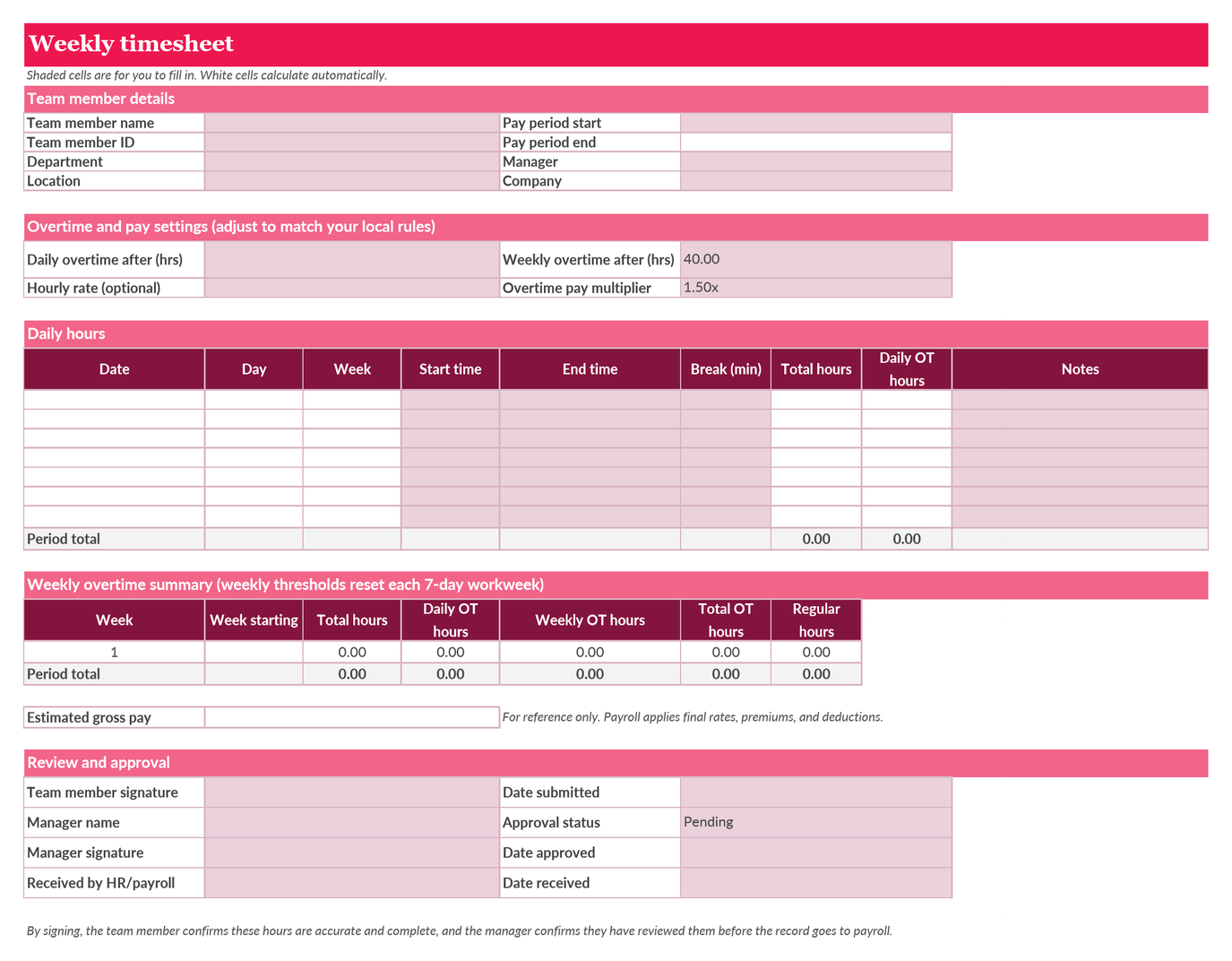
Each template is free to download and ready to use. They include formulas that auto-calculate total hours and flag overtime, so your team doesn’t have to do the math manually at the end of every pay period.
Here’s how to get started with any of them:
1. Download or copy the template. Open the Excel file or make a copy of the Google Sheet so each team member has their own version to work from.
2. Enter the pay period dates. Fill in the start and end dates at the top of the template or instruct team members to do so on their own copies. This anchors the record to a specific period and keeps your files organized over time.
3. Log daily hours. Team members enter their start time, end time, and break duration for each day. Total hours calculate automatically.
4. Review overtime. The template flags hours beyond your company’s standard threshold—typically eight hours per day or 40 hours per week, depending on your jurisdiction. Adjust the formula to match your local overtime rules.
5. Submit for manager approval. Once the pay period closes, the team member submits the completed timesheet to their manager. The manager reviews, signs or confirms, and forwards to HR or payroll.
6. Archive the approved record. Store approved timesheets in a consistent location, whether that’s a shared drive, your HR system, or a dedicated payroll folder, so they’re easy to retrieve for audits or disputes.
Recommended For Further Reading
When to move from templates to an HR tool
Timesheet templates are a great starting point, but at some point spreadsheets stop meeting your team’s needs. Knowing when to make the switch can save your team significant time and reduce compliance risk.
Here are the signals worth paying attention to:
- Headcount is growing fast. Managing 10 timesheets manually is possible. Managing 100 is a huge challenge. When collecting, reviewing, and processing timesheets takes a meaningful chunk of your week, it’s worth exploring automation.
- Payroll errors are recurring. If you regularly catch calculation mistakes, missing approvals, or mismatched records before payroll runs, the manual process introduces risk that a dedicated system can eliminate.
- Your team is distributed. Remote, multi-location, and multi-national teams make version control and file sharing harder. When timesheets live in different formats across different time zones, consolidating them becomes its own project.
- Approvals are getting lost. A manual approval chain—email to manager, manager to HR, HR to payroll—creates delays and gaps. Automated workflows route approvals without making sending the task reminder a task in itself.
- Compliance requirements are getting more complex. As your organization grows into new jurisdictions, overtime rules, break requirements, and recordkeeping obligations multiply. A dedicated HR tool tracks these requirements and flags potential gaps before they become costly.
When manual time tracking starts slowing teams down, an all-in-one HR and payroll platform can help. HiBob brings HR, payroll, and Finance together in one intuitive, AI-powered platform built for growing, global organizations. Its time and attendance tools make it easy for team members to log hours, managers to approve time, and HR teams to access accurate, consolidated data for payroll.
Built on trusted workforce data, HiBob connects time tracking with broader workforce management workflows, including scheduling, compliance, and reporting. With automation, people analytics, and AI-powered insights embedded into everyday work, HiBob helps organizations reduce manual tasks, make better decisions, and manage their people and operations with confidence—without the complexity of legacy HCM systems.
<< Download your free timesheet templates and simplify time tracking today >>
Timesheet template FAQs
Yes, the templates in this article are free to download in both Excel and Google Sheets formats, covering daily, weekly, biweekly, monthly, and project-based pay cycles. Each template includes built-in formulas that auto-calculate total hours and overtime.
Start with a format that matches your pay cycle, then add the core fields: team member name, pay period dates, daily start and end times, break duration, total hours, overtime, and a manager approval row. From there, set a submission deadline aligned with your payroll close date and establish a consistent approval and archiving process.
Retention requirements vary by jurisdiction. In the United States, the Fair Labor Standards Act (FLSA) generally requires employers to keep payroll records for three years and wage-calculation records for two years, and in the UK, employers must keep PAYE records for 3 years. Confirm the specific rules for each location where your team works.