Migrating to a new HRIS gives organizations a chance to simplify workflows, improve data accuracy, and align HR and Finance operations, replacing legacy systems that often become a roadblock as businesses grow. Strong change management during transitions can significantly improve project outcomes by up to seven times, ensuring your migration delivers real value.
As businesses grow, legacy systems often become a roadblock to scalability. Modern tools handle expansion seamlessly, helping organizations align their HR processes with evolving needs.
<< Download our migration plan to help smooth the way for your HRIS changeover >>
Key insights
- Set clear goals early to align stakeholders and guide a smoother, more strategic HRIS migration
- Clean, accurate data helps reduce migration issues and ensures your new HRIS delivers reliable insights from day one
- Customizing your HRIS to match your workflows helps teams work more efficiently and get more value from the platform
- Thorough testing before launch helps organizations identify issues early and minimize disruption during rollout
- Effective training drives adoption and helps teams use the new HRIS with confidence and consistency
What is HRIS migration?
HRIS migration is the process of moving your people data, documents, workflows, and historical records from one HR system to another. Along the way, teams often clean data, map fields, configure the new system, set up integrations, test the experience, and train people for a smooth transition.
Why a well-planned HRIS migration is important
An HRIS migration touches every part of people operations, from onboarding and reporting to payroll inputs and compliance records. A clear plan keeps work moving, helps teams trust the data, and gives people a steadier experience during the switch.
Planning also improves project outcomes. Organizations lose an average of $12.9 million or more a year to poor data quality—for HR teams, the takeaway is simple: Preparation protects time, confidence, and decision-making.
A migration plan also gives HR a chance to improve how work flows across the business. Instead of moving every legacy field and outdated process into a new system, your team can clean records, simplify approvals, and build a setup that fits your organization now—not three years ago.
<< Start your HRIS migration with confidence with a free checklist >>
The role of HR in HRIS migration—and how every team can support the transition
HR often leads the migration because they know how people data connects to daily work. HR teams understand the lifecycle behind each record, including job changes, compensation updates, leave policies, onboarding steps, reporting lines, and local requirements.
A people-first perspective helps HR guide decisions early. HR can define which data matters, flag records that need a closer look, align workflows with real business practices, and help every partner team understand how the new setup affects their work.
HR also plays a big part after migration. Clear communication, practical training, and steady support help managers and team members use the new system with confidence. That’s what drives broad adoption and helps the organization see value in the new system faster.
The chart below describes how each department can most effectively support the changeover and offers ideas for what responsibilities should belong where.
| Responsibilities of each department during HRIS migration | ||
|---|---|---|
| Function | Main focus | What each team owns |
| HR | People processes, data quality, and adoption | Setting migration goals, reviewing and cleaning people data, mapping workflows, validating org structures, supporting change management, and guiding training |
| Finance | Budget, reporting, and cost center alignment | Confirming budget, aligning financial structures, validating reporting requirements, and reviewing Finance-related data connections |
| IT | Security, access, and technical setup | Managing SSO, permissions, integrations, data transfer support, and security standards |
| Payroll | Pay data and payroll readiness | Reviewing payroll fields, validating earning and deduction setup, testing payroll outputs, and helping to protect pay accuracy during the transition |
| Implementation partner/vendor | Project delivery and system configuration | Supporting data mapping, configuring the new system, guiding testing, sharing migration best practices, and helping to keep the timeline on track |
| Legal | Privacy, compliance, and retention requirements | Reviewing data handling practices, retention rules, consent requirements, and jurisdiction-specific considerations |
| Managers | Team accuracy and adoption | Confirming team structures and reporting lines, job details and helping people adopt new processes in day-to-day work |
Why do companies switch HR systems?
Companies switch HR systems when growth changes what they need from their system. A platform that worked well for 150 people can start to feel limited at 1,000, especially when new entities, jurisdictions, and reporting lines enter the picture. Here are a few examples of what may trigger a change:
- Signs of inefficiency in daily work. HR updates job titles in one system, payroll details sit in another, Finance tracks headcount in spreadsheets, and leaders spend too long reconciling numbers before planning meetings. A change here can improve clarity and consistency across departments.
- A merger or acquisition. Existing businesses often bring different structures, policies, and data fields, so HR spends time stitching records together instead of focusing on people programs.
- Global compliance and localization. PTO policies, public holidays, notice periods, and documentation can vary across jurisdictions, and older systems don’t always support that complexity well.
- Challenges with manager workflows. If managers can’t access clean org charts, approve changes easily, or see accurate team data, routine people decisions take longer and create extra admin across the business.
- Misalignment between HR and Finance. When HR and Finance share the same view of headcount, compensation, cost centers, or start dates, workforce planning and budgeting are clearer and more aligned.
A stronger HR system helps HR and Finance work from the same source of truth. That makes forecasting clearer, reporting more consistent, and hiring plans easier to manage as the business grows.
HRIS migration timeline, phases, and checklist
A successful HRIS migration usually follows a clear sequence. Most projects move through six phases, and each phase gives your team a chance to plan well, stay aligned, and build confidence before launch. Below, we go over the details of each phase and provide checklists you can use to manage your company’s migration.
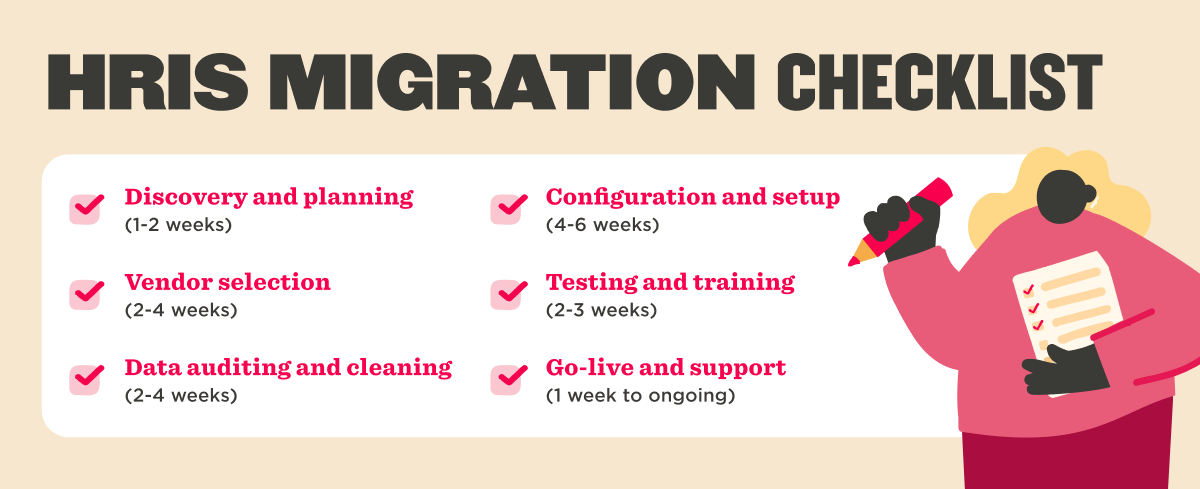
Discovery and planning (1-2 weeks)
HR usually owns this phase, with support from IT, payroll, Finance, and your implementation lead. Early planning creates structure for the rest of the migration and helps every team work from the same goals.
Start by defining what the new HRIS needs to support. Focus on business goals, team workflows, reporting needs, integrations, approval flows, and the people who’ll make decisions along the way.
Watch out for vague ownership and an oversized scope. When roles aren’t clear or the project tries to redesign every process at once, timelines can stretch.
Discovery and planning checklist:
- Name a project owner in HR and confirm decision-makers across IT, payroll, Finance, and legal
- Define migration goals, success metrics, scope, and timeline
- List every workflow, integration, data source, and record type in scope
- Identify key milestones, dependencies, and sign-off points
- Document local and jurisdiction-specific requirements early
- Set a communication rhythm for stakeholders and project updates
Vendor selection (2-4 weeks)
HR continues to lead the process during vendor selection, with valuable input from IT, payroll, Finance, procurement, and managers during evaluation.
Start with your requirements, not just a feature list. Look at usability, configurability, reporting, permissions, integration support, global readiness, and how well the platform fits your current structure and future growth. A structured evaluation process reduces implementation risk and improves long-term adoption.
Vendor selection checklist:
- Build a requirements list tied to your business goals and workflows
- Create demo scenarios based on real HR, manager, payroll, and Finance tasks
- Score each vendor on usability, configurability, reporting, security, and support
- Review implementation services, migration support, and training plans
- Confirm privacy standards, access controls, and integration capabilities
- Align on pricing, rollout timing, and post-launch support
Data auditing and cleaning (2-4 weeks)
HR operations usually leads this phase, with support from IT, payroll, and the implementation team. Clean data gives the new system a stronger start and makes reporting far more reliable after you go live.
Begin with a full inventory of your people data. Pull records from your current HRIS, payroll platform, spreadsheets, document storage, recruiting tools, and any local systems teams use. Review the data before anything moves. Look for duplicate profiles, missing fields, inconsistent naming, outdated values, inactive departments, and date formats that vary across systems.
Data field mapping and transformation sit at the center of this phase. Mapping shows where each legacy field will live in the new HRIS, while transformation standardizes values so they fit the new setup, such as aligning job levels, department names, status values, and date formats.
You’ll also decide what to migrate and what to leave behind. Most teams move active records, core profile data, reporting lines, compensation data, and required historical records, while retiring duplicate fields, unused custom values, outdated workflows, and documents with little long-term value.
Move things in stages rather than all at once. Too much legacy data can slow the project, and unclear mapping can negatively affect reporting, permissions, workflows, and integrations later.
Data auditing and cleaning checklist:
- Inventory every people data source in use
- Define the source of truth for each record type
- Audit data for duplicates, gaps, outdated values, and inconsistent formats
- Standardize naming conventions, picklists, and date formats
- Map old fields to new fields
- Define transformation rules for values that need cleanup or consolidation
- Decide which historical records to migrate, archive, or retire
- Validate reporting lines, employment status, compensation data, and manager relationships
- Create migration templates and a version-control process
Configuration and setup (4-6 weeks)
Implementation leads or systems admins often drive setup, while HR owns process design and final approval. This phase turns planning into a working environment people can actually use.
Configure your company structure, entities, departments, locations, profiles, permissions, workflows, policies, forms, and approval paths. HRIS integration setup also starts to come together here, especially across payroll, Finance, identity management, and collaboration tools.
Keep the setup aligned with how your organization works now. A migration gives you room to simplify old workarounds instead of rebuilding every legacy process in a new system.
Watch out for overconfiguration. Too many custom rules and exceptions can make the system harder to manage and less intuitive for managers and team members.
Configuration and setup checklist:
- Set up company structure, legal entities, departments, and locations
- Configure people profiles and required fields
- Build permissions based on role, level, and data sensitivity
- Set up approval flows and lifecycle workflows
- Configure policies, templates, forms, and automation rules
- Connect integrations and confirm data flow direction
- Review local requirements for leave, documents, and compliance
- Validate org charts, reporting lines, and manager relationships
- Document setup decisions for future admins
Testing and training (2-3 weeks)
Strong testing builds trust before launch and helps people feel ready on day one. HR usually coordinates this phase, while IT, payroll, Finance, your implementation team, and selected end users help run it.
Start with data validation testing. Data validation confirms migrated records appear in the right fields, use the right format, and support the right logic across profiles, workflows, permissions, and reports.
Next, run functional testing. Functional testing checks daily tasks such as onboarding, job changes, leave requests, compensation changes, document access, approvals, and offboarding.
Then test integrations. Integration testing confirms data moves correctly between the HRIS and connected systems, such as payroll, identity tools, Finance systems, and communication platforms.
User acceptance testing adds a practical layer. HR, managers, payroll teams, and other stakeholders walk through real scenarios to confirm the setup feels clear and supports day-to-day work.
Permission testing also matters. Review what each user role can view, edit, approve, and report on so access aligns with your data governance approach.
If payroll is in scope, add parallel payroll testing. Parallel testing compares sample outputs from the new setup against expected payroll results so your team can confirm earnings, deductions, balances, and effective dates align correctly.
Training works best when it matches each audience. HR admins often need deeper process and reporting training, while managers and team members usually benefit more from short role-based sessions, practical guides, and clear help paths.
Ensure you keep your test cases broad and your training at a methodical pace, rather than rushing or limiting either. A limited test group can miss local variations or less common workflows, and late training can leave people unsure during launch week.
Testing and training checklist:
- Validate migrated data against source records
- Test core HR, manager, payroll, and team member workflows
- Test integrations and confirm sync timing
- Review permissions across every user role
- Run user acceptance testing with a representative group
- Run parallel payroll testing if payroll data is included
- Track findings, assign owners, and retest after updates
- Create role-based training guides, videos, and live sessions
- Schedule office hours or support channels for launch questions
Go-live and support (1 week to ongoing)
HR usually leads the rollout, with support from IT, payroll, managers, and the implementation team. Go-live marks the transition from implementation to day-to-day operations.
Complete the final data load, confirm access, share launch communications, and open clear support channels. Many teams also set up a hypercare period so project owners can respond quickly, monitor workflows closely, and help people settle into the new system.
Track adoption early. Login rates, support requests, approval completion, reporting accuracy, and manager feedback can show where people feel confident and where extra guidance may help.
Watch out for unclear launch communication and limited support coverage. People adopt a new system more comfortably when they know what changed, when it starts, where to go for help, and what actions come first.
Go-live and support checklist:
- Complete the final migration and reconciliation
- Confirm user access, permissions, and login readiness
- Share launch communications with clear next steps
- Open support channels for HR, managers, and team members
- Monitor workflows, integrations, and reports during hypercare
- Track adoption through logins, task completion, and support trends
- Gather feedback and prioritize early improvements
- Schedule a post-launch review with key stakeholders
<< Get the practical guide to a successful HRIS migration >>
Challenging HRIS migration stages—and how to plan for them
Even a well-run HRIS migration has a few moments that call for closer coordination. Planning for each stage early helps HR keep data clean, protect business continuity, and give people a smoother experience.
Dual maintenance period
The dual maintenance period is the window when teams simultaneously update both the old HR system and the new one. Most organizations schedule the overlap during testing, payroll validation, or a phased launch.
An overlap period can create confusion. A job change entered in one system but missed in the other can affect reporting, approvals, and payroll readiness.
Clear ownership keeps work manageable. Assign a source of truth for each record type, define who enters updates, and track every change in a shared log. A shorter overlap period also helps. Less time in dual maintenance means less admin, fewer mismatches, and a cleaner final cutover.
Contingency planning and rollback management
Contingency planning gives your team a practical backup plan if a workflow, integration, or data load takes longer than expected. A strong plan keeps launch decisions calm, clear, and organized.
Start with the processes that carry the most weight, such as payroll inputs, access permissions, onboarding, and manager approvals. Then outline manual steps, temporary workarounds, and decision owners for each scenario.
Rollback management adds another layer of control. Before go-live, define what would trigger a pause, which system remains the source of truth, and who approves a rollback decision if a rollback becomes necessary.
Communication matters here, too. HR, IT, payroll, and managers all benefit from knowing the next step if the team pauses launch or extends support coverage.
Security and compliance maintenance
Security and compliance work runs through the full migration timeline. People data includes personal details, compensation records, documents, and access rights, so every transfer deserves careful review.
Start with role-based access. Limit migration access to the people involved directly, confirm permissions in test environments, and review who can view, edit, export, and approve records.
Data handling also calls for structure. Document where migration files live, how teams share files, how long temporary files stay in place, and when teams archive or delete them.
Compliance checks also vary across jurisdictions. Data retention rules, consent standards, document requirements, and residency expectations can differ, so early alignment with legal and IT helps teams move forward with confidence.
Determining success
Success starts before go-live. HR can define what a strong migration looks like early by linking outcomes directly to the goals that drove the decision to migrate in the first place.
Useful measures often include clean, deduplicated records, accurate org structures, working integrations with payroll and benefits providers, and reports that run without manual cleanup. On the people side, strong adoption, fewer support tickets, and reduced manual tasks for HR and managers are all signs the new system is landing well.
Each stakeholder group will read success differently. Managers may focus on faster approvals, cleaner team visibility, and easier access to direct report data. HR may prioritize reporting accuracy, smoother onboarding flows, and lifecycle management that doesn’t require workarounds. Payroll teams typically look for clean inputs, accurate outputs, and fewer last-minute corrections before each pay run.
Post-launch feedback rounds out the picture. In Bob, login activity, workflow completion rates, and self-service adoption can show where the platform is working well and where more guidance would help. Support request trends and comments from managers and team members add context that numbers alone won’t surface.
How HiBob simplifies HRIS migration
HRIS migration is an opportunity to do more than move data. With HiBob, teams can simplify workflows, clean and centralize people data, and build a stronger foundation for growth. brings HR, payroll, and workforce data into one connected platform, with flexible configuration, role-based access controls, and built-in integrations across payroll, Finance, and IT—so your team spends less time reconciling systems and more time focusing on people.
That flexibility matters especially during periods of rapid change. When Lunar, a Danish digital bank, doubled its headcount in a single year, the team used HiBob to keep onboarding running smoothly, including onboarding 14 new team members in one day. Automated workflows handled task lists and communications, while HiBob’s integration with their ATS pulled new hire data across automatically, removing manual entry and reducing errors from day one.
Recommended For Further Reading
Empower your people with a successful HRIS migration
A successful HRIS migration can give HR more than a new system. You can create cleaner people data, smoother workflows, stronger reporting, and a better day-to-day experience for managers and team members.
The strongest migrations start with clear goals, shared ownership, and a realistic plan. When HR, IT, payroll, Finance, and legal stay aligned, the transition feels more manageable, and people gain confidence faster.
At HiBob, we see HR leaders drive the best migrations when they treat the process as an opportunity to improve how work happens across the business. If your team is preparing for an HRIS migration, our migration plan and checklists can help you move from planning to go-live with more clarity.
<< Build one connected HRIS migration plan for HR and Finance >>
HRIS migration FAQs
What are the types of HRIS systems?
HRIS systems usually fall into a few categories. Some focus on core HR, like people records, time off, org charts, and documents, while others include payroll, talent management, performance, and workforce planning.
You may also see terms like HRIS, HRMS, and HCM used interchangeably. The difference usually comes down to scope. Some systems support day-to-day HR admin, while others cover a wider range of people processes across the business.
What is an HRIS system used for?
An HRIS system helps you store and manage people data in one place. HR teams use HRIS software to support onboarding, job changes, compensation records, time off, reporting, approvals, and compliance documentation.
A strong HRIS setup also cuts down on manual admin and improves data accuracy. As a result, managers and team members can find the information they need faster, and HR can make decisions with more confidence.
How long does HRIS migration take?
HRIS migration timelines vary based on company size, data quality, number of integrations, and setup complexity. A straightforward migration can take a few weeks, while a multi-jurisdiction rollout with historical data and custom workflows can take a few months.
In most cases, clear scope, clean data, and named owners across HR, IT, payroll, and Finance keep the work moving. That also gives people a smoother experience when the new system goes live.