Growing your team’s skills isn’t just about sending them to training. The right HR platform turns development into a strategic advantage that keeps your best people engaged, motivated, and moving forward.
We’ve reviewed the top HR platforms for employee development to help you find the perfect fit, assessing everything from automated performance reviews to built-in learning tools. HiBob is the best HR platform for employee development because it combines performance management, learning tools, and engagement features in one smooth system that people actually enjoy using.
Discover the power of a modern HRIS and learn firsthand how Bob can optimize your HR processes
Key insights
- HR platforms support professional growth by combining tools for learning, performance, and engagement into one streamlined system
- Prioritizing features like continuous feedback, learning management, and performance analytics helps align individual goals with business objectives
- Integrated platforms help HR teams align individual goals with organizational objectives, boosting overall team performance
Quick guide: 10 best HR platforms for employee development
| Software | Best for | Performance reviews | Learning management | G2 rating |
|---|---|---|---|---|
| HiBob | Growing companies that want performance, learning, and engagement in one HR platform | 360-degree reviews with OKRs | Built-in LMS (Bob Learning) | 4.5/5 (2,700+) |
| BambooHR | Small teams with straightforward goal tracking and review cycles | Standard review cycles | Training tracking | 4.4/5 (7,100+) |
| Rippling | Teams that want HR, IT, and development tools in one system | Calibrated reviews | Built-in LMS | 4.7/5 (14,100+) |
| Workday | Large enterprises that want AI-powered skills analysis | AI-powered continuous reviews | Full LMS | 4.1/5 (2,100+) |
| ADP | Companies already on ADP that need compliance training | Standard reviews | Compliance training | 4.2/5 (4,400+) |
| Gusto | Small US teams with basic development needs | Basic templates | None | 4.6/5 (13,400+) |
| Personio | European companies that need GDPR-compliant HR | 360-degree feedback | Training records | 4.4/5 (1,000+) |
| SAP SuccessFactors | Large enterprises running complex learning programs | Calibrated reviews | Advanced LMS | 4.1/5 (1,650+) |
| UKG | Frontline and shift-based workforces | Shift-based reviews | Mobile learning | 4.3/5 (2,200+) |
| Namely | Teams that want social recognition and peer feedback | Peer feedback | None | 3.9/5 (330+) |
We scored every platform on the same set of capabilities and published the full scoring, with ratings and review counts, in the spreadsheet linked here.
How we chose the best HR platforms for employee development
Today’s team members want more than once-a-year feedback. They expect real opportunities to grow, learn, and level up. To build this list, we compared each platform on what matters most for professional growth, using each vendor’s own product and pricing pages and verified customer reviews on G2 and Capterra. We looked at:
- Performance management capabilities: Does it support continuous feedback, 360-degree reviews, and goal alignment?
- Learning and development features: Can people access training directly through the platform’s interface?
- Manager enablement tools: How easy is it for managers to coach their teams?
- Analytics and insights: Can you track development progress and identify skill gaps?
- Integration with development tools: Does it connect with your existing learning platforms?
- User experience: Will your team enjoy using the development features?
- Scalability: Can the platform grow with your development programs?
The 10 best HR platforms for employee development
1. HiBob: Best overall HR platform for employee development

G2 rating: 4.5/5 from over 2,700 G2 reviews
Professional growth is an important part of your company culture, and HiBob’s employee development tools make it happen: 360-degree performance reviews, automated 1-on-1s, and integrated learning management. Forget juggling multiple tools—you’ll find performance history, career timelines, goals, and achievements all in the same place.
With HiBob, you and your managers can easily connect all the dots: the OKR framework that helps you align people’s individual goals with team and company objectives. When everyone understands how their growth contributes to bigger wins, your managers can lead meaningful development conversations.
Bob AI brings AI-powered organizational intelligence into those same workflows, helping leaders understand their workforce, identify skill gaps, and plan development with more confidence. And because development, performance, and compensation data live in the same platform as HR and payroll, promotion and pay decisions are easier to connect to the budget Finance is planning against. Built for mid-sized and multinational companies, with 100 to 1,000 employees the sweet spot, HiBob keeps teams across locations and countries on the same development path.
There are a lot of great learning systems out there, and with Bob Learning, you can integrate content from catalogs like Udemy, LinkedIn Learning, and Go1, or upload your own materials. It’s all right there, directly in your HR platform. This means you can easily track how learning translates into performance boosts and career growth.
All this comes in an interface that people love. HiBob’s Instagram-like design will have your people checking their progress, giving kudos to colleagues, and keeping their goals updated.
HiBob’s key features
- 360-degree performance reviews with customizable templates and anonymous feedback options
- Automated 1-on-1s and check-ins scheduled around employee lifecycle milestones
- Bob Learning LMS with external platform integration and custom content support
- OKR goal-setting framework that aligns everyone on the company’s objectives
- Performance analytics connecting review data with compensation and career progression
- Development plans integrated with succession planning and internal mobility
- Manager dashboards for team insights and coaching recommendations
- Mobile app for on-the-go feedback and development conversations

HiBob pros and cons
Pros:
- “Bob has been great for our time off, performance management” – verified review
- “Performance management with a lot of data behind it” – verified review
- “Helped us to streamline our performance review cycle” – verified review
- “Provides excellent reporting and visibility of data” – verified review
Cons:
- “The engagement surveys are a little bit clunky” – verified review
- “I can no longer easily see all the ‘essentials’ in one long list” – verified review
(Pros and cons are compiled from reviews found on G2.)
Pricing: HiBob offers custom pricing
2. BambooHR: Best for small teams with straightforward goal tracking and review cycles

G2 rating: 4.4/5 from over 7,100 G2 reviews
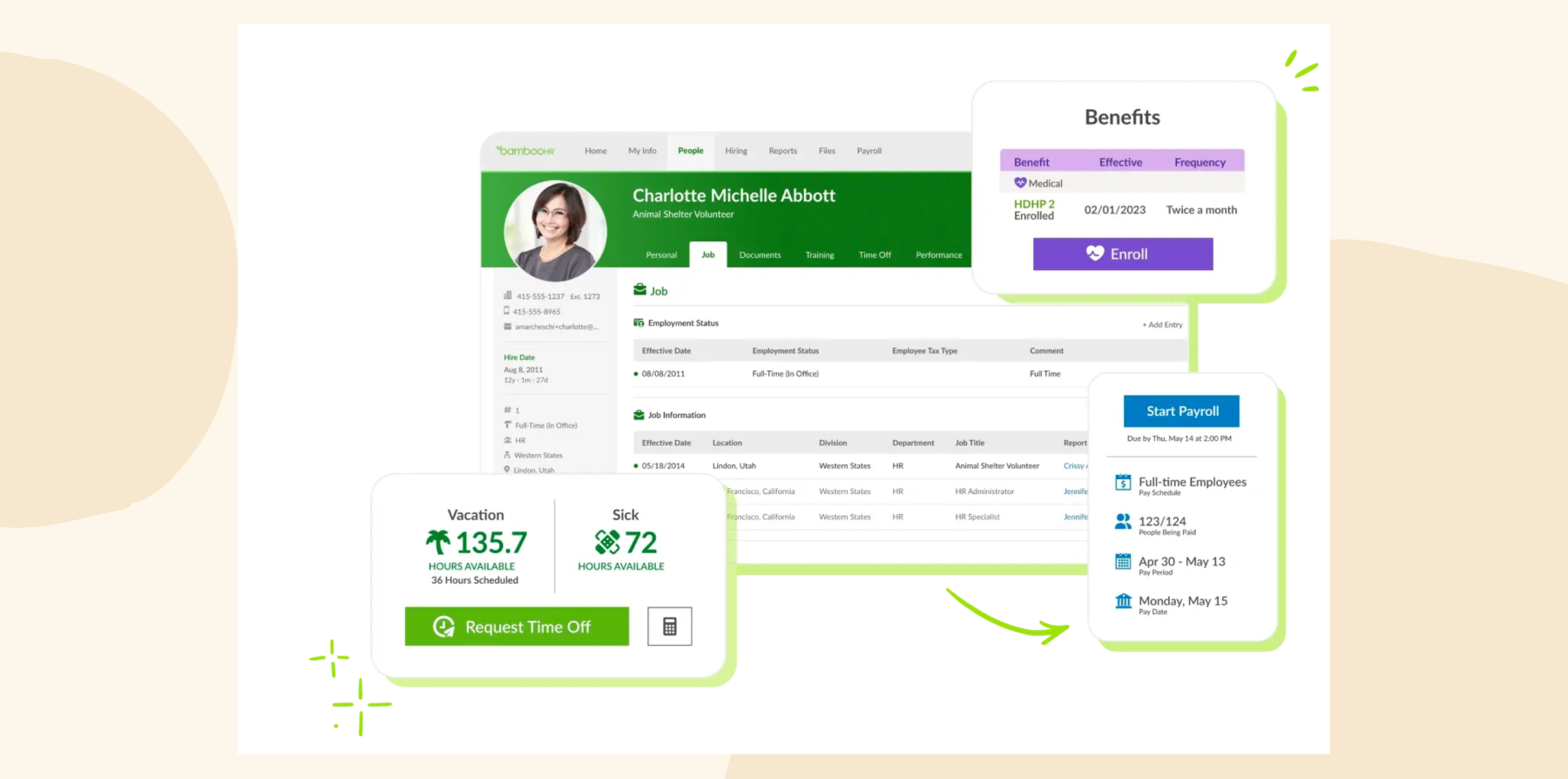
BambooHR offers simple employee development features that can work for smaller organizations. You’ll have goal setting and tracking, with manager dashboards for monitoring progress, and you’ll be able to keep track of completed courses and certifications in people’s profiles.
Performance reviews follow traditional cycles, with 60- and 90-day assessments for new hires, and self-assessment tools let people evaluate their own performance before manager reviews. This can cover your team’s basic development needs, but if you’re looking for advanced analytics or integrated learning, you might need additional tools.
Implementation typically takes 6-12 weeks, so it’s accessible for teams that don’t have dedicated HR tech resources. That said, as your team grows, you might find yourself working around BambooHR’s limitations rather than having a platform that grows with you.
BambooHR key features
- Goal setting and tracking with manager dashboards
- Performance review cycles with customizable templates
- Training tracking and certification management
(This article includes platform features that reflect the information available on the BambooHR website as of the publication date.)
BambooHR pros and cons
Pros:
- “I can easily calculate performance reports with numerical data” – verified review
- “The intuitive interface is very easy to learn from the administrative side” – verified review
- “User-friendly performance management with goal-setting” – verified review
Cons:
- “While the simplicity of Bamboo is beneficial for navigation, it’s also a negative because it limits the ability to handle complex HR situations” – verified review
- “It doesn’t integrate with many of our other systems which makes reporting, tracking, and other HR components difficult.” – verified review
- “Your company set up needs to be fairly cookie cutter to get the most efficiencies out of BambooHR” – verified review
(Pros and cons are compiled from reviews found on G2.)
Pricing: Core $10, Pro $17, and Elite $25 per employee/mo; payroll and benefits administration are US-only add-ons
Compare HiBob vs. BambooHR – see which fits your business best
3. Rippling: Best for teams that want HR, IT, and development tools in one system

G2 rating: 4.7/5 from over 14,100 G2 reviews
Rippling bundles employee development right alongside your HR and IT management. You can set goals using cascading OKRs to quickly align everyone’s objectives, and run performance reviews with 360-degree feedback—gathering input from self-evaluations, peers, and managers. Calibration sessions help you keep evaluations fair.
You’ll have learning management as part of the performance features, though these development tools are still relatively new. When reviews spot skill gaps, you can assign courses immediately. When someone gets promoted, they automatically get new tool access and updated training requirements.
Since everything’s in one system, your development data connects with all your other tools—but these integrations can get complex. If you’re running a smaller team that just needs basic development tracking, you might find the system overwhelming.
Rippling key features
- Goal setting with cascading OKRs for company alignment
- 360-degree performance reviews with calibration tools
- Learning management with course assignments

(This article includes platform features that reflect the information available on the Rippling website as of the publication date.)
Rippling pros and cons
Pros:
- “The user experience is top notch, very clean” – verified review
- “Rippling makes it so simple to handle employee relations” – verified review
- “The onboarding process was what I was most impressed with” – verified review
Cons:
- “The platform is cluttered and disjointed. I either experience multiple notification about features and issues irrelevant to my organization or having to dig through confusing sub menus and help articles to find a clear answer to a question” – verified review
- “Many of the issues we’ve experienced have been caused by a poor sales experience that promised functionality that either doesn’t exactly exist as presented, or only exists in higher tiers ” – verified review
- “While support has improved, there’s still room for better follow-through on commitments.” – verified review
(Pros and cons are compiled from reviews found on G2.)
Pricing: Pricing is not publicly available
Compare HiBob vs. Rippling – see which fits your business best
4. Workday: Best for large enterprises that want AI-powered skills analysis

G2 rating: 4.1/5 from over 2,100 G2 reviews
If you’re part of a large organization, Workday packs in plenty of talent development tools. The AI-powered Skills Cloud figures out what your people can do and suggests development opportunities that make sense for them. They can also use the Career Hub to find internal roles that match both their skills and where they want to take their careers.
You get what you’d expect for enterprise-scale development. Your teams can give and receive feedback anytime—nobody’s stuck waiting for annual reviews. If you’re dealing with complex matrix structures where people report to multiple managers across departments, Workday can handle that. The Learning Experience serves up curated content and keeps track of who’s completed what, even across different formats.
Keep in mind that you’re looking at 6-10 months to get everything up and running with Workday. You’ll need dedicated L&D staff to handle all the configuration options, plus IT people to keep things running smoothly. This makes sense if you’ve got thousands of people and solid infrastructure already. But if you need something faster, you might find HiBob fits your timeline better.
Workday key features
- AI-powered Skills Cloud for gap analysis
- Career Hub with opportunity marketplace
- Continuous performance management

(This article includes platform features that reflect the information available on the Workday website as of the publication date.)
Workday pros and cons
Pros:
- “I especially like the format they provide for performance and development reviews” – verified review
- “Very easy to use software to review the team goals and performance” – verified review
- “Provides a fast and easy way for our team to input their goals” – verified review
Cons:
- “One potential drawback of Workday HCM can be the complexity of implementation and configuration, which may require significant time and resources” – verified review
- “Not the fastest or nicest looking platform.” – verified review
- “Workday is a complex tool, and I went through a steep learning curve to navigate the platform.” – verified review
(Pros and cons are compiled from reviews found on G2.)
Pricing: Pricing is not publicly available
Compare HiBob vs. Workday – see which fits your business best
5. ADP: Best for companies already on ADP that need compliance training

G2 rating: 4.2/5 from over 4,400 G2 reviews
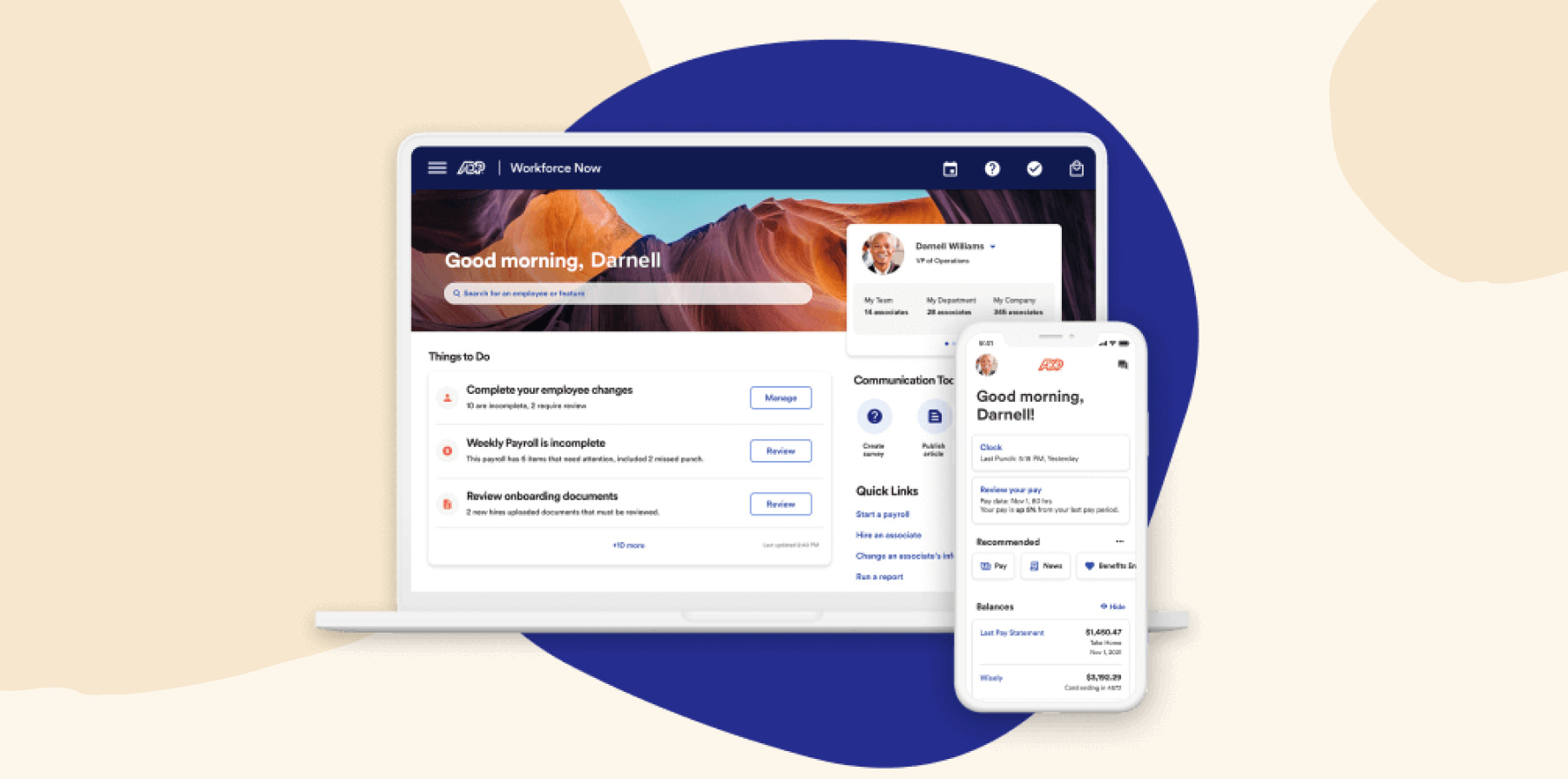
ADP Workforce Now gives you built-in talent management modules for employee development. You can run performance management with goal tracking and review workflows, plus handle learning management to assign and track required training—especially handy for keeping up with compliance needs.
Already on ADP for payroll? These development modules slot right in. Your managers can run their own reviews and track team progress through self-service tools. Merit increases can automatically flow from performance ratings straight to paychecks—meaning you don’t have to worry about manual compensation updates or errors creeping in.
You’re looking at about three months to get set up, which can work if you’ve got 50-500 people and need reliable basics. Just know that any customization you need happens within ADP’s traditional framework—it’s not the most flexible system out there.
ADP key features
- Performance management with goal alignment
- Learning management for compliance training
- Manager self-service development tools
(This article includes platform features that reflect the information available on the ADP website as of the publication date.)
ADP pros and cons
Pros:
- “Extremely user friendly, intuitive and current” – verified review
- “The software displays analytics in real-time” – verified review
- “ADP strives to keep their clients informed of the many changing laws” – verified review
Cons:
- “Requires navigating multiple disconnected areas to complete even basic tasks.” – verified review
- “it’s difficult to create customized reports, and it’s easy to make manual errors that the system won’t catch.” – verified review
- “There are too many customer service reps who are unqualified and not knowledgeable about the service we need help with” – verified review
(Pros and cons are compiled from reviews found on G2.)
Pricing: Pricing is not publicly available
6. Gusto: Best for small US teams with basic development needs

G2 rating: 4.6/5 from over 13,400 G2 reviews
If you’re a small business, Gusto gives you performance management features that might work for your team’s development needs. You get goal tracking and feedback tools, but there’s no built-in learning system. You can integrate with some external platforms to run your development programs.
Running performance reviews is pretty simple—you’ll use clear templates with self and manager assessments, which makes it easy to keep those development conversations going. This could be a good option if you’re setting up your first formal development program, especially since you’ll be up and running in days, not months.
Gusto keeps employee development affordable for budget-conscious startups. That said, once your team grows past 50-75 people, you might want more features.
Gusto key features
- Basic goal tracking and feedback
- Simple performance review templates
- Limited learning platform integrations

(This article includes platform features that reflect the information available on the Gusto website as of the publication date.)
Gusto pros and cons
Pros:
- “Allows me to pay my employees quickly and easily” – verified review
- “So easy to use—from the initial setup” – verified review
- “Literally a lifesaver when it comes to payroll” – verified review
Cons:
- “Sometimes the loading times can be annoying, especially if I have to open Gusto multiple times a day” – verified review
- “I’ve noticed that some of the reporting tools are a bit limited or not as customizable as I’d like.” – verified review
- “The settings are not intuitive, there are constantly adjustments to the accounts, syncing issues, and limited options for tracking purposes” – verified review
(Pros and cons are compiled from reviews found on G2.)
Pricing: From $49/mo plus $6 per person/mo
7. Personio: Best for European companies that need GDPR-compliant HR

G2 rating: 4.4/5 from over 1,000 G2 reviews
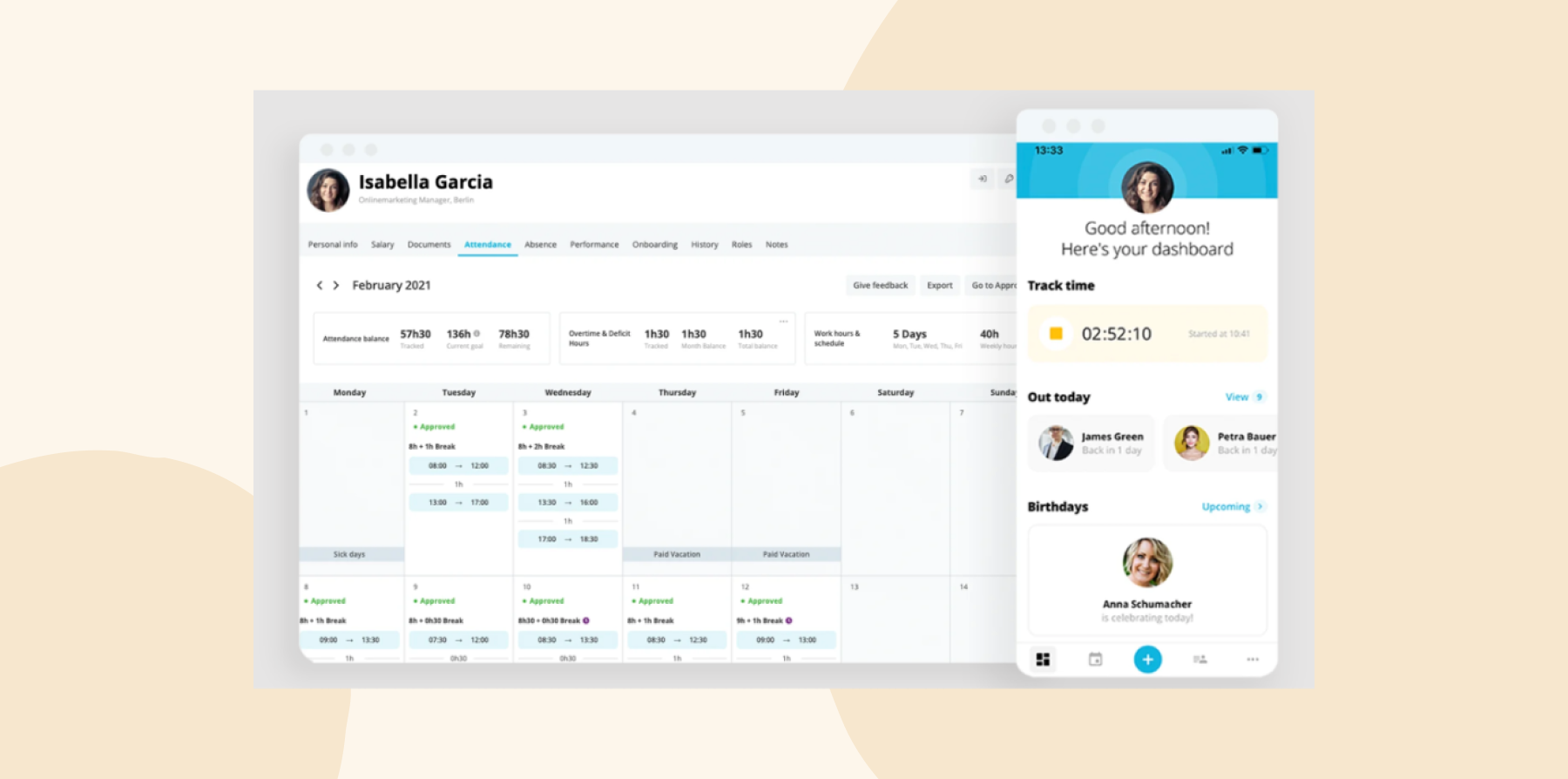
Personio includes employee development features built for European businesses. You can set up customizable review cycles with 360-degree feedback and run continuous check-ins between formal reviews. Goal tracking works at both individual and team levels, which helps keep everyone aligned.
The training features handle the basics: you can record completed courses and plan upcoming development activities. While Personio covers these basic needs well, if you want advanced learning tools or deeper analytics, you’ll probably need to add specialized platforms alongside it.
Setup takes 4-5 weeks, which might work if you need GDPR-compliant tools fairly quickly. The built-in EU compliance features save real time when you’re operating under European regulations—everything stays compliant without extra effort on your part.
Personio key features
- Performance reviews with 360-degree feedback
- Goal management and tracking
- Basic training record management
(This article includes platform features that reflect the information available on the Personio website as of the publication date.)
Personio pros and cons
Pros:
- “The interface is super user-friendly” – verified review
- “What I really like about Personio is how it takes care of pretty much everything” – verified review
- “This all-in-one solution saves a ton of time” – verified review
Cons:
- “Its pricing can be a bit steep for smaller businesses or startups” – verified review
- “At renewal they decided to sneak in a new model where they changed the contract to commit us to many more seats than we ever needed” – verified review
- “The mobile app could benefit from additional functionality to match the desktop version” – verified review
(Pros and cons are compiled from reviews found on G2.)
Pricing: Pricing is not publicly available
Compare HiBob vs. Personio – see which fits your business best
8. SAP SuccessFactors: Best for large enterprises running complex learning programs

G2 rating: 4.1/5 from over 1,650 G2 reviews
If you’re managing employee development at a large enterprise, SAP SuccessFactors can cover your needs. You get performance and goals modules with calibration to keep reviews fair, plus SuccessFactors Learning, a full LMS with multi-language support where you can create content, track compliance, and more.
The Career Development Planning helps your people map out growth paths, running skills assessments and matching them with mentors. You can manage complex competency frameworks and succession planning, spotting future leaders across your organization.
Implementation typically runs 6-12 months for the core talent suites, and complex organizations typically need longer than that. If you need something up and running faster, this might not be your best bet.
SAP SuccessFactors key features
- Full-featured LMS with content authoring
- Career development planning tools
- Complex competency management

(This article includes platform features that reflect the information available on the SAP SuccessFactors website as of the publication date.)
SAP SuccessFactors pros and cons
Pros:
- “It’s a great tool to know our progress” –verified review
- “Very well suited for employee performance evaluation platform” –verified review
- “It helps me to know my goal settings” –verified review
Cons:
- “Maintenance cost is high and integration is complex.” –verified review
- “Some parts of the interface feel a bit outdated and not very intuitive.” – verified review
- “Standard reporting tools can be less flexible than other HCM systems, often requiring IT support for custom reports.” – verified review
(Pros and cons are compiled from reviews found on G2.)
Pricing: From around $6.30 per person/mo, with enterprise pricing quoted
9. UKG: Best for frontline and shift-based workforces

G2 rating: 4.3/5 from over 2,200 G2 reviews
UKG (Ultimate Kronos Group) focuses on employee development for hourly and frontline workers. Its performance management works around shift-based schedules, meaning your check-ins happen around production flow rather than quarterly reviews. Learning takes place on mobile devices, with short training modules your workers can complete during breaks or between shifts.
Career path tools help hourly workers see how they can move from entry-level positions to supervisor roles. The system tracks skills and automatically matches certified workers to shifts that need their specific qualifications. UKG is built for frontline workers, so if you’re mostly managing office teams, you may want a platform that’s built for different development needs.
UKG key features
- Mobile-first learning for frontline workers
- Performance management for hourly employees
- Skills-based scheduling optimization

(This article includes platform features that reflect the information available on the UKG website as of the publication date.)
UKG pros and cons
Pros:
- “UKG Pro is a powerful, intuitive and easy to use platform” – verified review
- “It’s really user friendly” – verified review
- “It helps to manage performance, compensation and employee tracking with great ease” – verified review
Cons:
- “The implementation team was more worried about “checking boxes” than actually completing the tasks” – verified review
- “Their customer service is very slow and it takes days to get issues resolved.” – verified review
- “Learning and training are a bit more difficult to navigate” – verified review
(Pros and cons are compiled from reviews found on G2.)
Pricing: Pricing is not publicly available
Compare HiBob vs. UKG – see which fits your business best
10. Namely: Best for teams that want social recognition and peer feedback

G2 rating: 3.9/5 from over 330 G2 reviews
Namely combines basic performance management with social recognition features. You get goal setting, performance reviews, and peer feedback capabilities. The social newsfeed lets your people recognize achievements publicly, creating a more connected workplace culture through visible celebrations.
For performance reviews, you’ll have customizable forms that you can adjust for different roles or departments. But since the platform doesn’t have integrated learning management or advanced analytics for tracking development outcomes, you’ll need separate tools if training and detailed metrics are priorities.
Namely key features
- Performance reviews with peer feedback
- Social recognition and news feed
- Basic goal tracking and alignment

(This article includes platform features that reflect the information available on the Namely website as of the publication date.)
Namely pros and cons
Pros:
- “The platform is user friendly and we like the social media like home page” – verified review
- “Fun and interactive from an end user perspective” – verified review
- “Namely has made my work easier in various ways” – verified review
Cons:
- “It lacks flexibility to create our own forms, particularly for performance management. The reporting option is too limited” – verified review
- “Reporting is difficult. Most times I have to run a report in HRIS and in Payroll to get what I want.” – verified review
- “The payroll side does NOT flow well” – verified review
(Pros and cons are compiled from reviews found on G2.)
Pricing: From $9 per person/mo (Namely Now); other plans are quoted
What features should you look for in software for employee development?
Look for features that spark real behavior change, not just box-ticking during annual reviews. The right platform doesn’t just track goals—it helps people grow. The software you choose should help your managers and employees have ongoing conversations.
Look for a system that connects performance data with learning opportunities. When HiBob’s advanced analytics spot a skill gap during a review, the platform automatically suggests relevant courses from your learning library, making development feel effortless.
Thinking long-term? You’ll want something that scales as you go. You might start with basic goal tracking, but you’ll soon want 360-degree reviews, succession planning, and skills mapping. HiBob’s modular approach lets you add features as your needs evolve without switching systems.
It’s not just about browser access anymore. These days, mobile access is key for employee development, and platforms with great mobile experiences can see higher engagement with development activities. In other words, your people need to be able to complete training, track goals, and give feedback wherever they are. Choose a platform with intuitive apps and smooth mobile features.
Without the right integrations, your development platform can become just another disconnected tool your team avoids. The best platforms connect smoothly with the platforms you’re already using, and offer open APIs for whatever comes next. HiBob’s marketplace comes packed with pre-built connections to all the major learning and productivity tools.
How can employee development tools improve retention?
Employee development and engagement HR tools have a direct impact on retention because they show your team you’re invested in their growth. When people can see clear paths for advancement and get regular feedback, they’re much more likely to stick around and grow with your company.
Good platforms make development conversations a natural part of the workday. HiBob’s automated onboarding check-ins make sure new hires get feedback at 30, 60, and 90 days. These early touchpoints help people feel supported from day one, and they matter: in HiBob research, 64 percent of people said they’re likely to leave a new job within their first year after a poor onboarding experience.
Structured learning makes a measurable difference. In HiBob research, 78 percent of people who train through a learning management system see a clear path for growth at their company, compared with 60 percent of those without one, and 78 percent would recommend their employer as a great place to work, compared with 67 percent. When your team can track their progress, tap into learning resources, and understand how their goals connect to company success, they feel genuinely connected to their work.
Recognition plays a huge role in keeping people around, too. HiBob’s culture tools let teams celebrate wins and milestones publicly, creating the kind of positive feedback loop that keeps your best performers engaged and excited about their work.
What really matters is making development feel personal, not generic. Platforms that adapt to how each person wants to grow and learn get much better results than cookie-cutter approaches. Your team wants to know you see their unique contributions and that their growth actually matters to the company.
Recommended For Further Reading
Why HiBob is the best HR platform for employee development
HiBob stands out as the best HR platform for employee development because it makes growth a core part of your company culture. While other platforms might tack on development features to their HR systems, HiBob gives you performance, engagement, and learning tools all in one place.
HiBob’s all-in-one approach means you don’t need to juggle a bunch of different tools. It replaces multiple solutions with integrated features that work well together, providing you with insights you simply can’t get when your data lives in different systems. HiBob is easy to migrate to from separate performance and learning tools, and HiBob’s team supports you through implementation, so you get one platform to pay for instead of three.
What else makes HiBob different? People actually want to use it. The interface makes giving feedback and tracking development feel as natural as checking social media, not like another work task to avoid. When your team genuinely enjoys using their development tools, you’ll see participation rates shoot up and real results follow.
Get started with HiBob’s employee development platform →
Discover the power of a modern HRIS and learn firsthand how Bob can optimize your HR processes
FAQs about HR platforms for employee development
HiBob leads for engagement and development because it brings 360-degree reviews, automated 1-on-1s, and built-in learning into the same platform as your HR, payroll, and compensation data. Bob AI works inside those workflows to help leaders spot skill gaps and plan development, and the system connects all your people analytics data to give you the full picture, something you can’t get when you’re piecing together different tools. Because HR and Finance work from the same data, development plans connect directly to compensation decisions and headcount budgets.
HR’s role in employee development goes way beyond tracking who completed what training. They’re the ones creating spaces where people actually want to grow and learn. When platforms handle the time-consuming stuff automatically—think scheduling reviews and chasing down feedback—HR teams can spend their energy on what matters: building development programs people genuinely care about.
The sweet spot happens when managers can own their team’s development conversations, and HR can keep an eye on the bigger picture. That’s how you keep individual growth and company needs moving in the same direction.
Employee development in HR management covers everything that helps your people grow their skills, move up in their careers, and become more valuable to the organization. We’re talking about performance reviews, goal setting, skills training, mentorship programs, and career planning—the whole package.
Modern HR platforms like HiBob bring all these pieces together in one system. Performance data flows into learning recommendations, Bob AI brings AI-powered insights into the same workflows, and because HR and Finance share the same workforce data, development and promotion decisions tie directly into compensation and budget planning.
HR professionals need to think about scalability, user adoption, integration capabilities, and measurement when picking employee development tools. Your platform should grow with your organization, have an interface people actually want to use, play nicely with existing systems, and give you the analytics to prove it’s worth the investment. Don’t just look at software costs—factor in implementation time, training needs, and what it really costs to juggle multiple disconnected systems versus having everything in one place.
Standalone LMS platforms handle courses, certifications, and compliance tracking really well. Integrated development platforms take it further by connecting learning with performance reviews, goals, and career planning. When a performance review reveals a skill gap, the platform can suggest relevant training immediately. Managers can track whether that training actually improved performance, and everything flows together naturally.
You’ll start seeing positive changes within 30 to 60 days. Teams begin having regular check-ins, goals get documented, and managers have better visibility into their team’s development. The bigger impact comes after three to six months, once you’ve completed a full review cycle. That’s when you can measure real improvements in review completion rates, engagement scores, and see how training connects to performance gains.
Cloud-based platforms mean everyone accesses the same performance reviews, training content, and goal tracking whether they’re at the office or working remotely. Async review processes accommodate different time zones and schedules. Virtual check-ins and digital feedback tools replace in-person development conversations. The key is that location doesn’t limit anyone’s access to growth opportunities or manager support.
Disclaimer:
This content reflects HiBob’s perspective, informed by our experience supporting HR teams as they evaluate and implement HR software. It is provided for informational purposes only and is not intended as independent research or professional advice. Prospective users should conduct their own evaluation before making a decision.
Feature descriptions, pricing references, and availability for third-party platforms are based on publicly available information at the time of publication and may change. HiBob does not guarantee the accuracy or completeness of information related to third-party products. Prospective users should verify details directly with each provider.